


.webp)


Ask where schema markup goes and you will get two different answers, because the question hides two decisions. One is which pages on your site should carry markup at all. The other is where in the code of a page the markup physically sits. Most guides answer only the second, with a one-line "paste it in the head," and leave you guessing about the first. That is the wrong way round for a B2B site, where the real work is deciding that the homepage needs an Organization entry, the blog needs author and date markup, and the thank-you page needs nothing.
This guide answers both. It gives you a page-by-page map for a typical B2B site, the simple rules for where the code goes, and the three ways to deploy it, including one that looks convenient and quietly hides your markup from some crawlers. A downloadable placement map at the end turns it into a checklist your developer or CMS admin can work from. If you want the case for schema in the first place, including the honest answer on whether it helps AI citations, start with our schema markup for AI search guide. This one assumes you have decided to add it and want it in the right places.
Two questions hiding inside "where"
The first question is about pages: of everything on your site, which pages deserve schema, and which type goes on which. The second is about code: inside a given page, where does the JSON-LD block go, and how does it get there.
They are answered at different levels. The page question is a strategy call, made once, with a short list of page types. The code question is a template decision, also made once, so that every page of a given type inherits the right markup automatically. Treat them separately and the job becomes small. Treat them as one and you end up pasting scripts into individual pages by hand, which is how markup drifts out of sync with the content it describes.
Which pages get which schema
Here is the map for a typical B2B site, in the order to roll it out.
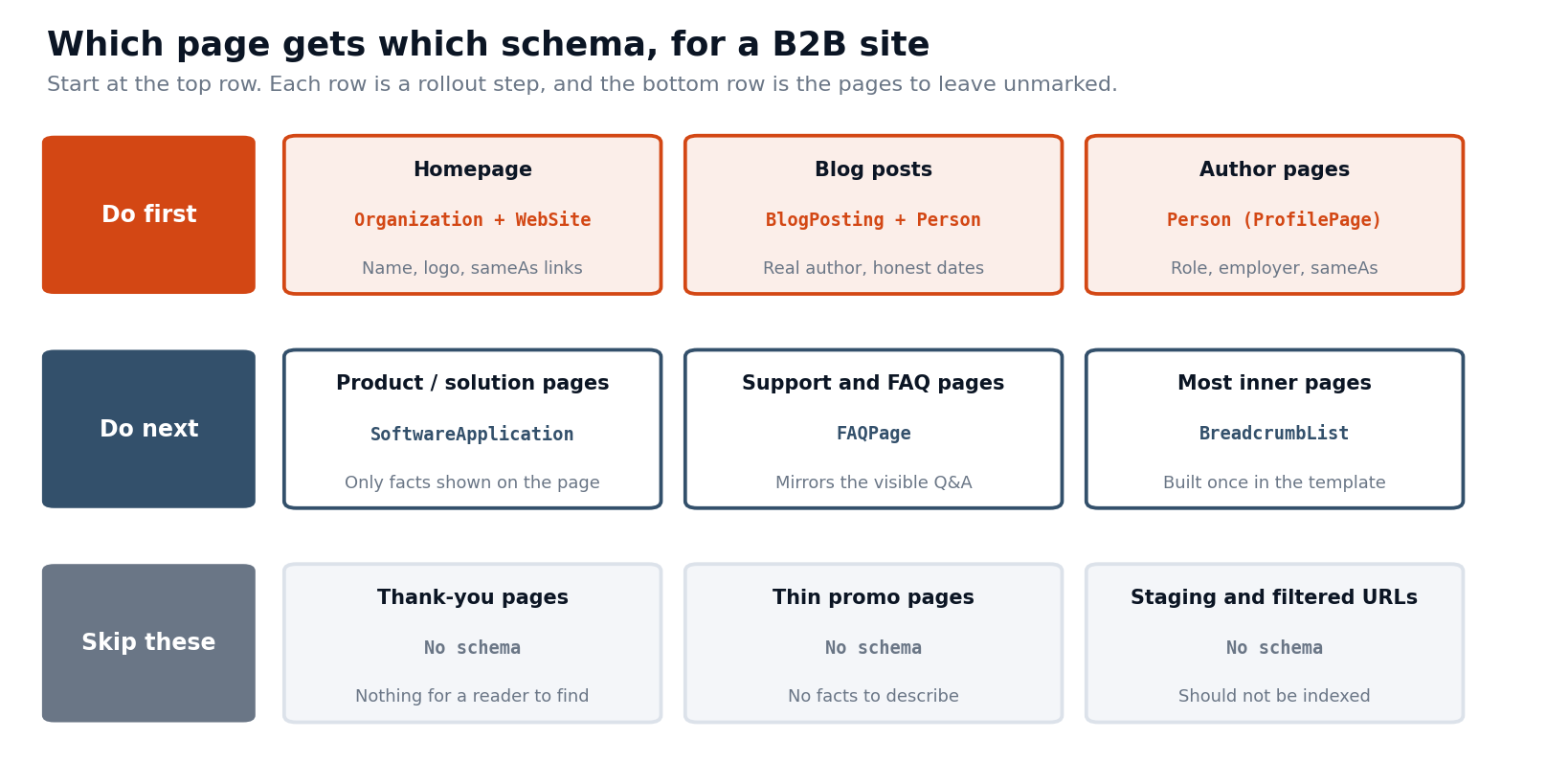
Start with the top row, since those three page types carry most of the value. The homepage gets Organization and WebSite markup: your company name, logo, URL, and sameAs links to your authoritative profiles. This is the entity backbone, the markup that tells a machine who you are and which other profiles belong to you. Blog posts get BlogPosting with a real author modeled as a Person and honest published and updated dates, covered in depth in our Article schema examples. Author pages get Person markup with the author's role, employer, and sameAs links, so the byline on every post resolves to someone real.
The second row is worth doing once the first is in place. Product or solution pages can carry SoftwareApplication or Product markup, but only with facts the page visibly states: the name, a description, the category, and an offer if you publish a price. If your pricing page shows plans, the offers can sit inside the product markup, and if it says "contact us," leave the price out rather than invent one. Support and FAQ pages can carry FAQPage markup, which is supporting hygiene and not a citation lever, and it must mirror the visible questions and answers word for word. Our FAQ schema examples show how. BreadcrumbList belongs on most inner pages, and because the pattern is identical everywhere, it is the easiest markup to build once in the template.
Two warnings apply to this row. Do not add Review or AggregateRating markup to your own pages for testimonials about your own company; Google's guidelines do not treat self-published reviews of your own organization as eligible for review stars, and fabricated or unsupported ratings are the quickest way to invite a manual action. And do not mark up a feature, price, or claim that a reader cannot see on the page.
Where the code goes in the page
Once you know which page gets which type, the code placement is simpler than it sounds. JSON-LD is a self-contained script block, so it does not wrap or touch your visible content the way older formats such as Microdata do. That means it can sit in the head of the page or in the body, and both are valid. Pick one and keep it consistent across your templates; the head is the common convention because it keeps the markup away from your content and is easy to find.
What matters is not head versus body. It is three things. The block has to be present in the page itself, on the page it describes. Each entity should be described once, in one place, instead of repeated in conflicting copies. And everything in the block has to match what the reader can see. A script in the head that names an author the page never shows, or a price that appears nowhere, breaks the match rule and teaches engines to distrust your markup.
Describe your organization once, then stay consistent
The most common structural mistake on B2B sites is describing the company differently on every page: one name on the homepage, a shortened one in blog markup, a different logo URL in the footer. The fix is to define the organization fully in one place and keep every other reference consistent with it.
Give the homepage the full Organization entry, with an @id that works as the entity's stable name, and let other pages point back to it.
<script type="application/ld+json">
{
"@context": "https://schema.org",
"@graph": [
{
"@type": "Organization",
"@id": "https://www.example.com/#organization",
"name": "[Company]",
"url": "https://www.example.com/",
"logo": "https://www.example.com/logo.png",
"sameAs": [
"https://www.linkedin.com/company/[company]",
"https://x.com/[handle]"
]
},
{
"@type": "WebSite",
"@id": "https://www.example.com/#website",
"url": "https://www.example.com/",
"name": "[Company]",
"publisher": { "@id": "https://www.example.com/#organization" }
}
]
}
</script>
On a blog post, the BlogPosting names the same organization as its publisher, using the same @id, the same name, and the same logo. The author is a Person on the same page
<script type="application/ld+json">
{
"@context": "https://schema.org",
"@type": "BlogPosting",
"headline": "[Exact H1 of the post]",
"datePublished": "2026-10-01",
"dateModified": "2026-10-01",
"author": {
"@type": "Person",
"name": "[Author Name]",
"url": "https://www.example.com/author/[slug]"
},
"publisher": { "@id": "https://www.example.com/#organization" }
}
</script>
The point is consistency. Every page that mentions the company uses the same name and identifier, so the entity is the same everywhere a machine meets it. Whether an engine resolves those identifiers across separate pages is up to the engine, so treat the shared @id as good hygiene and not a guarantee, and make sure the visible name and logo agree on every page regardless.
Three ways to put it on the site
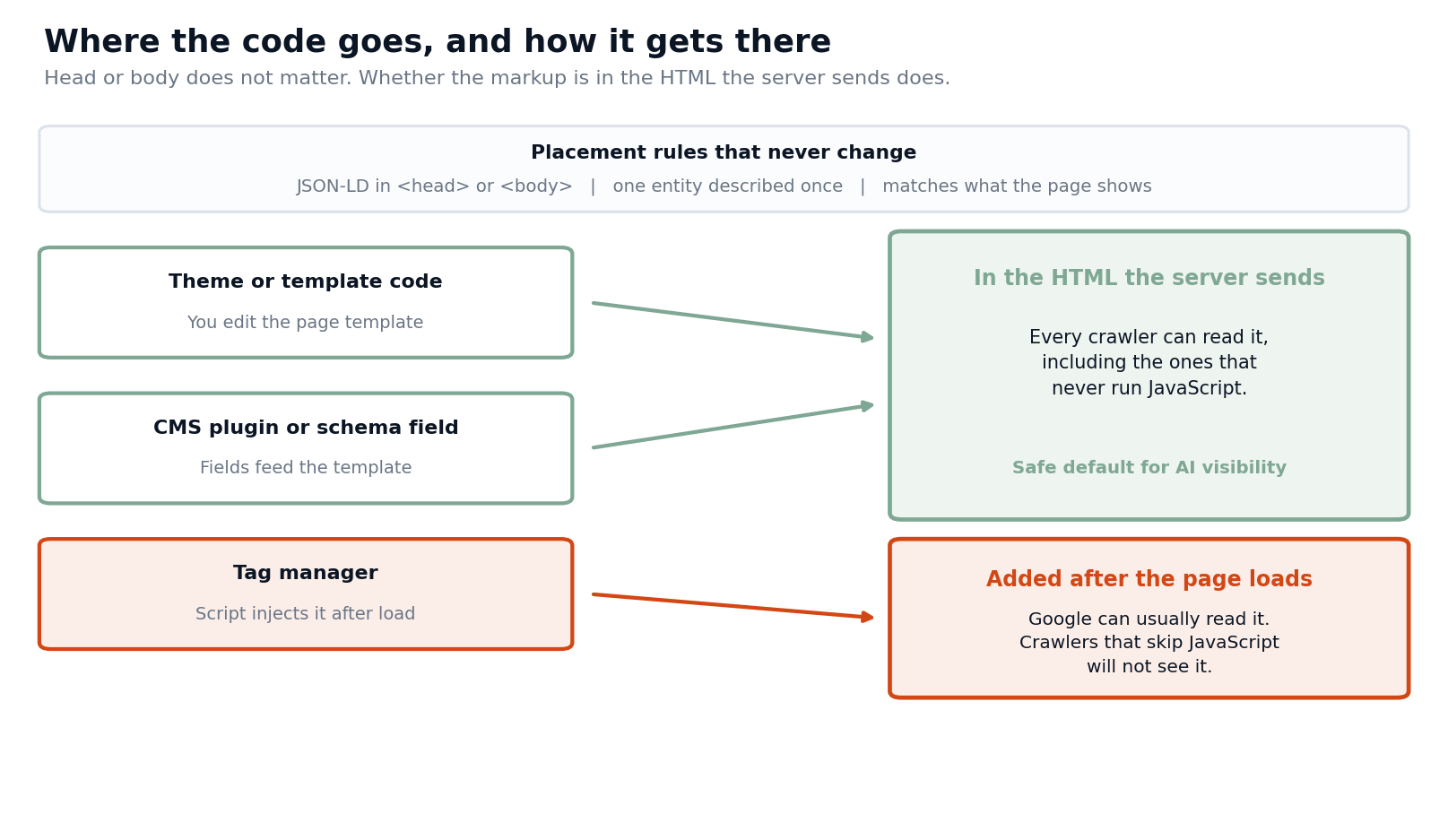
The first is theme or template code. A developer adds the script to the page template and fills it from real page data: the headline, the author field, the dates. This is the most reliable route, because the markup is part of the HTML the server sends, and it scales, since every new post inherits it.
The second is a CMS plugin or schema fields. Most content management systems either have a built-in schema setting or support a plugin that generates the markup from fields you already fill in, like author and publish date. This is the practical choice for teams without a developer, and it works for the same reason as the template route: the markup is in the HTML the server returns. Check what the plugin actually outputs before you trust it, since default settings sometimes name the wrong author or add types you do not want.
The third is a tag manager. It is attractive because a marketer can add markup without a developer or a release. The catch is that a tag manager injects the script after the page loads, using JavaScript. Google can generally read structured data added that way, so it may still be eligible for rich results. But crawlers that do not run JavaScript never see it. We covered how many AI crawlers behave in can AI crawlers render your JavaScript. If you want markup visible to every crawler, put it in the server-rendered HTML. Use a tag manager as a stopgap while you wait for a template change, not as the permanent home.
Whichever you pick, build it at the template level. The page type decides the markup, the page's own data fills it in, and nobody pastes a script into an individual page.
A worked example: auditing one small site
Say you inherit a B2B software site and check where its markup actually sits. The homepage has Organization markup, but it comes from an SEO plugin and uses a logo the company retired two years ago. Blog posts carry Article markup that names the company as the author, because the theme default was never changed, so no post resolves to a real person. The pricing page has an AggregateRating block copied from a review site, which describes ratings the page itself does not show. The blog index and category pages carry the same BlogPosting block as individual posts, because the template that outputs it runs on every blog URL. And the thank-you page after the demo form has a full Organization block of its own.
Four of those five are placement problems and not content problems. The fix is a short list: correct the Organization block on the homepage and make the plugin or template the single source for it; switch the blog template to a real author field and a Person entry; remove the rating block, since the page does not display the ratings; restrict the BlogPosting output to single post pages; and strip the markup from the thank-you page. Nothing was missing so much as in the wrong place, which is the usual finding.
Mistakes that put markup in the wrong place
A few errors account for most placement trouble, and they all trace back to the template. The first is duplicate blocks, where a theme and a plugin both output Organization markup and the two disagree on the name or logo, leaving a machine with two versions of your company. The second is post markup on list pages, where a BlogPosting block fires on the blog index, category pages, and paginated archives, describing a post that is not the page. The third is hard-coded values, where the same author or dateModified is baked into the template instead of read from each post, so every page claims the same author and date.
The fourth is markup on the wrong version of a URL, such as parameter, print, or staging variants that should not be indexed. The fifth is the one-page Organization, where the homepage is perfect and every other page names the company differently. Each is cheap to prevent when the markup comes from one template filled by real page data, and expensive to find after it has spread across hundreds of pages.
Pages to leave alone
A site map of schema is as much about what you skip. Thank-you and confirmation pages have nothing for a reader to find, and marking them up adds noise. Thin promotional landing pages have no facts to describe, so there is nothing true to say in markup. Staging, filtered, and duplicate URLs should not be indexed at all, so markup on them is wasted effort and can confuse which version is the real one. Gated confirmation pages and internal tools sit in the same group.
The test is the same as for every other page: is there a real, visible fact on this page that the markup would describe? If not, leave it unmarked. Schema is a label on content that exists, not a way to add content that does not.
Check that it landed where you meant
After you deploy, confirm the markup is where you think it is. Open the page, view the source the way a crawler would, and search for application/ld+json. If you only find it by inspecting the page in the browser's developer tools and not in the raw source, it was added by JavaScript, and you are in the tag-manager case above. That one check separates "present in the HTML" from "added after load" faster than any tool.
Then validate. Google's Rich Results Test tells you whether the page is eligible for any rich result and flags errors, and the Schema.org validator confirms the JSON-LD is well formed. Check one page of each type, not just the homepage, since a template error repeats on every page of that type. Watch the structured data reports in Search Console for errors across the site, and re-check whenever someone changes a template.
Questions people ask
Do I put schema in the head or the body?
Either works for JSON-LD. Choose one convention and keep it consistent across your templates.
Do I need schema on every page?
No. Put it on the pages with real, visible facts to describe, such as the homepage, blog posts, author pages, and product pages, and skip pages like thank-you screens and thin promo pages.
Can I add schema through Google Tag Manager?
You can, and Google can generally read it, but crawlers that do not run JavaScript will not see it. For anything you want every crawler to read, use the template or a CMS plugin so it is in the server-rendered HTML.
Should every page repeat the full Organization markup?
Define it fully on the homepage and keep the name, logo, and identifier consistent wherever else the company appears, such as the publisher on blog posts.
Will adding schema get me cited in AI answers?
Not on its own. It supports entity clarity, author credibility, and rich results, while the visible content is what gets quoted. Our schema markup guide explains the honest picture.
Roll it out in an afternoon
You can cover the high-value ground in a few hours. Add the Organization and WebSite block to the homepage. Add BlogPosting with a real Person author to the blog template, so every post inherits it. Give each author a page with Person markup. Then add breadcrumbs in the template and leave the thank-you and thin pages alone. The downloadable placement map has the page types, the code blocks, and a checklist to hand to whoever owns your templates.
Once it is live, confirm it changed something. You can see where your pages stand today with our AI Search Visibility Checker, and if you want to know whether the pages you marked up are actually getting cited, Omnibound's AI Search Intelligence tracks that across engines, so you can tell clean markup apart from content that earned the answer. For the live-check side of that, see why live model checks matter.