


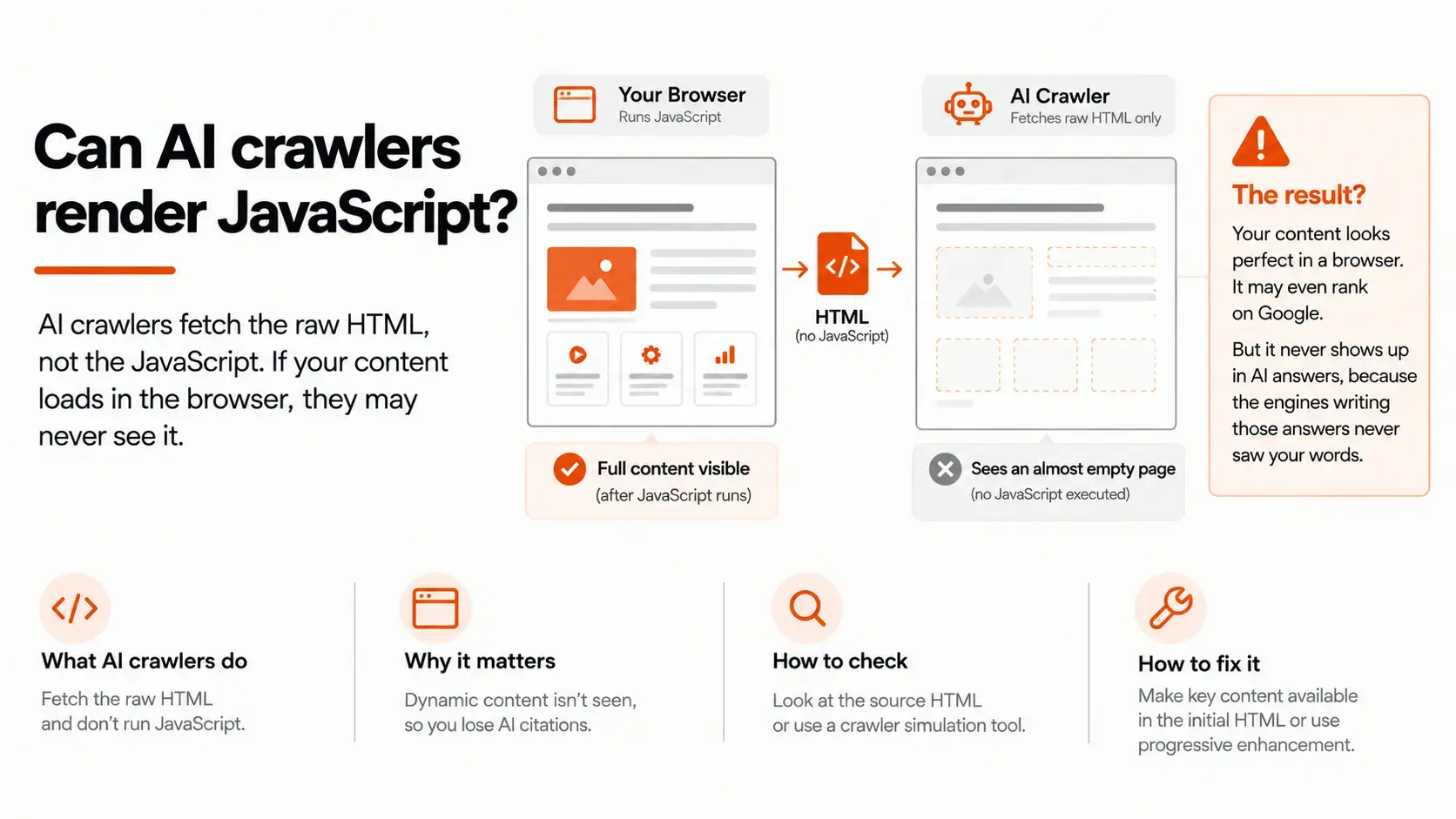


Short answer: mostly no, and it is quietly costing B2B sites their AI citations. The major AI crawlers that feed ChatGPT, Perplexity, and Claude fetch the raw HTML your server sends and then move on. They generally do not run the JavaScript that a browser runs. So if your page builds its content in the browser after load, which is how most modern JavaScript sites work by default, those crawlers see an almost empty page. They cannot cite what they cannot read.
This is one of the most damaging technical problems in AI search precisely because it is invisible from where marketers usually sit. Your page looks perfect in a browser. It may even rank on Google. And yet it never shows up in AI answers, because the engines writing those answers never saw your words. This guide explains what AI crawlers actually do with JavaScript, why they behave differently from Google, how to tell in a few minutes whether your pages have the problem, and how to fix it without rebuilding your whole site.
What AI crawlers actually do with a page
When any crawler requests your page, your server sends back an HTML document. In a JavaScript-heavy site, that first document is often close to empty: a shell with a couple of script tags and a placeholder like <div id="root"></div>. A web browser takes that shell, downloads and runs the JavaScript, and the JavaScript builds the real content on the fly. This is client-side rendering, and it is the default behavior of popular frameworks when you do not configure them otherwise.
The question that decides your AI visibility is simple: does the crawler run that JavaScript, or does it read only the first HTML response and stop? A large-scale analysis of AI crawler traffic published by Vercel found that the major AI crawlers fall firmly in the second camp. GPTBot, OAI-SearchBot, and ChatGPT-User from OpenAI, ClaudeBot from Anthropic, PerplexityBot, Meta's crawler, and others fetch the HTML and do not execute client-side JavaScript. They take what is in that first response and nothing more.
That means the practical rule is blunt. If a fact, a paragraph, a price, or a heading only exists after JavaScript has run, the AI crawlers that write answers about your category will not see it. Your beautifully rendered page, to them, is a blank.
Why Google can render JavaScript but AI crawlers do not
People who have done traditional SEO often assume this is a solved problem, because Google handles JavaScript. Google does, up to a point. Googlebot runs a two-step process: it fetches and indexes the HTML first, then queues the page to be rendered later by a headless browser that executes the JavaScript, and folds anything new into the index on that second pass. It is slower and less reliable than serving content directly, but Google built the infrastructure to do it at scale, and Gemini's answers draw on that same rendered index.
The AI answer crawlers have not built that infrastructure, or have chosen not to spend it on rendering. Running a full browser for every page is expensive in compute and time, and these crawlers are fetching enormous volumes of pages to build and refresh their models and answer engines. Reading raw HTML is cheap and fast; rendering JavaScript for every URL is neither. So the crawlers optimize for the cheap path and skip the render.
The result is a gap that did not exist in the Google-only era. A page can be fully indexed and ranking in Google, because Google rendered it, and at the same time be completely absent from ChatGPT, Perplexity, and Claude, because they did not. If you have ever wondered why a page that performs well in organic search never gets picked up in AI answers, client-side rendering is one of the first things to rule out.
How this quietly removes you from AI answers
It helps to see the two paths side by side. The same page produces two entirely different views depending on who is looking.
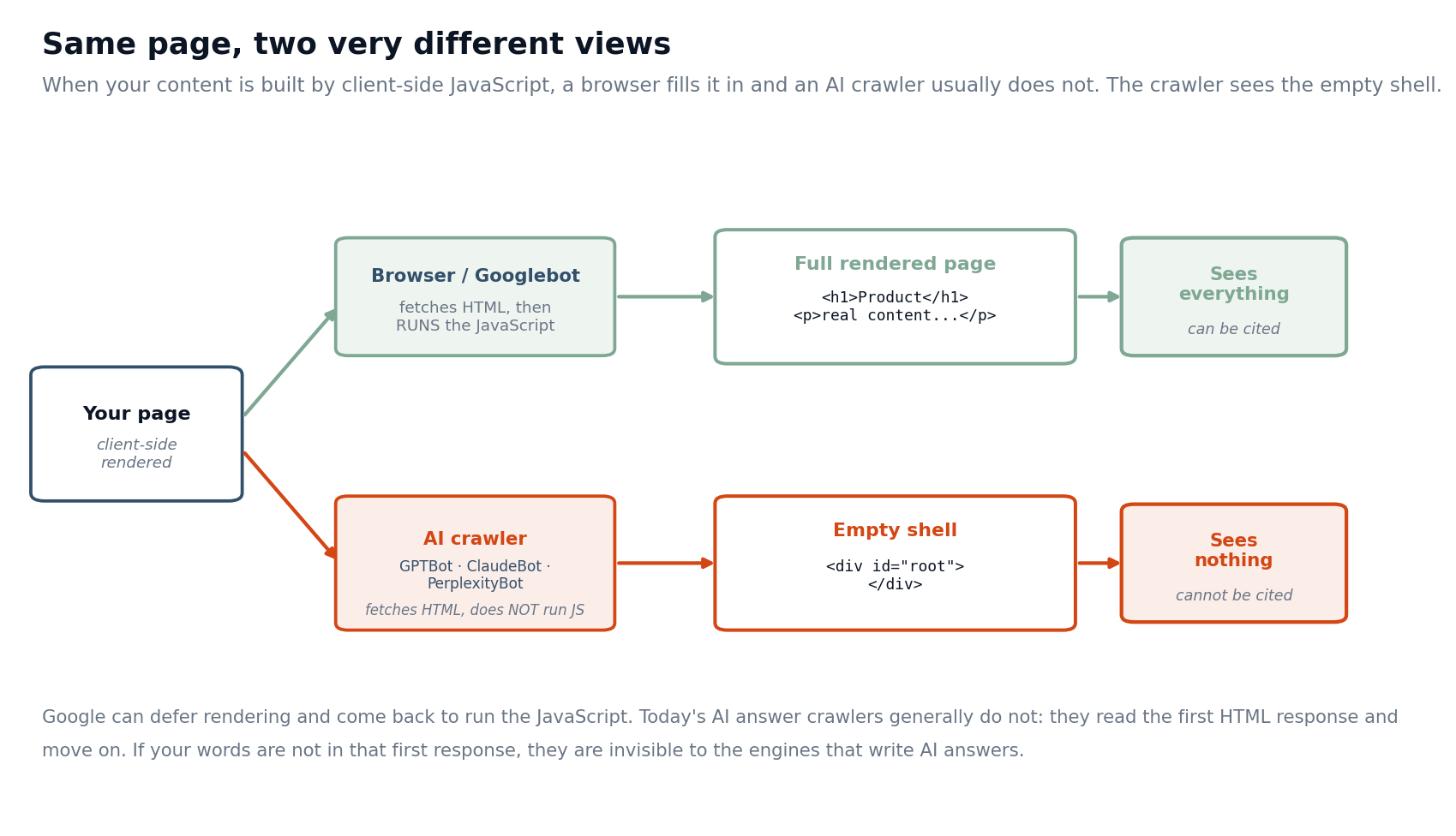
A browser, and Google's renderer, take the empty shell, run the JavaScript, and end up with the full page. They see your headings, your copy, your structured content, everything. An AI crawler takes the same empty shell, does not run the JavaScript, and ends up with the shell. It sees a container and no content. One path leads to a page that can be quoted and cited in an AI answer. The other leads to a page the engine has nothing to say about.
This is why the failure is so easy to miss. Every human check passes. Your team reviews the page in a browser and it is complete. Analytics shows traffic. Google shows rankings. Nothing in your normal workflow looks at the page the way an AI crawler does, so the one view that matters for AI citations is the one nobody sees. The content is there for people and absent for the machines writing AI answers, and the first sign of trouble is usually a competitor being named in an answer where you are not.
The rendering choice is what decides your visibility
The fix, and the diagnosis, both come down to one thing: what is actually in the HTML your server sends before any JavaScript runs. There are three common ways to render a site, and they produce three different outcomes for AI crawlers.
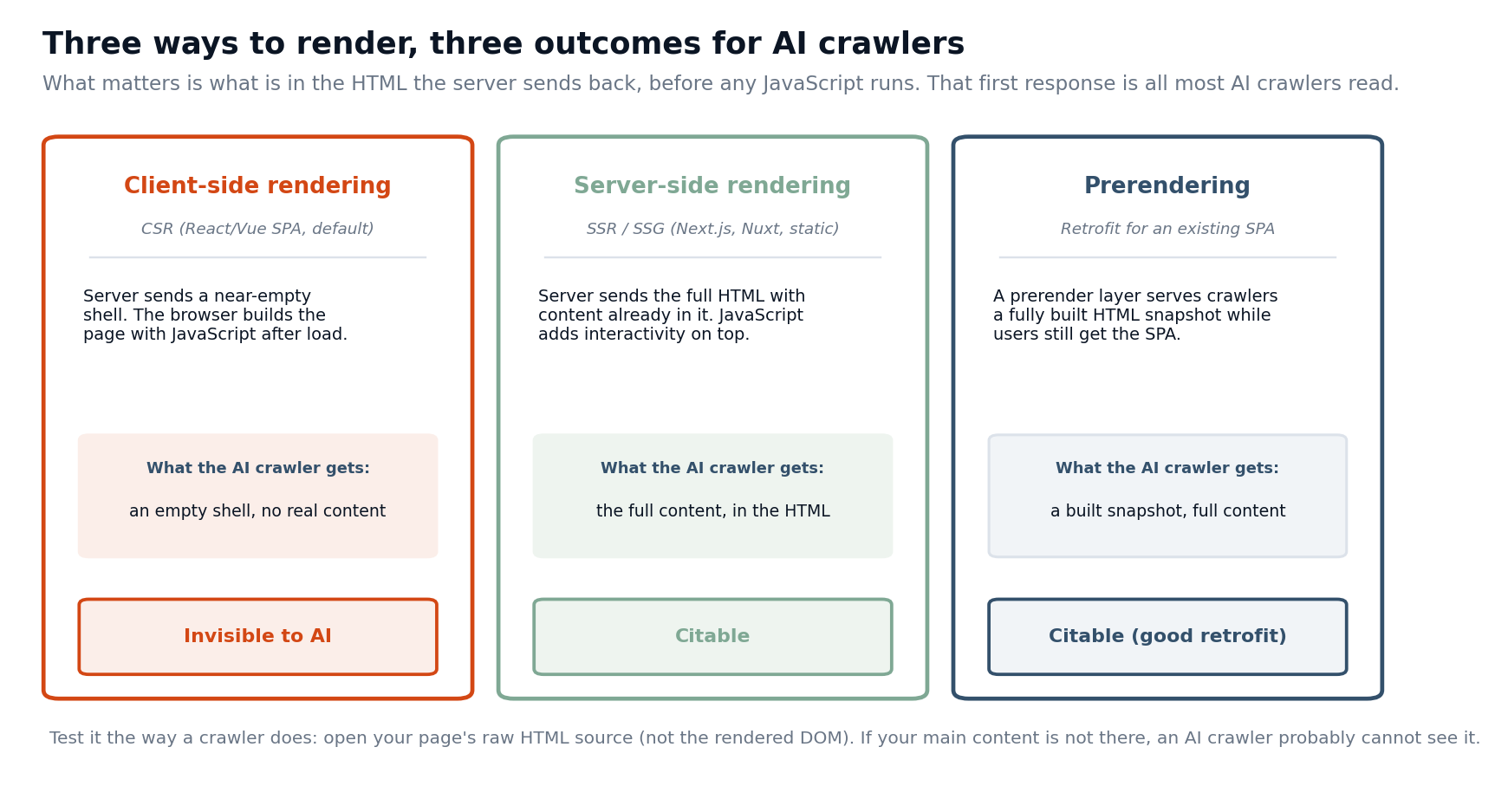
Client-side rendering sends the near-empty shell and builds everything in the browser. It is the default for a standard single-page application, and it is the pattern that hides your content from AI crawlers. Server-side rendering, including static generation, sends the full HTML with your content already in it, and then JavaScript adds interactivity on top.
Frameworks like Next.js, Nuxt, and static site generators do this, and it is what you want: the crawler gets the content in the first response. Prerendering sits between the two as a retrofit. A prerender layer detects a crawler and serves it a fully built HTML snapshot of the page, while real users still get the interactive app. It is the practical option when migrating an existing single-page application to server-side rendering is a big project.
The takeaway is not "JavaScript is bad." JavaScript is fine, and interactivity is fine. What matters is that your core content, the words you want an engine to read and cite, lives in the HTML the server returns, not only in what the browser builds afterward.
How to tell if your pages have this problem
You can diagnose this yourself in a few minutes, and the key is to look at the page the way a crawler does, not the way a browser does.
The single most useful check is to view the raw HTML source, not the rendered DOM. In your browser, use View Source, which shows the actual HTML the server sent, rather than the Inspect or Elements panel, which shows the live DOM after JavaScript has already run. Those two can look completely different on a client-side rendered page, and the Elements panel will fool you into thinking everything is fine. In the raw source, search for a specific sentence or heading from your page. If it is there, a crawler can see it. If the source is mostly script tags and an empty container, it is not.
A second check is to disable JavaScript in your browser and reload the page. What remains is roughly what an AI crawler gets. If the page goes blank or loses its main content, you have found the problem. You can also fetch the page as plain text from the command line, for example with a simple request that does not run JavaScript, and read what comes back. And for pages that matter most, check your server logs to confirm the AI crawlers are actually reaching them and what status they get.
If your content passes these checks and appears in the raw HTML, rendering is not your bottleneck, and you can turn your attention to the other things that decide citations, like whether your pages are structured so a model can lift a clean answer from them.
How to fix it
The right fix depends on how your site is built, but the options are well established.
The strongest fix is to serve your content with server-side rendering or static generation so the HTML the server sends already contains your words. If you are on a modern framework, this is usually a configuration and architecture change rather than a rewrite: render your content pages on the server or build them statically, and keep client-side JavaScript for the interactive parts that genuinely need it. For most B2B sites, the pages that need to be cited, your product pages, comparisons, guides, and documentation, are exactly the pages that should be server-rendered anyway.
If a migration is not realistic in the near term, add a prerendering layer. Services and self-hosted tools can serve crawlers a prebuilt HTML snapshot while leaving your application untouched for users. It is a retrofit rather than a clean solution, but it closes the visibility gap quickly.
Whatever the method, hold to a few principles. Put the content you want cited into the initial HTML, not into a client-only fetch that fires after load. Use progressive enhancement so the core content and links exist without JavaScript and interactivity layers on top. Make sure text is real text in the HTML, not baked into images or injected later. And confirm you are not blocking the AI crawlers at the same time: an open robots.txt and CDN configuration is what lets them reach the content once you have made it visible. Getting a page reachable and getting it renderable are two separate gates, and both have to pass. For the full set of technical gates around this one, our B2B guide to technical AEO covers crawler access, parsing, and entity clarity alongside rendering.
What you do not need to do
You do not need to strip JavaScript from your site. Interactive dashboards, calculators, configurators, and app-like features can stay client-side. Those are not the pages you are trying to get cited, and an AI answer is not going to quote your interactive pricing calculator. Focus the effort on your content pages: the ones with the paragraphs, comparisons, and answers you want to appear in AI responses.
You also do not need to panic-rebuild everything at once. Start by finding which of your important content pages are client-side rendered, using the checks above, and prioritize the ones that should be earning citations: your money pages and your best educational content. Fix those first. A handful of high-value pages moved into server-rendered HTML will do more for your AI visibility than a site-wide rewrite that touches pages no engine was ever going to cite.
Frequently asked questions
Do any AI crawlers render JavaScript?
Google's infrastructure renders JavaScript, and Gemini's answers draw on that rendered index, so content Google has rendered can surface there. The dedicated AI answer crawlers from OpenAI, Anthropic, and Perplexity generally do not render it. Because you cannot rely on the ones that matter most, the safe assumption is that your content must be in the raw HTML.
My page ranks on Google. Isn't that enough?
No. Google ranking means Google rendered and indexed your page. It says nothing about whether ChatGPT, Perplexity, or Claude can see it, because those crawlers do not render the way Google does. Ranking and AI visibility are now two separate outcomes.
Is this the same as being blocked in robots.txt?
No, and it is important not to confuse them. Blocking is an access problem: the crawler is not allowed to fetch the page. Rendering is a different problem: the crawler fetches the page fine but cannot see content that only appears after JavaScript runs. You have to solve both.
Will client-side rendering hurt my normal SEO too? It can, because Google's rendering is deferred and imperfect, so content that depends on it may be indexed slowly or incompletely. Server-side rendering helps both traditional search and AI search, which is part of why it is worth doing.
How do I know if the fix worked? Recheck the raw HTML source and confirm your content is now present before JavaScript runs. Then watch whether the pages start appearing in AI answers over time, since crawlers need to refetch and reprocess the page before anything changes.
Where this fits in the bigger picture
Rendering is one gate among several that decide whether your content can be cited, and it is the one most likely to be silently failing on a modern B2B site. It is also one of the more fixable: once your content is in the HTML the server sends, the crawlers that write AI answers can finally read it, and everything else you do to earn citations, from the signals that make a page citable to clean structure, actually has a chance to work.
The hard part is that you cannot see this problem from a browser, and you cannot see the result without checking where you show up in AI answers. That is the measurement gap this whole category lives in. You can get a read on where you stand today with our AI Search Visibility Checker, and if you want to keep watch on whether your pages are actually being cited after a rendering fix ships, that is what live model checks are for. Omnibound's AI Search Intelligence shows you which of your pages engines can see and cite, so a page that was invisible yesterday does not stay a blind spot.