


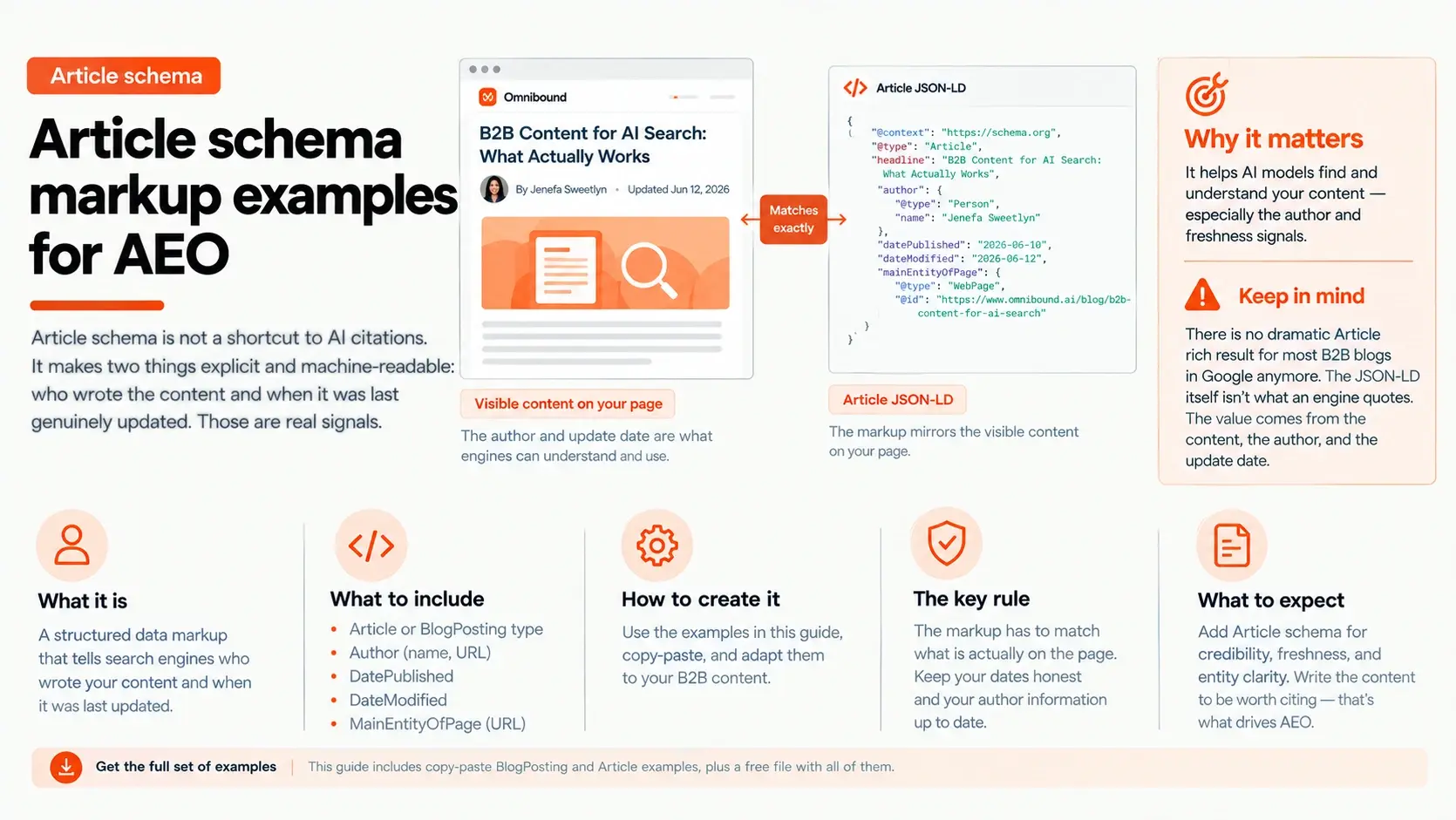


Article schema gets a lot of credit for AI citations that it does not deserve. Adding it won't make an AI engine cite your page. What it can do is make important details like who wrote the content and when it was updated easier for machines to understand. So what should you actually put in your markup? This guide breaks down the Article and BlogPosting fields that are worth using, with copy-paste examples and the rules that keep your schema aligned with the page.
What an Article entry that supports AEO looks like
Before the variations, here is the anatomy of one good BlogPosting entry, because the same shape repeats across all of them.
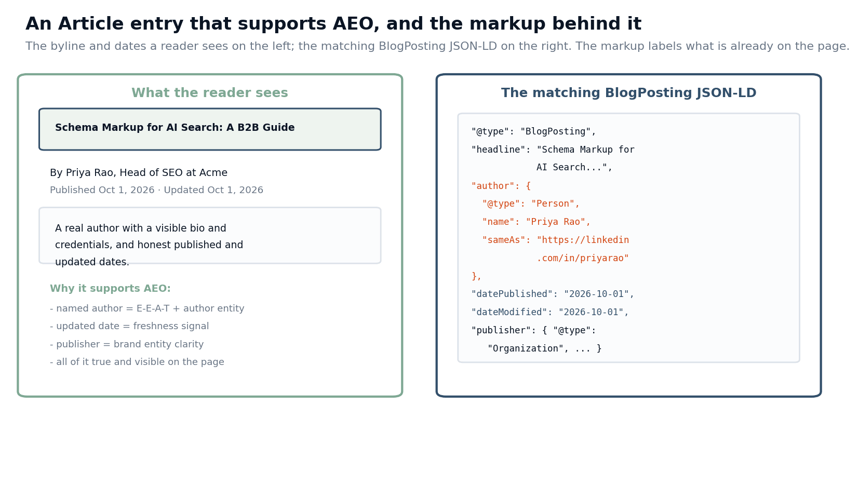
On the left is what a reader sees: a headline, a byline naming a real author with a role, and honest published and updated dates. On the right is the matching BlogPosting JSON-LD, where the author is modeled as a Person with a sameAs link to an authoritative profile, and datePublished and dateModified state the real dates. Notice what the markup is doing. It is not inventing anything. It labels the author and dates that are already visible on the page so a machine can read them without guessing. If the markup and the page ever disagree, for example a dateModified that says today on a post nobody touched, you teach the engine to distrust the signal, which is worse than not having it.
The two fields that do the AEO work
Article schema has a dozen possible fields, but for answer engines two of them carry the weight.
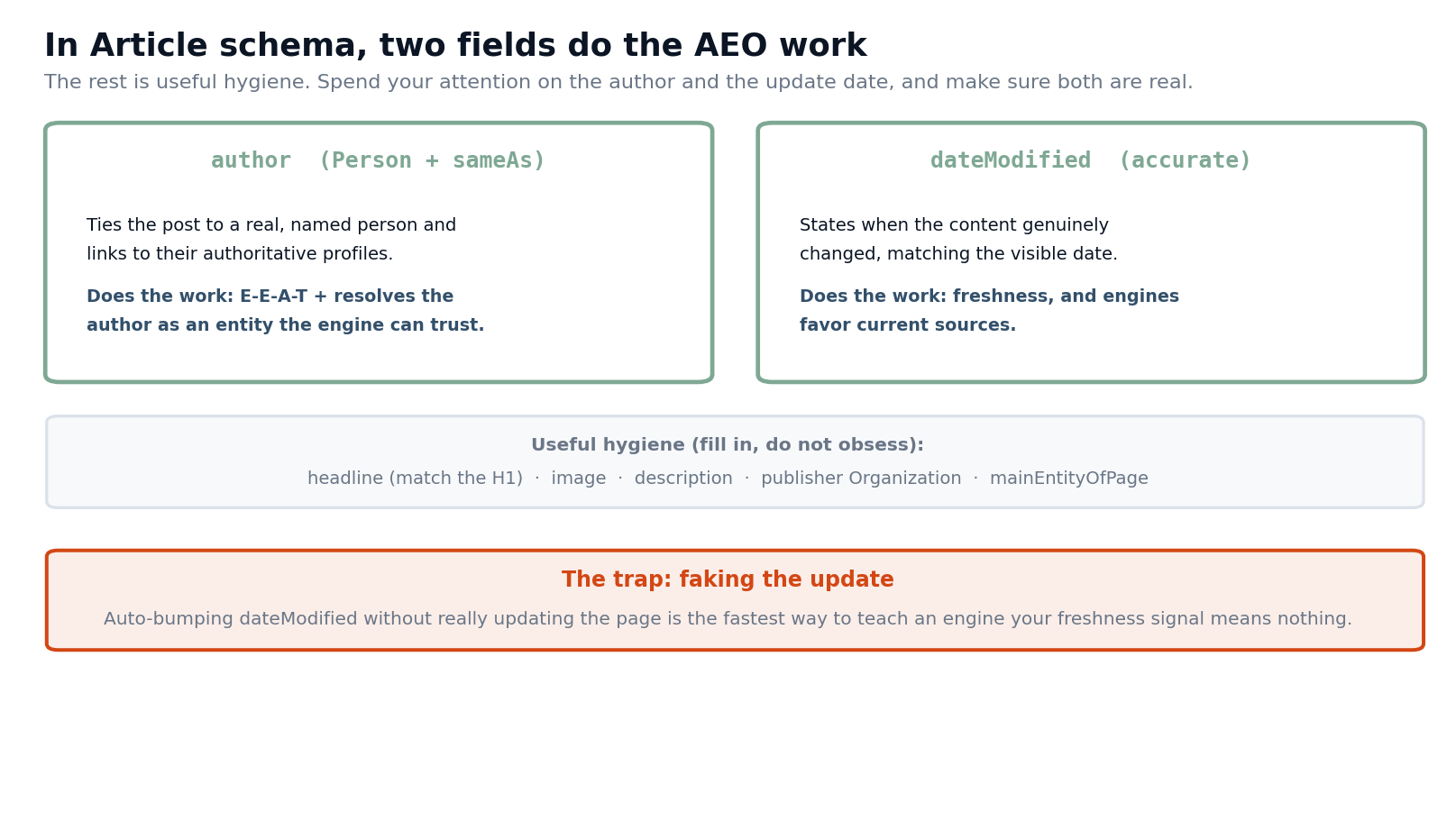
The first is author, modeled as a Person with sameAs. A named, credentialed author tied to their real profiles does two jobs at once: it supports E-E-A-T, the expertise and trust signals engines and Google both weigh, and it resolves the author as an entity the engine can recognize across the web. This is why author schema is worth getting right on its own, and it is the single highest-value field here. Listing the Organization as the author, or leaving the author generic, throws that away.
The second is dateModified, kept accurate. Engines favor current sources, so an honest update date is a genuine freshness signal, which connects to which pages and content to refresh for AI visibility. The rest of the fields, headline, image, description, publisher, and mainEntityOfPage, are worth filling in correctly, but they are hygiene, not levers. Put your attention on a real author and an honest update date.
There is a trap worth naming here, because it is common. Auto-bumping dateModified on a schedule, so every post looks freshly updated without any real change, is the fastest way to make your freshness signal worthless. Engines and Google can tell when the content did not actually change, and a signal that always says "fresh" says nothing. Update the date when you update the content, not before.
Article schema examples you can adapt
Here are the patterns that cover most B2B needs. Each is in the downloadable file in full; this is what each one is for.
A standard BlogPosting is the default for a normal blog post. It carries the headline, description, image, both dates, the author as a Person with sameAs, and the publisher Organization with its logo. This is the one you will reuse most, ideally built into your blog template so every post inherits it and the author and dates populate from real data. Here is the core of it:
<script type="application/ld+json">
{
"@context": "https://schema.org",
"@type": "BlogPosting",
"headline": "[Exact H1 of the post]",
"datePublished": "2026-10-01",
"dateModified": "2026-10-01",
"author": {
"@type": "Person",
"name": "[Author Name]",
"url": "https://www.example.com/author/[slug]",
"sameAs": ["https://www.linkedin.com/in/[profile]"]
},
"publisher": {
"@type": "Organization",
"name": "[Company]",
"logo": {
"@type": "ImageObject",
"url": "https://www.example.com/logo.png"
}
}
}
</script>
An Article with a separate reviewer adds a reviewedBy Person alongside the author. Use it when a named expert reviews the piece, which is common for technical or high-stakes B2B content. It makes the expertise behind the post explicit, which is exactly the kind of signal that supports being treated as a credible source.
A standalone author, or Person, schema is the highest-value single addition and belongs on author bio pages as well as inside your Article markup. It models the author with their role, employer, and sameAs links to authoritative profiles, so the engine can build a confident picture of who is behind your content. Because author identity ties directly to off-site authority, this pairs with first-party vs third-party citations, where sameAs links do the entity-resolution work.
And a minimal BlogPosting is the stripped-down version for when you can only add a few fields: the headline, both dates, and the author as a Person. If that is all you ship, you have still covered the fields that matter. The common thread is that the markup is boilerplate; what changes the outcome is whether the author is real and the dates are honest.
How to implement it without creating problems
The mechanics are quick, and a few rules keep the markup an asset rather than a liability.
Use JSON-LD and generate it from your real post data, so the author, headline, and dates always match the page instead of drifting as static blocks do. Model the author as a Person, not the Organization, and give that Person a sameAs link to at least one authoritative profile. Show the byline and the dates visibly on the page, since marking up an author or date a reader cannot see breaks the match rule. Keep the headline identical to the H1. And set dateModified from a real content change. For the underlying question of whether a page is even worth refreshing, and how often, our guides on what to refresh and how often to refresh cover the decision; the schema just reports the result of it.
Mistakes that waste Article schema
A handful of errors turn the markup from an asset into a liability, and none of them are about syntax. The first is the Organization-as-author mistake, where the byline and markup credit the company instead of a named person, which throws away the E-E-A-T and author-entity value that is the whole point. The second is the phantom update, a dateModified that advances without any real change to the page, which trains engines to ignore your freshness signal.
The third is the invisible author or date, where the markup names an author or date that never appears on the page, breaking the match rule and risking a manual action. The fourth is the headline mismatch, where the schema headline and the visible H1 disagree. And the fifth is treating Article schema as a citation lever, so the markup gets built while the content itself, the thing an engine actually quotes, stays thin. Fix the author and the dates, make them real and visible, and the markup earns its keep.
How to check it works
Validate every template before you rely on it. Google's Rich Results Test flags whether the page is eligible for any Article rich result and surfaces markup errors, and the Schema.org validator confirms the JSON-LD is well-formed. Run both after any template change, and watch Search Console for structured-data errors across the site. Pay special attention to the author and date fields, since those are the ones that matter and the ones most likely to be wrong if they are hand-maintained.
What none of these tools report is whether your content is being cited in AI answers, because the markup is not what earns that. Validate the schema for correctness, then measure AI visibility separately. For the broader question of which schema types matter and the honest verdict on each, see our schema markup for AI search guide.
Frequently asked questions
Does Article schema get my posts cited in AI answers?
Not on its own. It makes author and freshness explicit, which are real signals, but the visible content is what gets quoted. Treat the markup as support, not the lever.
Author or Organization as the author?
A real Person, with sameAs links to their profiles. A named, credentialed author supports E-E-A-T and entity resolution in a way an Organization byline does not.
Do I still need Article schema if there is no rich result?
Yes, for most B2B posts there is no dramatic rich result, but the author, date, and publisher fields still clarify your content for machines and support freshness and E-E-A-T.
Should I update dateModified on a schedule?
No, only when you genuinely change the content. Auto-bumping it is a freshness signal that engines learn to ignore, and it can erode trust.
What is the most common Article schema mistake?
A dateModified that does not reflect a real update, followed by using the Organization instead of a named Person as the author. Both waste the two fields that matter most.
Put the examples to work
The fast path is to take the example file, build the standard BlogPosting into your blog template so it populates from real post data, add a Person author with sameAs, and make sure the byline and dates are visible. The markup is boilerplate once it is wired up. The judgment is in keeping the author real and the update date honest, because those are the parts an engine actually weighs.
Then confirm it changed something, since correct markup and an earned citation are different outcomes. You can see where your pages stand today with our AI Search Visibility Checker, and if you want to track whether your posts start getting cited after you ship the markup and the freshness work behind it, that is what live model checks are for. Omnibound's AI Search Intelligence shows you which of your posts engines actually cite, so you can separate a clean schema pass from content that genuinely earned the answer.