


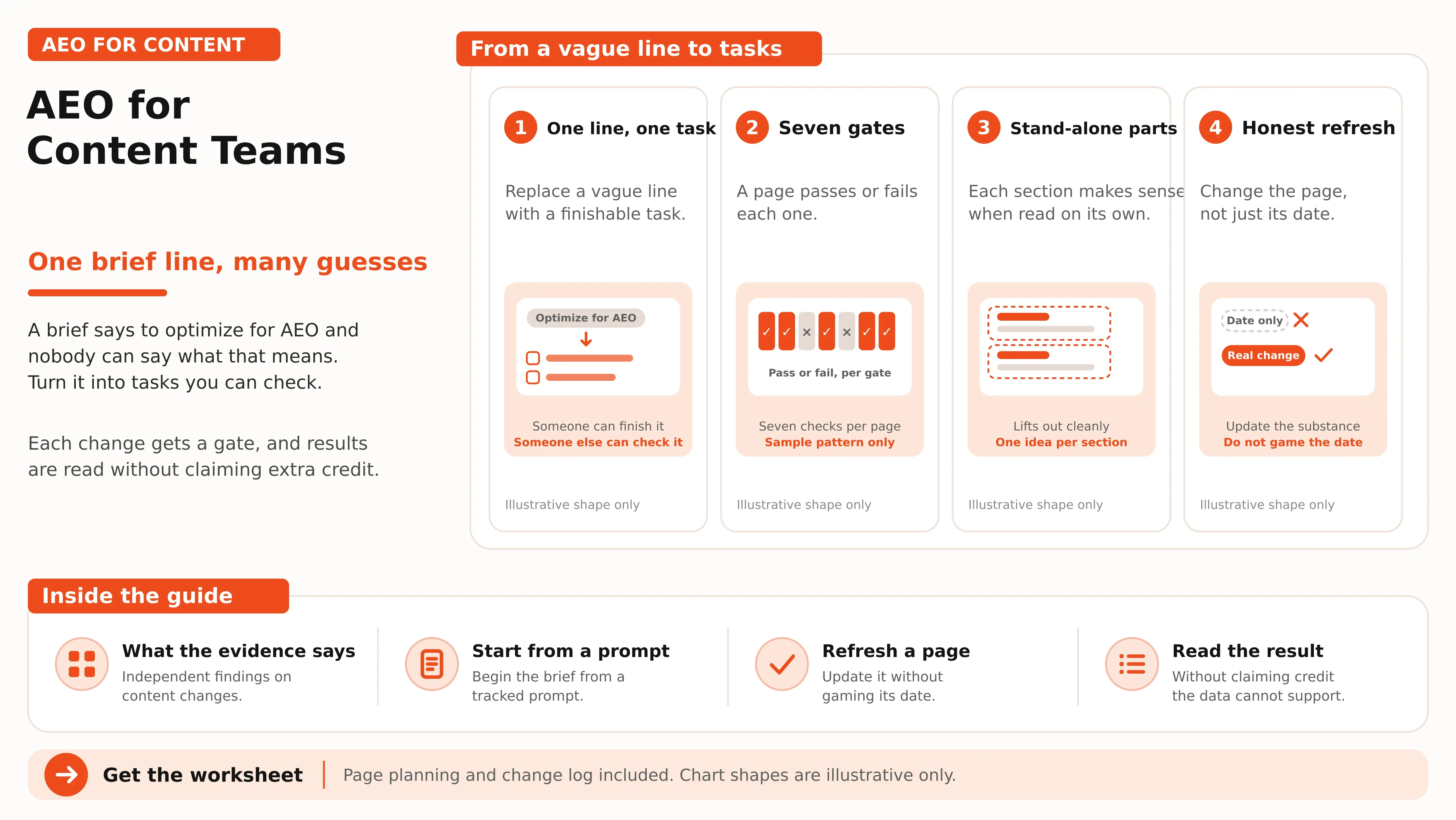


AEO gives content teams a new set of problems to solve, but “optimise for AI” is not a workable instruction. Writers need specific prompts to target, facts worth citing, sections that answer questions clearly, and a way to test whether their changes make a difference. This guide shows your team how to turn AEO into a repeatable workflow, from building briefs around tracked prompts and checking pages against seven quality gates to refreshing content responsibly and measuring results. A practical worksheet helps you plan each update and record its impact.
What "optimize for AEO" can mean in a brief
Each vague instruction below can be replaced with a task someone can finish and someone else can check. The last column says what, if anything, supports it.
| The instruction | The task | What supports it |
|---|---|---|
| "Answer the question first" | One or two sentences under the heading that state the answer in full | Google says important information should be available as text. No independent study tests answer position for B2B prompts |
| "Add proof" | Every claim names its source, a quotation or a figure | One academic benchmark, covered below |
| "Don't over-optimize" | No keyword repetition added for its own sake | The same benchmark found keyword stuffing lowered visibility |
| "Add schema" | Add markup only if it matches the visible text | Google says no special markup is needed and markup should match the page |
| "Make it original" | Include something the page's competitors lack: your own data, method or example | Google's guidance on helpful content |
| "Keep it fresh" | Update the page when a fact changes, and log what changed | Google warns against changing dates to seem fresh |
What the independent evidence says about content changes
There is one academic study that tests content changes directly. Researchers from Princeton, IIT Delhi and two independent affiliations built a benchmark of 10,000 queries and tested nine ways of rewriting a source page. Their setup fetched the top five Google results for each query and had a language model, gpt-3.5-turbo, write the answer. The measure was position-adjusted word count: how much of the answer's text comes from the rewritten page, weighted by where it appears (Aggarwal et al., GEO: Generative Engine Optimization, KDD 2024).
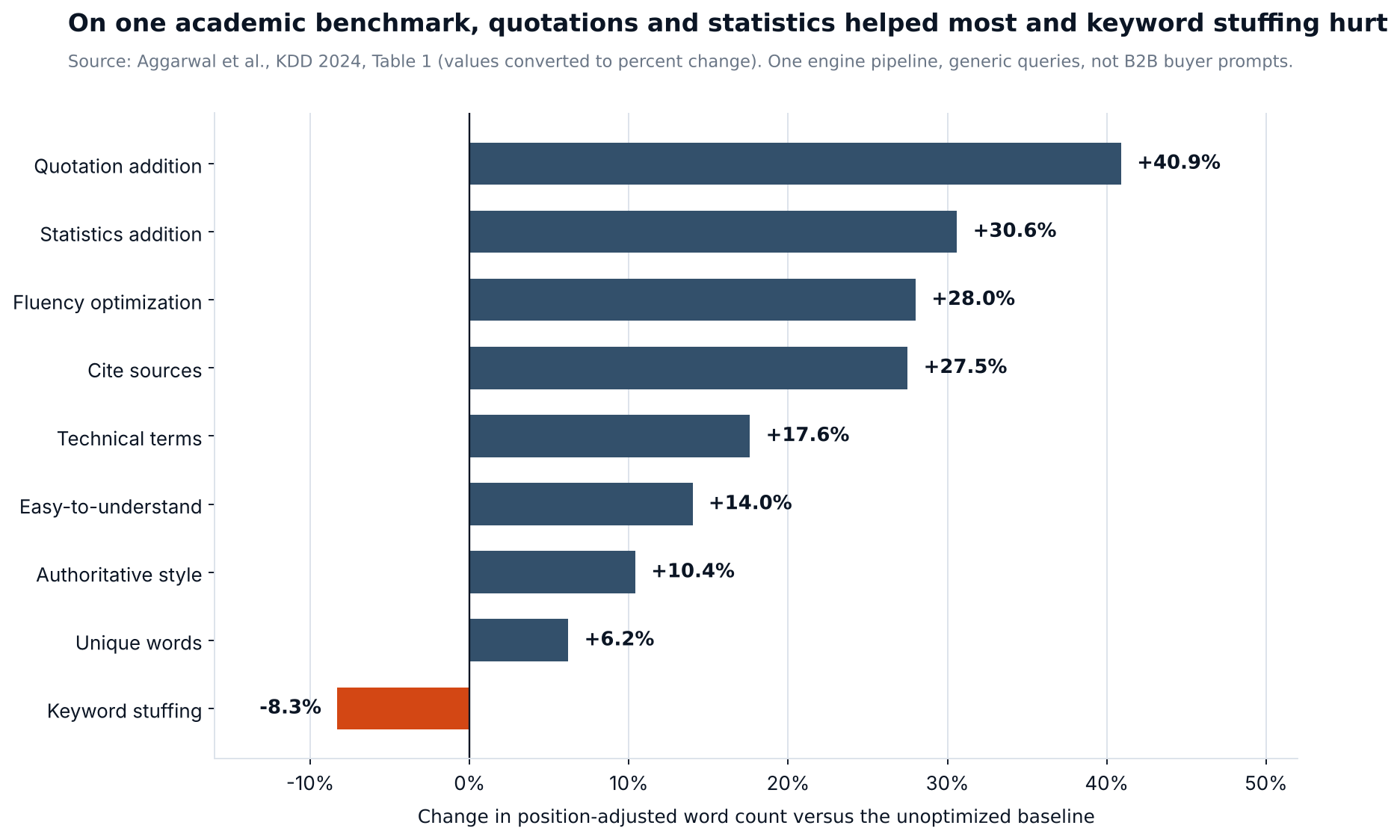
Figure 1. Percent change versus the unoptimized baseline, converted from the study's Table 1. One engine pipeline and generic queries.
Adding quotations raised the measure by about 41 percent, adding statistics by about 31 percent, citing sources by about 28 percent, and keyword stuffing lowered it by about 8 percent. The authors also report that how well a method works varies by domain, and that a separate test on a commercial engine reported gains of up to 37 percent.
Read that with the limits in view. The engine was one pipeline built on an older model. The queries were generic, not B2B buying questions. The metric is how much of an answer's wording comes from your page, which is not the same as being cited by name. The rewrites were done by a model, not by an editor who knows your product. The study gives a reason to prefer named sources, quotations and figures over keyword repetition. It does not give an expected lift for your pages.
Google's documentation is the other fixed point. Its guidance on helpful content asks for original information, reporting, research or analysis, not a rewording of other sources. It asks whether a reader leaves with enough to reach their goal, and it lists warning signs of content made mainly to rank: writing to a supposed preferred word count, summarizing others without adding value, and changing dates to seem fresh (Creating helpful, reliable, people-first content, last updated October 5, 2026). Its page on AI features says there are no additional requirements and no special optimizations needed, that important information should be available as text, and that structured data should match what is visible on the page (AI features and your website).
Start the brief from a tracked prompt, not a keyword
A keyword brief starts with a phrase and a volume. An AEO brief starts with a question a buyer would ask, in the words a buyer would use. Those words are often long: in a large study of real conversations with an AI assistant, nearly 80 percent of user prompts were longer than 20 terms (Amani et al., arXiv 2609.19244). A brief built on a two-word keyword is aimed at a different thing.
Take the prompt from your tracked list. How to write and version those prompts is its own post, and the buyer prompt library has starting points. Then save the current answers to it, so the brief starts from what an assistant says today. Engines can split a prompt into several searches before answering, so a page may need to cover sub-questions the prompt does not state (query fan-out explains how).
| Brief field | What goes in it |
|---|---|
| Prompt | The buyer's wording, exactly as it sits on the tracked list, with the date it was added |
| Funnel stage | Awareness, consideration or decision |
| Current answers | Which sources are cited, what claims are made, which of your facts appear, saved with the date |
| Gap | What the answers lack or get wrong that this page can supply |
| Evidence to add | The sources, quotations, figures and original material the page will carry |
| Fact owner | The person who confirms every number, name and date before publication |
| Author and method | Who wrote it, who reviewed it, and how any tested claim was tested |
| Success check | The same prompt, rechecked on a stated date, read with a range |
Write each section so it can stand alone
This part is our judgment, not a finding. An answer engine may use a passage of your page without the passage around it, so a section that depends on three earlier paragraphs to make sense is a risk. Nothing independent tells you the ideal section length, and Google specifically warns against writing to a preferred word count, so the test is whether the section answers its own heading.
Here is an invented example. Under a heading that asks how long a rollout takes, the draft says: "Rollout time depends on many factors, including team size and existing tools." That sentence answers nothing. A version a reader can use: "For a team of 20 with data in one existing tool, plan for two to four weeks: about one week to import and map fields, one to two weeks with a pilot team, and one week for everyone else. Replace these figures with ones you have tested." The second version names the situation, gives a range, breaks it into parts and tells the reader to substitute their own numbers. It is also easier for an editor to check.
Four habits help a section stand alone. Name the subject in the first sentence instead of writing "it" or "this approach". Define a term where it first matters. Put the source of a figure in the same sentence as the figure. Show who wrote the page and how any tested claim was tested, which is the who and how Google asks for.
Who does what
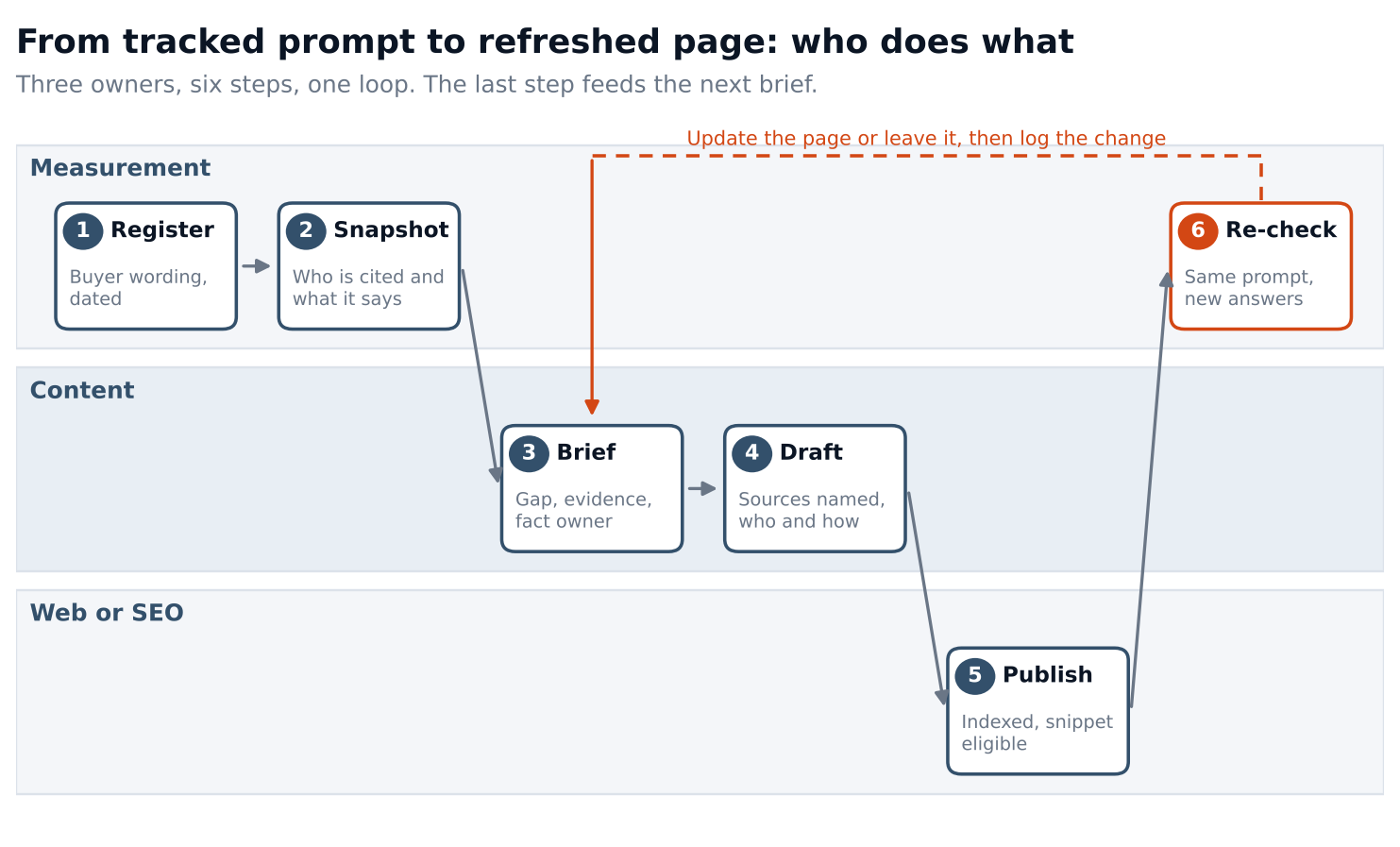
Figure 2. Six steps and three owners. The re-check feeds the next brief.
The content team owns the brief and the draft. Whoever runs measurement owns the register, the snapshot and the re-check. Web or SEO owns publishing and the access check. In a small team one person holds all three lanes, and the diagram still helps because it shows which step you skipped. Who owns each workstream is covered in the team design post. The re-check is the step teams drop. Without it, a page gets changed and nobody learns whether the answers moved, so the next brief starts from guesses again.
Seven gates a page can pass or fail
Run each page through the same list before and after you change it. Gates 1 to 3 draw on the benchmark and Google's guidance and are the content team's work. The others are shared.
| Gate | Where it comes from |
|---|---|
| 1. The answer is stated as text near the top of the section | Google: important information as text. Our judgment on placement |
| 2. Each claim names its source | The benchmark; Google on clear sourcing |
| 3. The page adds original information | Google on original reporting, research or analysis |
| 4. Author and method are shown | Google's who and how questions |
| 5. Facts match the fact sheet | Your own fact sheet; see AEO for PR and comms teams |
| 6. The page is indexed and eligible for a snippet | Google's AI features page |
| 7. Any structured data matches the visible text | Google's AI features page |
A page that fails gate 6 should not be reworked until it is fixed, because the best rewrite cannot help a page that is not indexed. The worksheet ranks pages by gates failed and by how much the prompt matters, so a failing page behind a high-stakes decision question comes before a failing page behind a glossary term.
Refresh without faking freshness
Update a page when a fact on it changes, when a tracked prompt's saved answers repeat an outdated claim from it, or when you can add evidence it lacks. Do not change the date alone. Google lists changing dates to seem fresh among the signs of content made for search engines, and a date-only edit adds nothing a reader or an engine can use.
Keep a change log. For each change record the page, the date, the type of change, and the saved answers before and after for the same prompt. The worksheet separates date-only edits from content changes so a date edit never shows up as a result. If a wrong claim in an answer traces to your page, fixing the page is the content team's job, and the PR and comms post covers the fact sheet and the order for fixing third-party pages.
Read the change without claiming credit
Suppose a page was cited in 10 of 50 saved answers before a change and in 20 of 50 after. That looks like a doubling, from 20 percent to 40 percent. The 95 percent ranges are about 11 to 33 percent before and 28 to 54 percent after, and they overlap, so the data does not rule out chance. The ranges assume each answer is an independent draw, which is a best case. The citation share dashboard post explains the method.
To tell 20 percent from 30 percent with an 80 percent chance of catching a real difference, you need about 290 to 300 answers per group per period, again as a best case. At 40 answers a month per prompt group that is about 8 months. Most content teams cannot collect that for a single page, which is why the worksheet reports a reading ("ranges overlap: do not claim a change") instead of a verdict, and why a handful of changes made at once cannot be told apart.
Change one thing per page where you can. If you add sources, fix facts and restructure a page in one edit, a rise afterward cannot be assigned to any of them. Report what you did and what you observed, with ranges, and do not report that a change caused a rise.
Plan pages and log changes in a worksheet
The worksheet has a page queue, a change log and a summary. Grey rows are invented examples, so replace them before you read any output.
- On the Settings tab, set the minimum saved answers per window and the number of gates a page needs to count as Ready.
- On the Page queue tab, add each page with the prompt it should help answer, its stage and a decision value from 1 to 5. Mark each of the seven gates Yes, No or Unchecked.
- Read the Status column. Pages with an indexing problem are marked Fix access first. The priority score multiplies gates failed by decision value.
- On the Change log tab, record each change, its type, and the saved answers checked and cited before and after. Read the range and the reading.
- On the Summary tab, find the five highest-priority pages and use the calculator to see how many answers you need to tell two rates apart.
Frequently asked questions
Will AI-generated content hurt our AEO?
We found no independent study that tests it. Google's guidance says the concern is purpose and effort: large volumes of generated output with little human oversight are treated as low effort, and it recommends saying how content was produced where readers would reasonably wonder. A useful rule is that anyone on the team could explain who checked each claim and how.
Do we need schema markup?
Google says no special markup is needed for its AI features and that structured data should match the visible text. Add markup where it helps for other reasons and keep it accurate. The worksheet counts "not used" as a pass for gate 7 and fails the gate only when markup exists and does not match.
How long should a page be?
Long enough to answer the prompt and its sub-questions, and no longer. Google warns against writing to a preferred word count, and we found no independent evidence for a best length. Look at what the saved answers cover and check that your page covers it with something added.
How often should we refresh?
Refresh when a fact changes, an answer repeats an outdated claim from your page, or you have new evidence. We found no independent evidence for a fixed cadence. Log each change so you can see which ones were followed by a different answer.
Should we add FAQ sections to every post?
Add a question where readers actually ask it, and answer it fully in the sentence under the heading. We found no independent study showing that FAQ blocks change citation. A block of questions nobody asks adds length without adding value.
Change one thing on one page, then check the same prompt
Pick one page and the prompt it should help answer. Save the current answers, mark the seven gates, and choose a single change: name the source for each claim, add something original, or correct a fact. Make it, note the date, and save new answers to the same prompt a few weeks later. Write down what changed, how many answers you checked and what the ranges say, even when they overlap.
If you want a first reading on one prompt before you set up the log, the AI Search Visibility Checker gives you one. If you want to keep checking the same prompts as you update pages, AI Search Intelligence tracks individual prompts, so the question stays fixed while the page changes.