


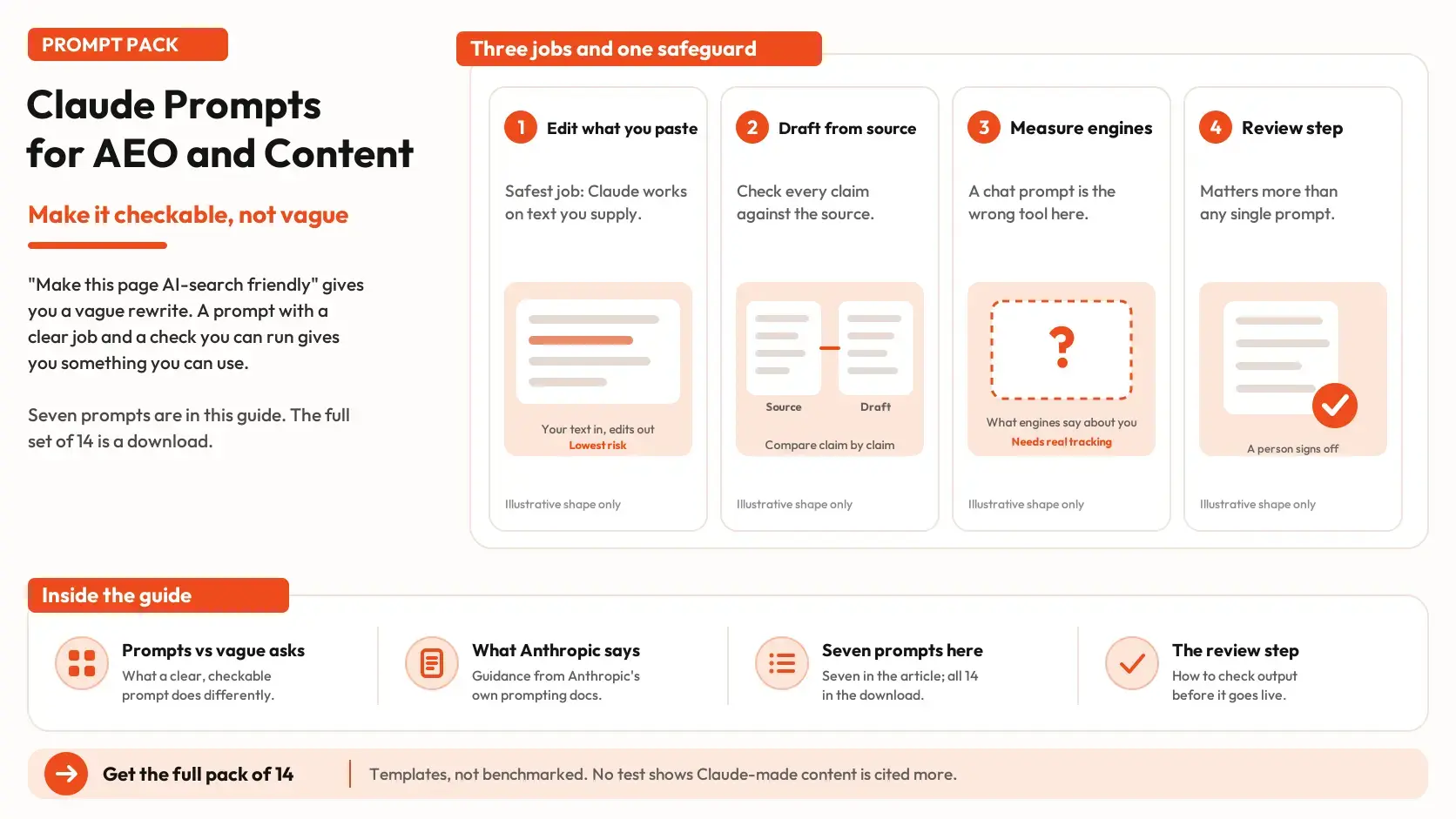


Ask Claude to "make this page AI-search friendly" and you will get a confident list of tips and a rewrite with more headings. It reads well, and you cannot tell what changed or whether anything in it is true. Ask instead for the first sentence under each heading to answer the question the heading asks, with no new facts, and a list of every change, and you have something you can review in five minutes. This guide covers which answer engine optimization (AEO) jobs a chat prompt can do and which it cannot, what Anthropic's own documentation says about prompting Claude, seven prompts for editing and drafting, and a review step that matters more than any of them. T
What a prompt can and cannot do for AEO
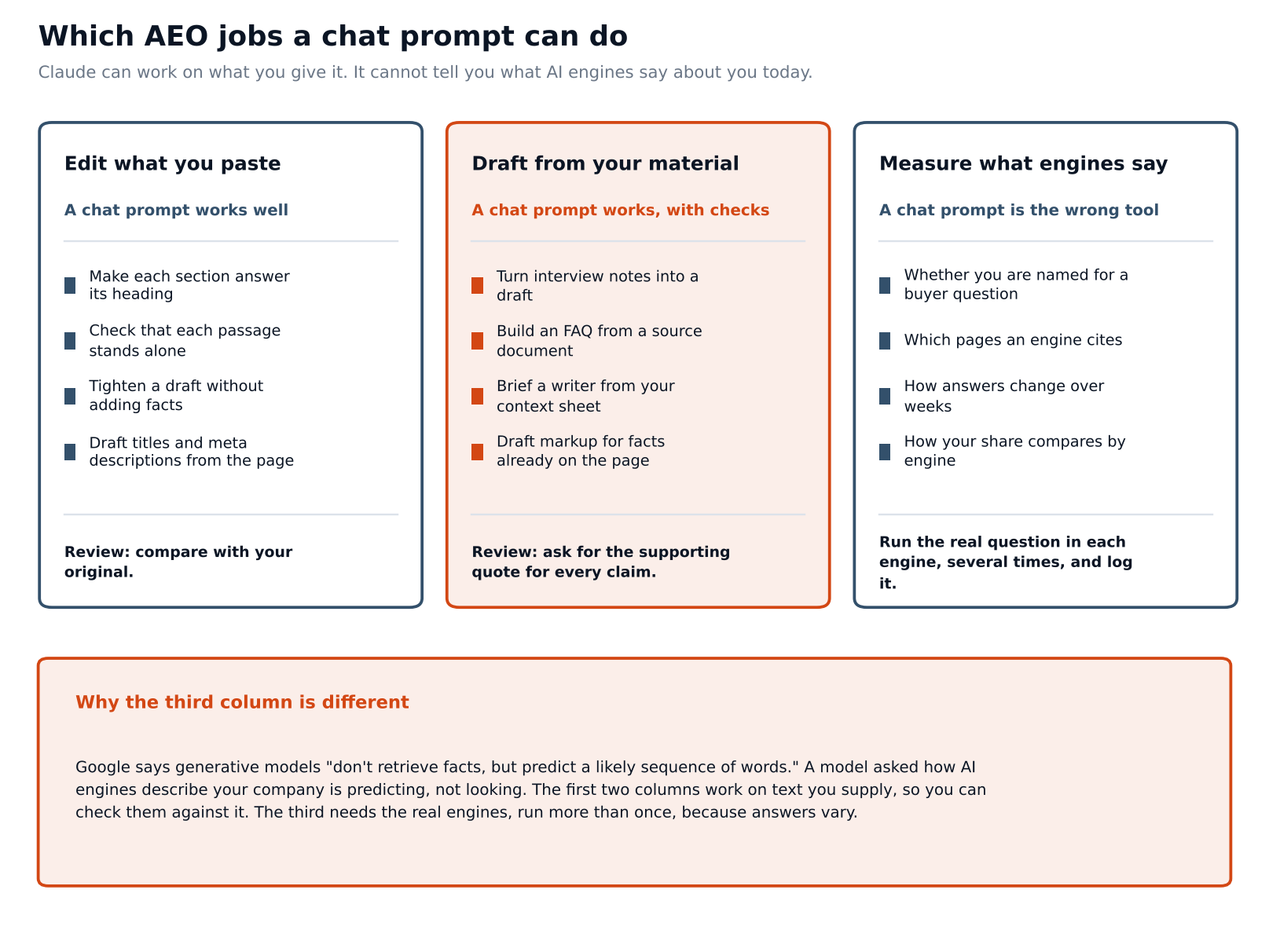
AEO work falls into three groups, and a chat prompt suits two of them.
1. Editing what you paste is the safest. You hand Claude a page and a narrow instruction, such as tightening the writing or checking that each section stands on its own, and you compare the result with your original.
2. Drafting from your material is useful when the material is yours: interview notes, a product document, a context sheet. The risk moves from the edit to the facts, so the draft needs a check against the source.
3. Measuring what engines say about you is the job a chat prompt is wrong for. Whether you are named for a buyer question, which pages an engine cites and how that changes over weeks can only be learned by running the real question in each engine, several times, and logging it. Google's guidance on generative AI notes that these models "don't retrieve facts, but predict a likely sequence of words." A model asked how AI engines describe your company is predicting an answer, not looking one up. Our piece on model variability in AI citations explains why one run is a sample of one.
If you want to hold your facts in one place before you start, our guide to marketing context and marketing intelligence describes the material most of these prompts depend on.
What Anthropic's documentation says about prompting Claude
Anthropic publishes prompting guidance for Claude. It is the developer's own advice, not an independent test, so it tells you what the maker recommends and not what has been proven on marketing work. The points that matter most for content tasks are these.
- Be clear and direct. The page's rule of thumb is to show your prompt to a colleague with minimal context and ask them to follow it. If they would be confused, Claude will be too.
- Explain why. Giving the reason behind a rule works better than a bare rule, because Claude can generalize from the explanation.
- Show three to five examples when you want a particular style, wrapped in tags and chosen to be relevant and varied.
- Use XML-style tags such as
<instructions>,<context>and<input>to keep the parts of a prompt separate, with consistent names. - Put long documents first and the question last. The page says queries at the end can improve response quality by up to 30 percent in Anthropic's tests, especially with complex, multi-document inputs. The advice applies to inputs of roughly 20,000 tokens or more, and the page does not publish the test details.
- Say what to do, not only what to avoid. "Write in flowing prose paragraphs" works better than "do not use markdown."
- Ask for quotes first on long documents, and give Claude permission to say it does not know.
The page also warns that techniques measured on one model should be re-checked against your own tests before you rely on them with another, and it describes a single-sentence role in the system prompt as useful. A separate academic study, by Zheng and colleagues, tested 162 personas on 2,410 factual questions across four open-source model families and found that adding a persona did not improve accuracy compared with using none. These two do not conflict. A role line can steer tone and focus, and a persona is not a substitute for facts. Our ChatGPT prompts for B2B marketers guide covers that point in more detail.
A layout that follows the guidance
Every prompt in this pack uses the same layout: the material first, wrapped in a tag, then the instructions, then the format. Replace anything in [square brackets] with your own text.
| <documents> [paste the page, notes or source text here] </documents> <instructions> [the task, in one or two sentences, and the rules that limit guessing] </instructions> <output_format> [what you want back and in what order] </output_format> |
The rules that limit guessing are the same in every prompt: use only the pasted text, write "not provided" for gaps, and do not add facts, numbers or quotes. They matter because a model fills gaps fluently, and a gap is where a wrong claim can slip in. In a 2025 paper, "Why Language Models Hallucinate," Kalai and colleagues argue that training and evaluation methods reward guessing over admitting uncertainty. That is a theoretical account and not a measurement of marketing tasks, but it is a reason to give Claude explicit permission to leave a gap.
How much to paste
More material is not better material. Anthropic's engineering team writes that context is "a finite resource with diminishing marginal returns" and recommends the smallest set of high-signal information that makes the result likely. Research on long inputs points the same way: a 2023 study by Liu and colleagues, published as a preprint and later in a journal, found that models used relevant information best when it sat at the beginning or end of a long input and did worse when it sat in the middle. Both findings are about language models in general, not marketing tasks, and models have changed since 2023.
For these prompts, that means pasting the one page or the one transcript the task needs, not the whole site, and putting the context sheet and the draft in separate tags so each can be found. If a source is long, ask for the quotes first, as Prompt 4 does, and work from them.
Prompts for editing pages you already have
Editing is where a prompt earns its keep fastest, because you hold the original and can compare.
Prompt 1 checks whether each section can be read on its own. An answer is assembled from passages, so a section that says "as we saw above" or relies on an earlier definition is harder to use.
|
<documents>
|
Prompt 2 finds sentences that make a claim without support or say little.
|
<documents>
|
The instruction not to supply the fact is the point. A model that fills the gap with a plausible number has made your problem worse.
Here is the kind of output to expect, using two invented sentences from an imaginary page.
| Sentence | Problem | What would fix it |
|---|---|---|
| "Our platform delivers industry-leading results for modern teams." | Both: no named result, no comparison, no stated team type | A named outcome with a figure, its source and date, or a named situation it applies to |
| "Customers cut onboarding time by 40%." | Unsupported: no source, date or sample | The study or customer account behind the figure, with the date and what was measured |
Notice what the table does not contain: a replacement sentence. The next step is yours, and it starts with finding the real fact. If you ask for rewrites in a second pass, tell Claude to use only the facts you supply.
Prompt 3 drafts titles and meta descriptions from the page.
Google says content made with generative AI should be reviewed before publishing, and that the same review applies to title elements, meta descriptions, structured data and image alt text, because these can appear in search results.
| <documents> [paste the page text] </documents> <instructions> Write 5 title options of no more than 60 characters and 3 meta description options of no more than 155 characters for this page. Each must describe only what the page actually covers. Do not use claims, numbers or superlatives that are not in the page. Say what the reader will get, in plain words. </instructions> <output_format> A numbered list. After each option, the character count. </output_format> |
Check the character counts yourself, since a model's count can be off and a long title may be cut in search results.
If you would rather review existing pages inside a platform than in a chat, Omnibound's Content Audit and Optimization page describes that approach.
Prompts for drafting from your own material
Drafting prompts fail when the material is thin, so each one names its source and tells Claude what to do when the source is silent. Prompt 4 builds an FAQ from a document you own. Anthropic's guidance on long documents is to ask for word-for-word quotes first, which this prompt does.
| documents> [paste the source document, such as a product guide or a webinar transcript] </documents> <instructions> First, extract the quotes from the document that answer questions a buyer would ask. Then write 8 to 10 questions with answers of no more than 60 words each, using only those quotes. Under each answer, include the quote it came from. If the document does not answer a question buyers are likely to ask, list it separately as "not covered". </instructions> <output_format> < |
Prompt 5 turns notes from a subject-matter expert into a draft. The point is to keep the expert's own words intact, in line with what we found in our look at whether expert quotes earn LLM citations.
|
<documents>
|
The GEO research from Princeton, IIT Delhi and others, presented at KDD 2024, found that adding quotations, statistics and citations raised a source's visibility in generated answers by up to about 40 percent on its measure. Its benchmark used generic queries, not Claude and not B2B vendor choices, so it supports the habit and not a result. Our piece on influencing early-stage buyers covers what that paper did and did not test.
Prompt 6 edits a draft to match your voice. Anthropic suggests three to five examples for a particular style, so give it real paragraphs you have published.
| <examples> <example> [paste a paragraph of your own published writing] </example> <example> [paste a second paragraph] </example> <example> [paste a third paragraph] </example> </examples> <documents> [paste the draft to edit] </documents> <instructions> Edit the draft so it reads like the examples: sentence length, word choice and level of formality. Do not change any fact, number, name or quote. Do not add sentences that make new claims. </instructions> <output_format> The edited draft, then a list of the five biggest changes you made and why. </output_format> |
Check the draft before anyone sees it
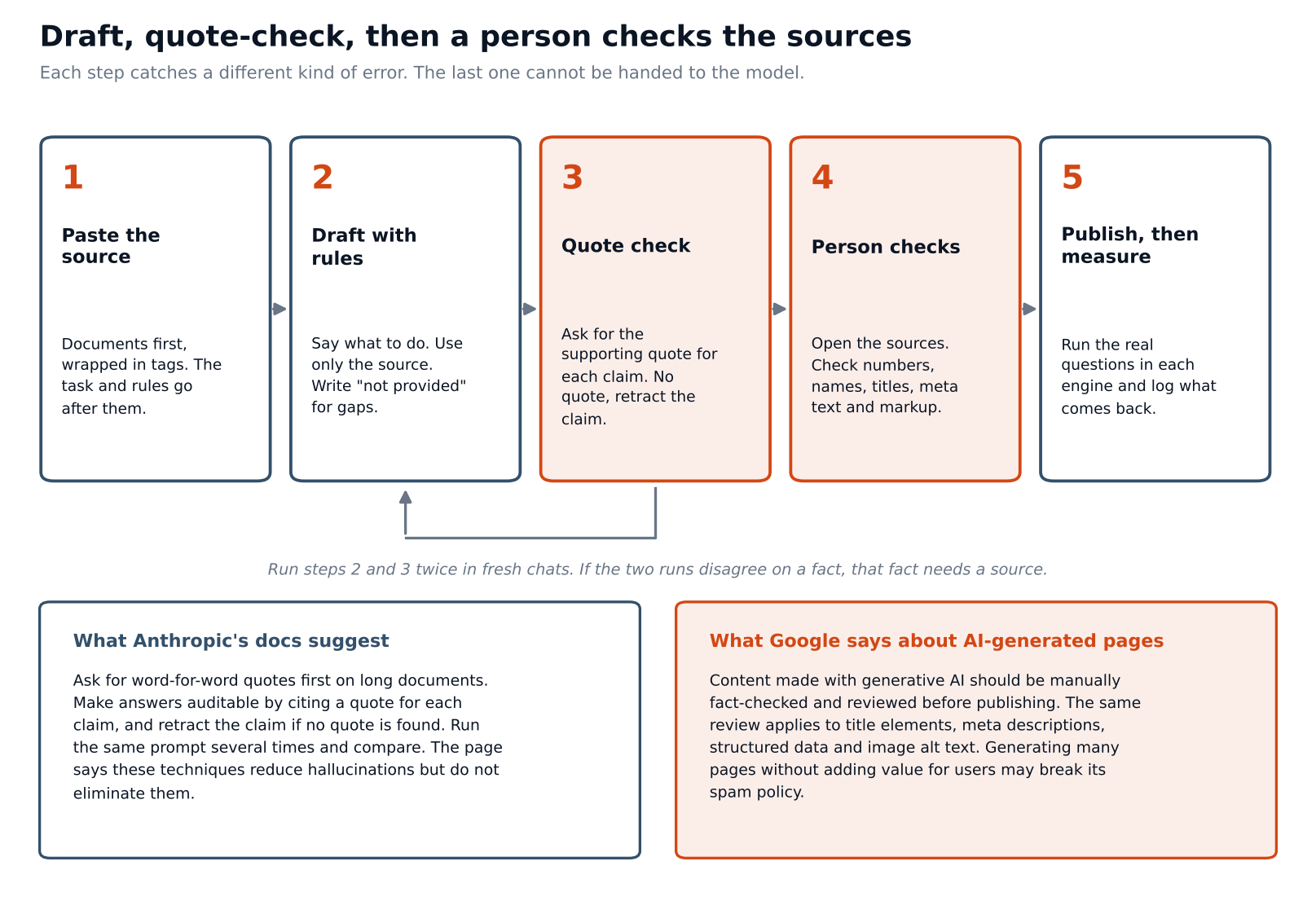
Every draft needs a check, and the check has two layers: one a model can do and one it cannot.
The first layer is the quote check. Anthropic's guidance on reducing hallucinations suggests making answers auditable by having Claude cite a supporting quote for each claim, and retracting the claim if it cannot find one. It also suggests running the same prompt several times and comparing, since inconsistencies can point to made-up details. The page states that these techniques reduce hallucinations but do not eliminate them.
Prompt 7 applies that to a finished draft<documents>
| <source> [paste the source material the draft should rely on] </source> <draft> [paste the draft] </draft> </documents> <instructions> For every factual claim in the draft, find the exact sentence in the source that supports it and quote it. If you cannot find a supporting sentence, write "no support found" and do not defend the claim. Treat numbers, names, job titles, dates and comparisons as claims. </instructions> <output_format> A table with columns for the claim, the supporting quote or "no support found", and a verdict (supported, partly supported, unsupported). </output_format> |
The second layer is a person. Google's guidance says AI-generated content should be manually fact-checked and reviewed before publishing, and that generating many pages without adding value for users may violate its spam policy. A quote check proves that the draft matches the source. It does not prove that the source is right, current or complete, and it cannot see your titles, markup or images. Open the sources, check the numbers and decide whether the page adds something a reader could not get elsewhere.
Questions people ask
Is Claude better than ChatGPT for AEO?
We found no independent comparison. The techniques here, such as separating material from instructions and asking for support for each claim, are general, and Anthropic's own guidance says to re-check what works on each model. Pick the tool you can review output from fastest.
Can Claude tell me how AI engines describe us?
Not by itself. It can compare an answer you paste with a page you paste, which is a useful job. Running the question in each engine, several times, is how you find out what they say.
Does Google penalize pages written with AI?
Google's guidance says generative AI can be useful when researching a topic and adding structure to original content. It also says that producing many pages without adding value for users may violate its spam policy, and that AI-generated content should be fact-checked before it is published.
Do I need special markup for AI answers?
Google says there are no extra requirements to appear in its AI features, and that structured data should match the visible text. The download includes a prompt for drafting markup from facts already on the page, and its output should be validated before use.
Is it safe to paste unpublished material?
That depends on your company's policy and your plan with the provider, which this guide cannot assess. Check the policy, remove names and confidential details, and paste only what the task needs.
Test one prompt on one page this week
Pick one page that matters, such as a product page or your best-performing article. Run Prompt 1 and Prompt 2 on it and fix what they find. Then run Prompt 7 on your next draft and keep the table.
Once the pages are in order, the third column of the first diagram is still open: what engines actually say. The AI Search Visibility Checker gives a first read of how an answer describes your company today. To follow the questions that matter over time, AI Search Intelligence tracks each prompt individually, so you can see whether an edit to a page is followed by a change in the answer to the question it was written for.