


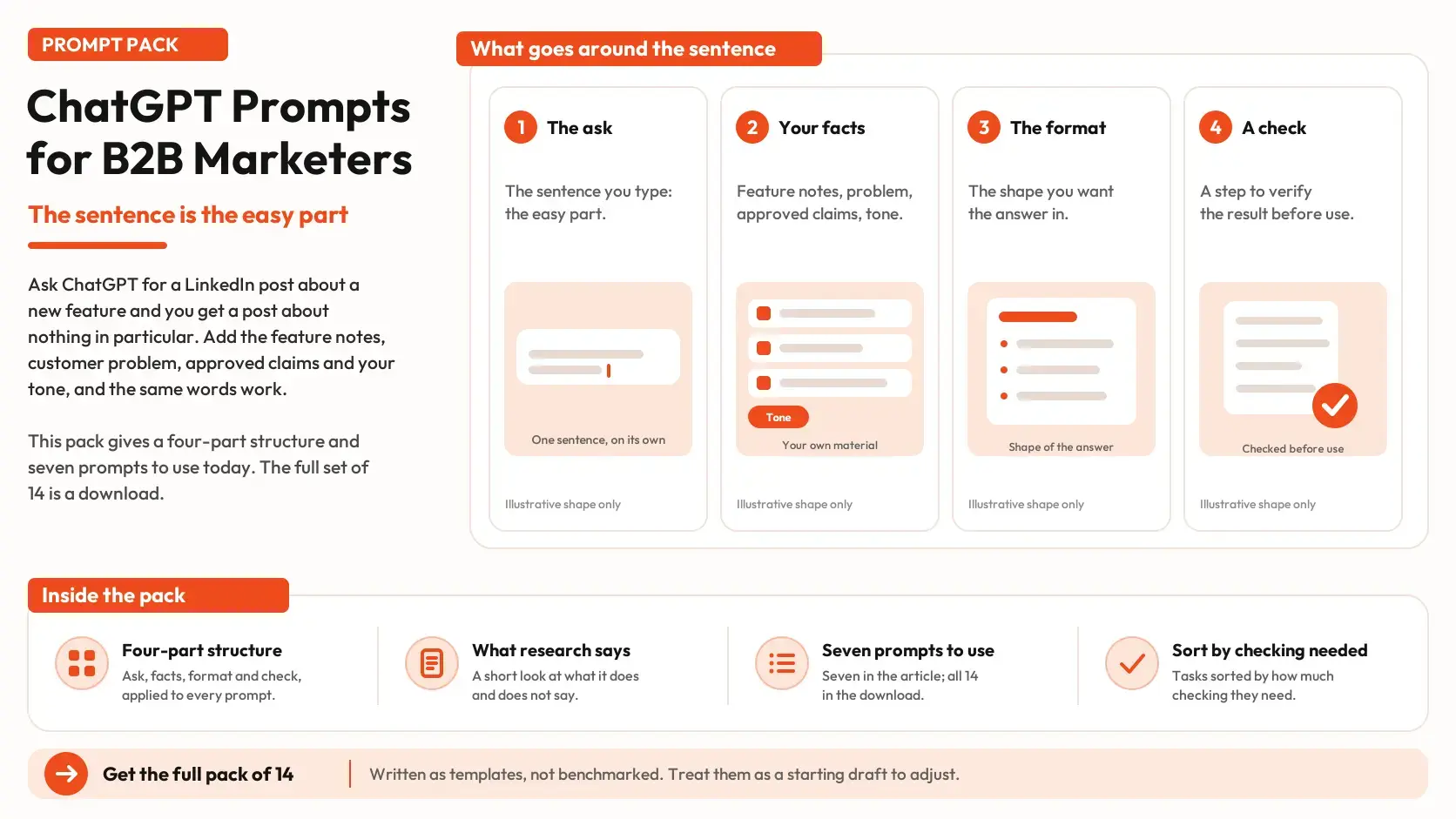


Type "Write a LinkedIn post about our new feature" into ChatGPT and you get a post: friendly, well organized and about nothing in particular. Now paste in the feature notes, the customer problem it solves, the claims legal has approved and a line about your tone, and ask for the same post. The words you typed were identical both times. What changed was the context.
That is the idea behind this pack. Most lists of ChatGPT prompts for marketers give you a sentence to copy. A sentence is the easy part. The part that decides whether the answer is useful is what you put around it: your facts, the format you want and a check on the result. This guide gives a four-part structure, a short look at what research does and does not say about prompting, seven prompts you can use today, and a way to sort tasks by how much checking they need.
Four parts every prompt needs
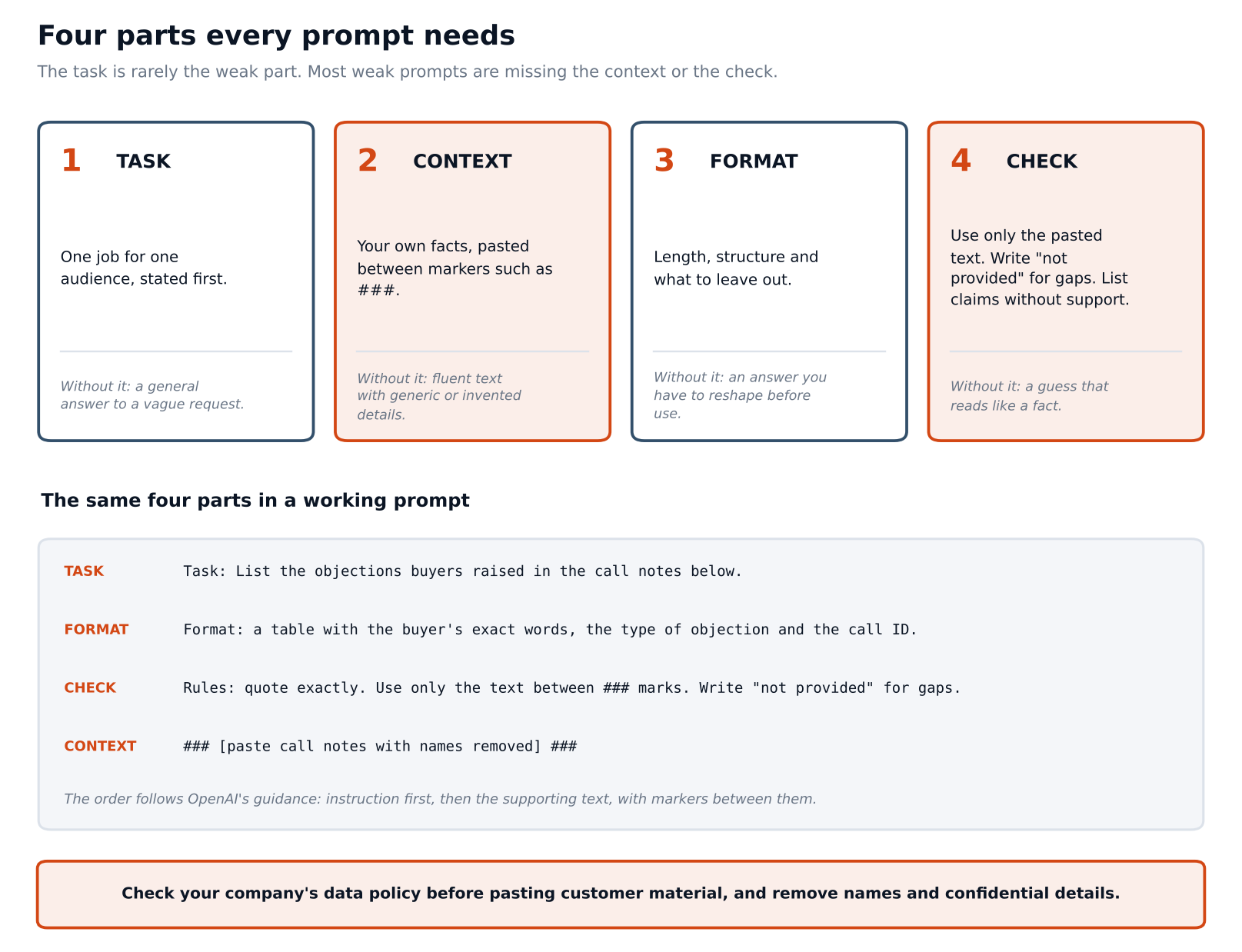
Every prompt in this pack has the same four parts.
1. Task: One job for one audience, stated first. "List the objections buyers raised in the call notes below" is a task. "Help with sales" is not.
2. Context: Your own facts, pasted into the prompt between markers such as ###. This is the part most prompt lists leave out, and it is the part only you can supply.
3. Format: The length, the structure and what to leave out. If you want a table, say so and name the columns.
4. Check: Rules that limit guessing: use only the pasted text, write "not provided" when something is missing, and list any claim the text does not support.
OpenAI's own prompt-engineering guide for ChatGPT points the same way. It advises putting the instruction first and separating it from the supporting text with markers such as ### or triple quotes, being specific about the outcome, length and format, and saying what to do instead of only what to avoid. The structure above is that advice with a fourth part added, the check, for reasons the next section covers.
What the research says about prompting
Three bodies of work are worth knowing, and each has limits.
Writing help is real, on tasks that do not need your facts
A study by Shakked Noy and Whitney Zhang, published in Science in 2023, gave 453 college-educated professionals, marketers among them, two writing tasks specific to their occupation, each of about 20 to 30 minutes, and had the results graded blind. People who used ChatGPT (the 3.5 version) finished about 40 percent faster, roughly 11 minutes sooner, and their work scored about 18 percent higher on quality. Lower scorers gained the most, so the gap between people narrowed. The authors' own caveats matter for marketers. The tasks did not need knowledge of a particular company or precise facts, no one checked the output for accuracy, and real-world gains are likely to be smaller.
A role prefix is not a reliable shortcut
Many prompt lists begin with "You are a senior B2B content strategist." Zheng and colleagues tested 162 personas across four open-source model families on 2,410 factual questions and found that adding a persona to the system prompt did not improve accuracy compared with using none. Effects were small, and automatically picking the best persona for a question did about as well as picking at random. That study is about factual questions, not marketing copy, so it does not prove a role never helps with tone. It does mean a role line is no substitute for facts. Put the concern, the audience and the context in the prompt instead, which is also how we tagged prompts in our guide to tracking AI search by buyer persona, ICP and funnel stage.
Models guess when they are unsure, and the way they are trained makes that likely
In a 2025 paper, "Why Language Models Hallucinate," Adam Tauman Kalai and colleagues argue that training and evaluation methods reward guessing over admitting uncertainty, so models are optimized to be good test-takers. That is a theoretical account, not a measurement of any marketing task, but it explains why the check is a standing part of the structure. A model has little reason to say "I don't know" unless you give it permission and a place to put the gaps.
What none of this shows is how well any specific marketing prompt template works. Noy and Zhang tested ChatGPT on general professional writing, not on these prompts. Read the rest of this guide as a way to reduce known risks, not as a measured result.
Start with a context sheet
If one habit matters more than any prompt, it is keeping a short context sheet you can paste. It holds the facts a good answer depends on: what the product does, who it is for, the claims you may and may not make, your tone and a few sentences on each buyer role. In our piece on marketing context and marketing intelligence, these are the facts that face inward, the ones you hold and can state without looking outside. Omnibound's Marketing Context page describes how a platform can keep this kind of material in one place, and a plain document works for starting out.
Prompt 1 builds the first version from material you already have.
| Task: Draft a one-page context sheet for our marketing team. Format: Headings for Product, Audience, Approved claims, Claims to avoid, Tone and Open questions. Keep each section under 100 words. Rules: Use only the text between the ### markers. Write "not provided" for anything missing. Do not add features, numbers, customer names or claims. In Open questions, list what we would need to confirm. ### [paste product page copy, positioning notes and brand voice guidance] ### |
Read the Open questions section first. It is the model telling you where your own documents are thin, which is useful on its own. Fix those gaps, then keep the finished sheet in one place and update it whenever the product, pricing or approved claims change.
Prompts for understanding buyers
These prompts work on text you already hold, such as call notes, tickets and reviews. Remove names and confidential details first, and check your company's data policy on pasting customer material into any AI tool before you start.
Prompt 2 pulls objections out of call notes.
| Task: List the objections buyers raised in the call notes below. Format: A table with columns for the buyer's exact words, the type of objection (price, risk, fit, timing, other) and the call ID. Rules: Quote exactly and do not paraphrase. Use only the text between the ### markers. If a call has no objection, write "none stated". Do not guess at a buyer's reasons. ### [paste call notes with names removed, each labeled with a call ID] ### |
The call IDs are what let you check any row against the source. If you keep only the summary, nobody can tell whether a finding came from ten calls or two.
Prompt 3 drafts the questions a buyer might type before they name any vendor, the early stage we covered in how to influence early-stage buyers in AI search journeys.
| Task: Write 10 questions a buyer might type into an AI chat before they have chosen any vendor. Format: A numbered list. 4 questions that describe the problem, 3 that ask what kind of solution exists, 3 that ask what the solution should do. Write each in the buyer's own words, with no vendor names. Rules: Base the wording on the customer language between the ### markers. Do not invent statistics. Tag each question with the buyer role most likely to ask it. ### [paste a few customer quotes, ticket titles or review snippets, with names removed] ### |
These are drafts of questions, not evidence of what buyers ask. Our look at what B2B buyers actually ask ChatGPT explains why no public data gives you that directly, so treat the list as hypotheses to test against real conversations.
Prompts for positioning and messaging
Prompt 4 pressure-tests your positioning. It names a concern in place of a role, in line with the research above.
| Task: Review the positioning statement below as a skeptical buyer would. The buyer's stated concern is [for example: "I worry this will not work with the systems we already have"]. Format: Three parts. (1) The questions this buyer would still have after reading it. (2) The sentences that make a claim without support. (3) A rewrite that answers the concern using only the facts provided. Rules: Use only the text between the ### markers. If the facts do not answer a concern, say so and do not fill the gap. ### [paste the positioning statement] [paste the facts and approved claims that apply] ### |
Part 3 is where this prompt earns its keep. When the facts do not answer the concern, you want the model to say so, because that is a gap in your material and not a writing problem.
Prompts for content
Prompt 6 turns a topic and your own material into a brief.
|
Task: Write a content brief for an article titled "[working title]" for [role] at [type of company]. Format: The question the article answers, a 5 to 7 point outline, the points a reader should be able to act on, and a list headed "Needs a source" for any claim that requires evidence. |
The "Needs a source" list does most of the work. It turns a model's habit of stating a number with confidence into a to-do list for a person.
Prompt 7 edits a draft so each section answers its heading directly. That follows the habit the GEO research supports: a clear answer under each heading, with sources attached. It does not guarantee anything about citations, and our piece on how to influence early-stage buyers covers what that research did and did not test.
| Task: Edit the draft below so that the first sentence under each heading answers the question the heading asks. Format: Return the full draft with changes, then a list of the headings you changed. Rules: Do not add facts, numbers, quotes or claims. Do not remove any source. If a heading cannot be answered from the draft, write "needs content" under it. ### [paste the draft] ### |
Prompts for checking how AI describes you
Prompt 9 compares what an AI answer says about you with what your own page says. Run the buyer question in a fresh chat first, then paste the answer in.
Task: Compare the AI answer with our page and list every statement about our company in the answer. Format: A table with columns for the statement, whether the page supports it (yes, no, partly), and the page text that supports or contradicts it. Rules: Use only the text between the ### markers. Do not judge which source is right. Mark any statement about us that the page does not mention. ### ANSWER [paste the AI answer] ### PAGE [paste the relevant page text] ###
Statements marked "no" or "partly" are the ones to chase. Sometimes the page is unclear, and sometimes the description came from somewhere else, such as a review profile or a directory. One run is a sample of one, so repeat it, which the section on running prompts twice covers.
Sort the task by what the answer depends on
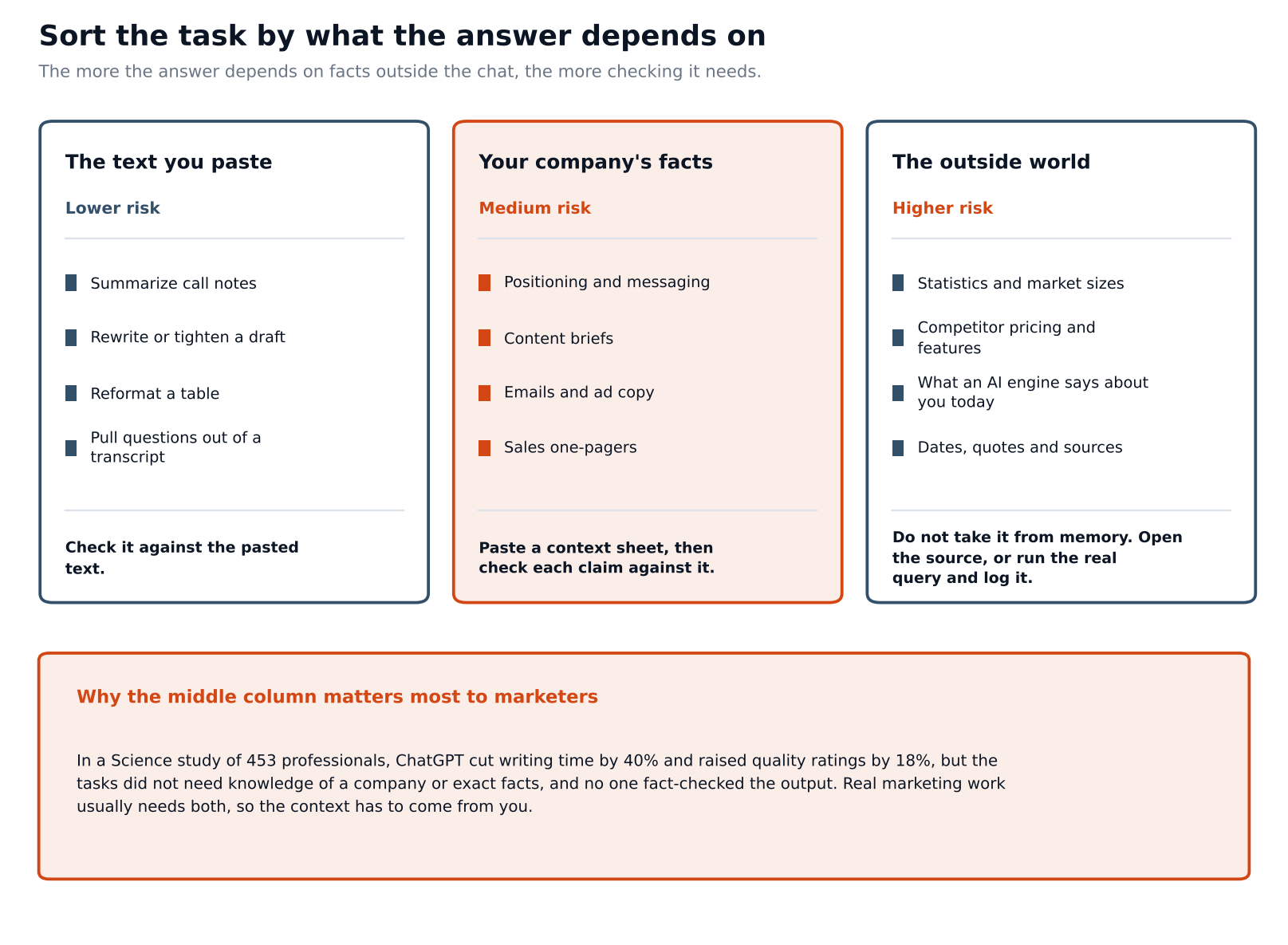
Not every prompt needs the same level of checking. A useful sort is by what the answer depends on. When the answer depends on the text you paste, as in summarizing, reformatting or pulling questions out of a transcript, the risk is lowest, and you can check the result against the pasted text. When it depends on your company's facts, as in positioning, briefs and emails, the risk is medium and the context sheet carries the load. Check each claim against the sheet.
When it depends on the outside world, as in statistics, competitor pricing, dates, quotes and what an AI engine says about you today, the risk is highest. A model's built-in knowledge is fixed at training and may be out of date or wrong. Open the source, or run the real query and log what comes back. Marketers tend to live in the middle tier, which is why the Science study is a weak guide to day-to-day work. Its tasks sat in the first tier, where facts were not the point.
Run each prompt twice and keep the versions
Answers vary from run to run. Our piece on model variability in AI citations covers that for citations, and the same habit helps with drafting. Run an important prompt twice in fresh chats and compare. Where the two answers disagree on a fact, the fact needs a source. Where they differ only in wording, pick the one that sounds more like you.
Keep a simple log with the prompt text, the date, the tool and version if you know it, and what you changed in the output. When a prompt works, it becomes a template. When it fails, the log shows which part failed: the task, the context, the format or the check.
Questions people ask
Should I start every prompt with a role?
The research we found does not support relying on it. Zheng and colleagues found persona prompts did not improve factual accuracy, so spend those words on the buyer's concern and your facts.
Can I trust the statistics ChatGPT gives me?
Treat any number it produces as unverified until you open the source. Prompts 6 and 7 are written to stop it adding numbers you did not supply.
Is it safe to paste customer notes?
That depends on your company's policy and your plan with the AI provider, which this guide cannot assess. Check the policy first, remove names and confidential details, and use the least text that gets the job done.
Do these prompts work in other tools?
They are plain text, so they should run in any chat tool, but we only wrote them with ChatGPT in mind and have not compared tools. Results will differ between tools and between versions of the same tool.
What if the output still sounds generic?
Generic output usually means the context was thin. Add a real customer quote, a specific constraint or an approved claim, and run it again.
Save one prompt, then improve it
Pick one task you do every week, such as call summaries or first-draft emails. Rewrite your current prompt with the four parts, paste in the facts it needs and add a check line. Run it twice, log what you changed and save the better version.
Prompt 9 compares one answer with one page by hand. For a quick first read of how an answer describes your company, the AI Search Visibility Checker is a place to start. To repeat that check over time, AI Search Intelligence tracks each prompt individually, so the answer to each buyer question keeps its own history and you can see when a description changes.