


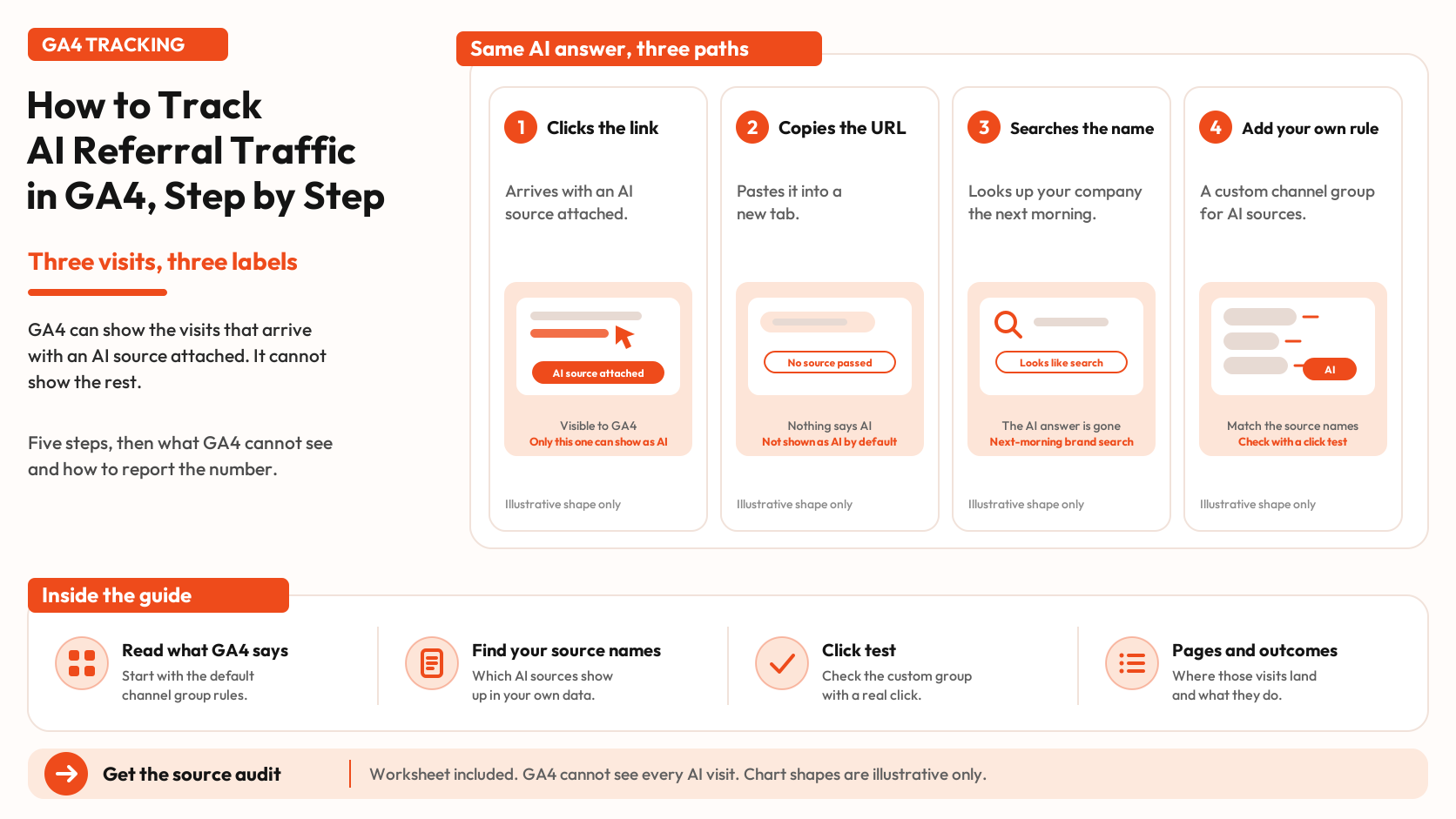


Three buyers discover your product through AI search. One clicks through. One visits your site later. One searches your brand the next day. GA4 may attribute each visit differently, leaving part of AI’s contribution to your traffic unaccounted for. The fix starts with knowing what GA4 captures, where AI referrals appear in your reports, and how to group them correctly.
This step-by-step guide shows you how to identify AI traffic sources, build a custom channel group, validate it with a click test, and track the pages and conversions those visits generate. It also includes a source audit worksheet to help you report AI referral traffic more accurately.
Three visits, three labels
Before any setup, it helps to see where each kind of visit lands. Google's default channel group sorts every session by rules. Four of those rules matter here.
The AI Assistant channel covers visits from sources like ChatGPT, Gemini, Deepseek, Copilot or Grok, and Google's definition excludes its own AI Overviews and AI Mode. Organic Search covers non-ad results from search engines, and Google's description includes AI Overviews and AI Mode. Direct is a saved link or a typed URL: the source is (direct) and the medium is (not set) or (none). Referral is any other non-ad link from a site or app.
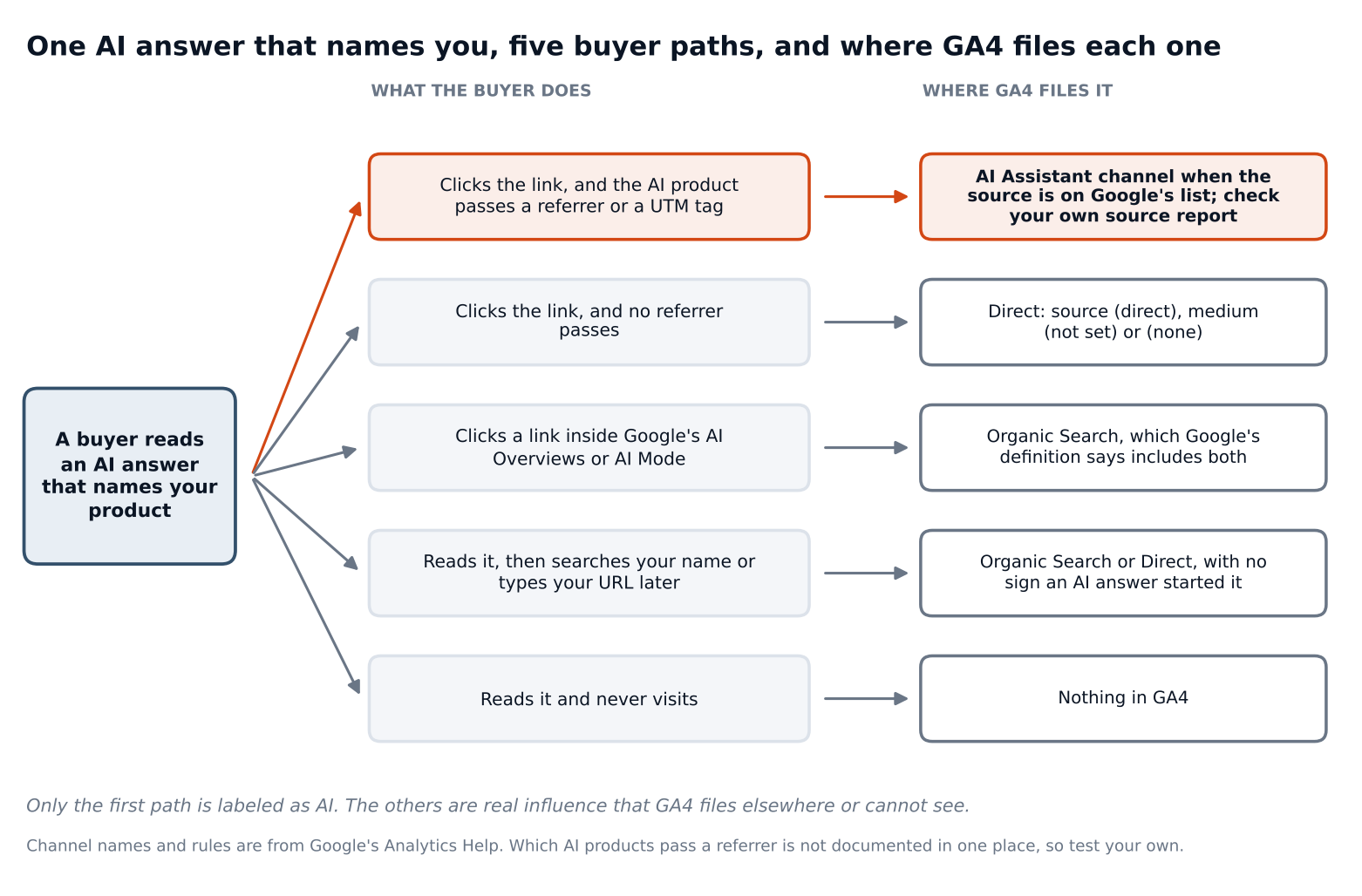
Only the first path is labeled as AI. The rest are real influence that GA4 files elsewhere or cannot see, which is why the number you get from the steps below is a floor, not a total.
Step 1: Read what GA4 already says
Open the Traffic acquisition report. Google describes it as a pre-made report of where visitors come from, new and returning, and its default primary dimension is Session default channel group (Analytics Help). Dimensions with "Session" in the name describe the most recent session, whether the user is new or returning, which is what you want for a question about visits.
Look for a row called AI Assistant. If it is there, GA4 has matched some visits by the rule Google publishes: the medium is exactly "ai-assistant", or the medium is set to "ai-assistant" when the referrer matches a list of AI assistants. If the row is missing or very small, that does not mean no AI visits arrived. It means none matched that rule in the date range.
Two cautions come from the same help page. Google says the channel definitions may evolve as the market changes, and the page does not say how the list of assistants is maintained or how quickly a new one is added. Treat the default channel as a starting point you verify, not a finished answer.
Step 2: Find the source names in your own data
Switch the report's primary dimension from channel to Session source / medium using the dimension drop-down, and set a date range of at least the last 90 days. Now you are looking at the raw labels instead of Google's grouping, which is where you find AI sources that landed in Referral, Direct or Unassigned. Unassigned is Google's value when no channel rule matches the event data.
Read the whole list, not just the top rows. You are looking for source names that belong to AI products. Our starter list is below. It is a starting point, not an official list, and Claude and Perplexity are on it because buyers use them, not because Google's page names them.
| Product | Text to look for in the source | Note |
|---|---|---|
| ChatGPT | chatgpt, openai | OpenAI's help center says ChatGPT automatically adds utm_source=chatgpt.com to referral URLs |
| Perplexity | perplexity | Check which subdomains appear in your data |
| Gemini | gemini | Google's Gemini app is separate from AI Overviews and AI Mode |
| Copilot | copilot | Named on Google's page; the text can also match other sources that contain it, so scan what the pattern catches |
| Claude | claude | Not named on Google's page; included because buyers use it, so confirm it appears in your own source report |
| DeepSeek | deepseek | Named on Google's page; leave it in even if it never appears, because an unused pattern does no harm |
| Grok | grok | Named on Google's page; leave it in even if it never appears, because an unused pattern does no harm |
The ChatGPT note comes from OpenAI's publishers and developers FAQ, which says publishers that allow its search crawler can track visits from ChatGPT in tools like Google Analytics, and that ChatGPT includes the UTM parameter utm_source=chatgpt.com in referral URLs. It does not say what any other AI product does. We found no single page that documents which AI products pass a referrer or a UTM tag, so your own source list is the reference.
UTM values matter here for a second reason. Google's URL builder page says parameter values are case sensitive, so utm_source=google and utm_source=Google are different, and it recommends lowercase. If you tag links you place yourself, use one source per platform and one medium per channel. You cannot tag the links an AI product generates, so for those you rely on what the product sends.
Step 3: Build a custom channel group
A custom channel group lets you label AI sources your own way without changing the data. In Admin, under Data display, open Channel groups. Google's custom channel groups page says you need the Editor role or above. You can start from the default group with Create new channel group, or copy an existing one with Copy to create new.
Add a channel for each AI product you want to see, or one channel for all of them. One per product shows which products send visits. One combined channel gives larger counts, which matters because small counts are noisy (more on that in Step 5). Each channel is a condition on fields such as Source, Medium or Source platform, and the match types are "exactly matches" and "matches regex".
A pattern built from the starter list looks like this:
.*(chatgpt|openai|perplexity|gemini|copilot|claude|deepseek|grok).*
The .* on each end lets the pattern match inside longer source names. Test it before you trust it, and scan the sources it catches, because a short piece of text can match something you did not mean. The text "openai", for example, can also appear in a source that is not ChatGPT.
Three rules from the same help page decide whether the group works:
- Order matters. Traffic goes into the first channel whose definition it matches, in the group's current order. Put your AI channels above Referral and above any channel they overlap, then check the order with Reorder.
- It works backward. Custom channel groups can be applied to your reports retroactively, so you can build the group today and read last quarter with it.
- It has limits. Standard properties allow 2 custom channel groups and 50 channels per group. The group appears as a primary or secondary dimension in the acquisition reports, and in explorations. It is not supported in the Key events paths report or in the BigQuery export schema, so if you analyze exported data, you repeat the pattern in your query.
Step 4: Check it with a click test
A channel rule only proves it matches the labels you wrote. A click test shows whether real visits arrive with the label you expect.
For each AI product you care about, open a fresh browser profile with no prior visits to your site. Ask the product a question your page can answer, find an answer that links to your page, click through, and open GA4's Realtime report. Realtime's Acquisition card breaks active users down by first user source, medium, source platform or campaign, and Google notes that new or unprocessed users may be missing from it (Realtime report help). A fresh profile matters because a returning user's first source is the source of their first visit, not this one.
Then check again the next day. Google's data freshness page says Realtime data is typically available in a few minutes but limited to a few dimensions and metrics, standard reports typically arrive later in the day, and processing can take 24 to 48 hours, during which numbers can change. Explorations and standard reports may not be synchronized. For each test, record the source and medium you saw, and the default channel group it ended up in.
Each result tells you something different. A visit filed as AI Assistant means the default rule catches it. A visit filed as Referral means you need a custom rule. A visit filed as Direct means no source arrived with the click, and no rule can label it. That last result is not a setup mistake, and the section on what GA4 cannot see explains why.
You can then confirm the totals in an exploration. Build a free-form exploration with Session source / medium as rows, your custom channel group as a second dimension, and Sessions and key events as values. Google's custom channel groups page says they can be used in explorations. Filter to your AI channels and compare the sessions with the same range in the Traffic acquisition report. If the two disagree, remember the freshness note above before you chase a bug.
Step 5: See which pages and outcomes AI visits reach
With the channel in place, ask two questions: where do these visits land, and what do they do?
For the first, open the Landing page report and add Session source / medium as a secondary dimension, as the help page describes. It shows the first page of a session, defined as the page path and query string of the first pageview. One detail to know: Google's URL builder page says UTM information is left out of the Landing page plus query string dimension, and appears in Page location instead. If you want to see the UTM itself, use Page location.
For the second, add Key events as a metric. The Traffic acquisition report includes key events and a session key event rate by channel, so you can compare your AI channel against the others.
Counts are the catch. A month with 20 AI sessions is consistent with a true monthly average from about 12 to 31, and a month with 5 is consistent with 2 to 12. A key event rate on 20 sessions is wider still. Figure 2 shows how fast the range tightens as counts grow.
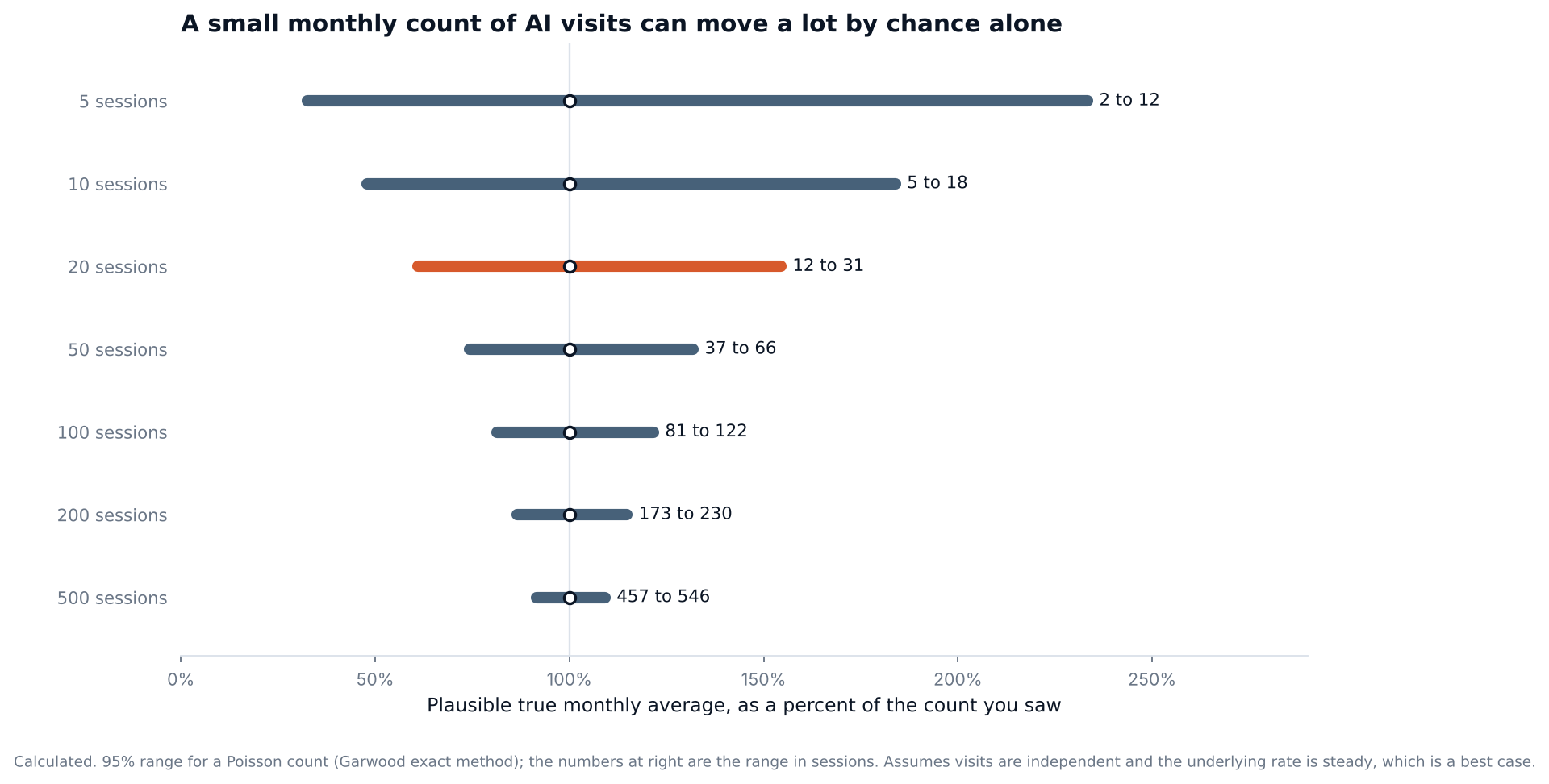
Figure 2. How much a monthly count can move by chance. Calculated: a 95% range for a Poisson count, treating visits as independent and the rate as steady, which is the best case.
So read AI counts monthly, not daily, and compare ranges before you call a change. Our guide to how often to track AI search applies the same logic to prompt tracking. When two months' ranges overlap, treat the months as the same. When the range for one month sits entirely above the other, the change is worth explaining.
What GA4 cannot see
GA4 records what happens after a click. Most of what an AI answer does for you happens before one, or without one.
1. Clicks with no referrer arrive as Direct.
When a user clicks a link, the browser decides what source information to pass based on a referrer policy. MDN documents the browser default as strict-origin-when-cross-origin: between two secure sites, the destination gets the origin only, and when a link goes from a secure to a less secure address, it gets no referrer at all (MDN). The linking page, element or link can override the policy, including with rel="noreferrer". So whether an AI product's links carry a source depends on how that product sets them. In the sources we read, only OpenAI says what its links include.
2. Copy and paste leaves no trace.
A buyer who reads your name in an answer and types your URL, or searches your company, arrives as Direct or Organic Search. Our guide to the dark AI search funnel covers why this influence is invisible, and the piece on attribution tools covers asking buyers directly.
3. Google's AI features sit inside Organic Search.
GA4 does not give AI Overviews or AI Mode their own channel. Google's Search Console has a separate generative AI report that shows impressions of your pages in those features by page, country, date and device. It does not list queries as a dimension, and the page describes impressions as its only metric. That makes it a way to see which pages Google's AI features show, not a count of AI-driven visits.
4. Answers that name you without linking are invisible.
A brand mention with no link produces no visit. Our piece on prompt volume lists other signals you can observe.
How to report the number
Report AI referral traffic as a share of all sessions, by month, with a range, and call it a floor. Say which channel rules you used and the date you built them, because the rules change what the number means. Do not add AI Assistant to Organic Search and call it AI traffic: the second channel includes ordinary search results. Keep one thing steady. If you change the pattern, note the date and re-read earlier months with the new group so the trend compares like with like. Custom channel groups can be applied to past reports, which makes that possible. Our north star metric guide explains why a metric needs a fixed definition before it can show a trend.
Frequently asked questions
Does GA4 track AI referral traffic by default?
Partly. The default channel group includes an AI Assistant channel for visits from sources like ChatGPT, Gemini, Deepseek, Copilot or Grok, and it excludes Google's AI Overviews and AI Mode. Google's page says definitions may evolve and does not say how the list of assistants is maintained, so check your own source report.
Why does my AI traffic show up as Direct?
Usually because no source arrived with the click, or because the buyer saw your name and typed it later. Browsers decide what referrer information to send, and linking pages can change that policy. A Direct visit has no source, so no channel rule can label it.
Can GA4 separate AI Overviews clicks from regular search clicks?
Not in the default channel group. Google's Organic Search definition includes AI Overviews and AI Mode. The Search Console generative AI report shows impressions of your pages in those features, which helps you see which pages appear but does not count visits.
Do I need UTM parameters on links from AI products?
You cannot tag links an AI product generates. OpenAI says ChatGPT adds utm_source=chatgpt.com itself. UTM parameters still matter for links you place yourself, and Google says to keep values lowercase and consistent because they are case sensitive.
How often should I check AI referral traffic?
Monthly is a good default, with a range around the count. Weekly counts are small and swing by chance, and GA4 data can take 24 to 48 hours to settle, so recent days can change.
Write down every AI source name you can find today
Open the source report for the last 90 days, switch to Session source / medium, and read the full list. Write down every name that belongs to an AI product, enter them in the worksheet's match list, and paste the regex into a custom channel group. Then run one click test from each product you care about, and put the findings next to last month's number before you report it.
GA4 shows what happens after a click. To see which answers name you before any click, the AI Search Visibility Checker gives you a first reading on a prompt you care about, and AI Search Intelligence tracks each prompt individually, so the visits GA4 records can sit beside the prompts where your brand appears.