

Table Of Contents
Marketing leaders in mid‑market SaaS know that every buyer click can be a clue. Yet many teams still wait for daily reports or manual checks. The result? Prospects slip through the cracks before anyone can act. Real‑time visibility is the missing link between interest and conversion. In this guide you will learn why instant alerts matter, how to set thresholds that actually signal intent, and how to route those alerts automatically so reviewers never miss a beat. The approach restores timely awareness, speeds decision‑making, and lets your marketing resources focus on the highest‑impact opportunities.
The hidden cost of missing real‑time buyer signals
When a visitor lands on your site, the moment is fleeting. Without an automated watcher, the signal disappears into logs that are checked hours later. The delay turns a hot prospect into a cold lead. "We never know when the user is hitting our website - that's why a webhook watcher is needed so we don't wait and can run the engine on automation." This quote captures the core frustration of many demand‑generation teams. By continuously monitoring site visits, form fills, and support tickets, you create a live pulse of buyer intent.
Signal monitoring turns raw activity into actionable data. It lets you answer questions like: Who just viewed the pricing page? Which account opened a support ticket after a demo? The answer is simple – an ai search visibility tracking software that ingests events in real time and surfaces them for your team.
When you see the signal instantly, you can engage the prospect while the interest is fresh. The cost of waiting is not just a missed opportunity; it is wasted marketing spend on campaigns that never reach the right person at the right time.
Recommended Read: Best 22 AEO Tools for Answer Engine Optimization in 2026 - A curated list of tools that can generate the buyer signals you need to monitor.
Consider a scenario where a mid‑size tech firm’s CFO downloads a whitepaper on cost‑optimization. Within minutes, the automated system flags the activity, routes the alert to the account‑based marketing owner, and suggests a tailored outreach. Without that instant nudge, the CFO might have moved on to a competitor’s content, and the opportunity would be lost.
Defining trigger thresholds that matter
Not every click deserves an alert. The key is to compare the current signal against a baseline and fire only when the change is significant. This is where ai search visibility checker tool and ai search visibility gap analysis tool become essential. They calculate the differential between normal activity and a spike that indicates intent.
Below is a simple framework you can use to set thresholds:
| Signal Type | Baseline Metric | Threshold Trigger | Action |
|---|---|---|---|
| Page View | Average 5 views/day | +200% increase in 1 hour | Send webhook alert |
| Form Submission | 2 submissions/week | 3+ submissions in 30 minutes | Route to sales rep |
| Support Ticket | 1 ticket/day | Multiple tickets from same domain | Flag for account review |
The table shows how a differential analysis can turn raw numbers into clear actions. By calibrating thresholds to your own traffic patterns, you avoid alert fatigue and focus on high‑impact changes.
Alert fatigue management is a discipline. Start with a narrow set of high‑value signals, then expand as you gain confidence in the system. The right thresholds turn noise into insight.
Recommended Read: AI Search Optimization Checklist: Win AI Citations and Drive B2B Pipeline - A step‑by‑step guide to configuring thresholds and measuring their impact.
When setting these thresholds, think about the buyer journey stage. A surge in pricing‑page visits often signals purchase intent, whereas a single blog view may be informational. Aligning thresholds with stage‑specific expectations helps the team prioritize outreach that matches the prospect’s readiness.
Automating the forward‑to‑review workflow
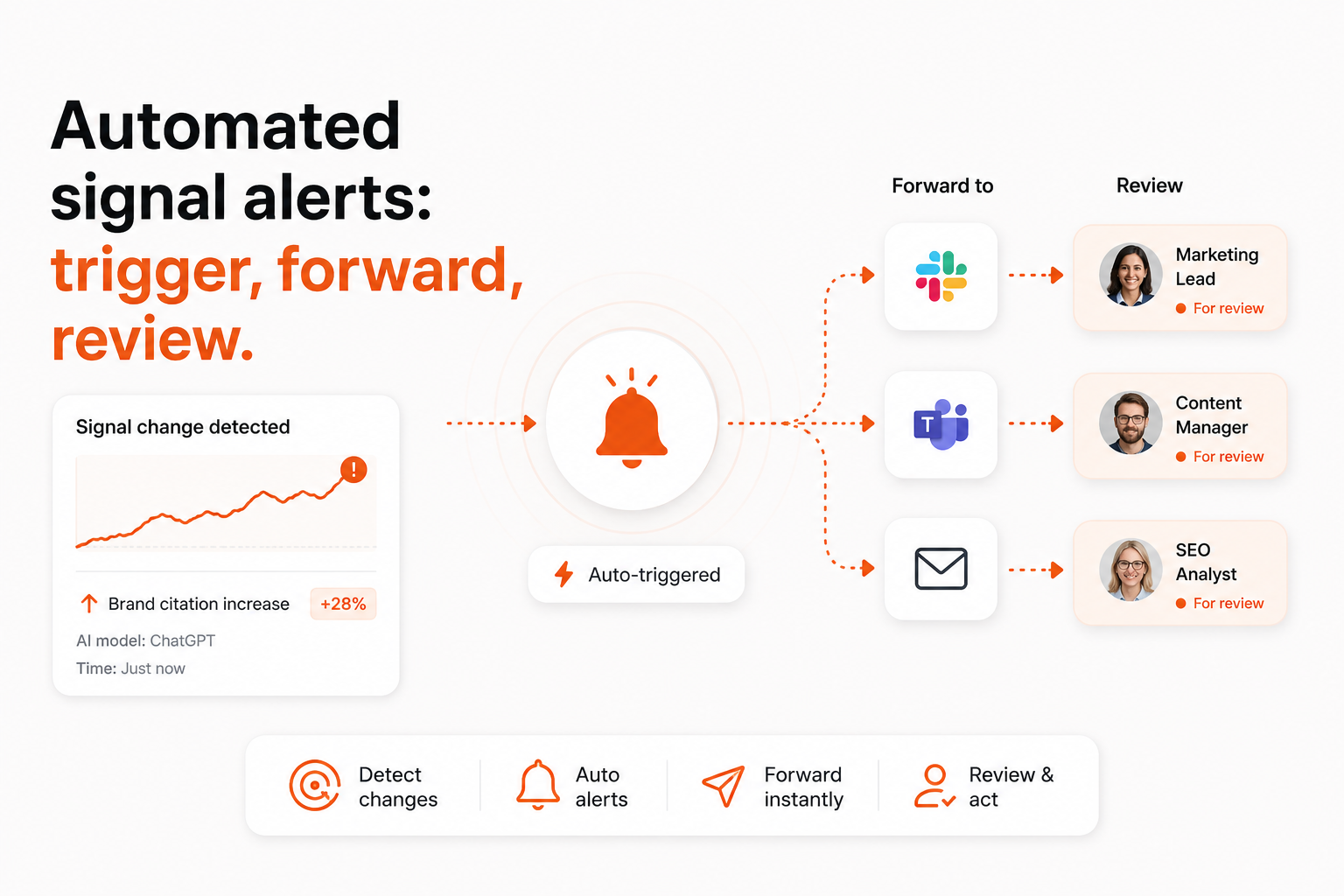
Once a trigger fires, the next challenge is getting the signal to the right person at the right time. Webhook triggers act as real‑time callbacks that push the event directly into your workflow engine. From there, a review routing workflow assigns the alert to the appropriate owner – whether it’s a sales rep, content marketer, or product manager.
Omnibound’s ai search visibility optimization tool includes a built‑in routing engine that maps signal types to teams. The platform can send alerts via Slack, email, or ticketing systems such as Jira. This eliminates the manual step of copying data from a dashboard into an inbox.
The automated hand‑off ensures that every qualified signal lands in a queue that is visible, trackable, and auditable. Reviewers receive a concise summary, a link to the original activity, and a suggested next step. The result is a faster response loop and more efficient use of marketing resources.
Recommended Read: Best AI Demand Generation Tactics for Growth Teams in 2026 - Practical tactics for scaling alert‑driven demand generation.
Imagine a scenario where a high‑value prospect submits a demo request and simultaneously opens a support ticket about integration challenges. The webhook fires, the routing engine tags both the sales and product teams, and each receives a tailored notification with the context they need to act. This coordinated approach reduces hand‑off delays and keeps the prospect experience seamless.
Managing alert volume to prevent fatigue
Even with perfect thresholds, a busy team can be overwhelmed if every minor change generates a notification. Prioritization is essential. One effective method is to rank alerts by share of voice optimization potential. Signals that could shift your brand’s visibility in AI‑driven search results deserve the highest priority.
Another lever is to track ai visibility metrics platform KPIs such as false‑positive rate and mean time to review. By monitoring these metrics, you can fine‑tune thresholds and routing rules over time. The goal is to keep the signal‑to‑noise ratio high enough that reviewers act on every alert.
Regulatory compliance also matters. The FTC safeguards rule outlines data‑handling requirements that apply when you capture and forward user activity. Designing your alert pipeline with audit trails and role‑based access helps you stay compliant while maintaining speed.
Balancing alert volume with impact ensures that your team remains focused on the opportunities that truly move the needle.
To keep the pipeline lean, consider implementing a “quiet hours” window for non‑critical alerts, allowing the team to concentrate on high‑priority signals during core working periods. Periodic reviews of alert categories can also reveal patterns where thresholds can be tightened without losing valuable insight.
Measuring Success and Continuous Improvement
After the system is live, the next step is to evaluate its performance against business goals. Start by defining clear success metrics such as mean time to review, conversion lift from alerted leads, and reduction in missed‑opportunity cost. Track these metrics over weekly intervals to spot trends early.
Use the data collected by your ai search visibility tracking software to run a simple before‑and‑after analysis. Compare the number of qualified leads generated in the month prior to automation with the month after. Even a modest increase can demonstrate the ROI of real‑time alerts.
Regularly schedule a calibration session with stakeholders from sales, marketing, and product. During these meetings, review false‑positive rates, adjust thresholds, and discuss any emerging buyer behaviors that may warrant new signal definitions. This collaborative approach ensures the system evolves alongside your market.
Finally, document the workflow and share best‑practice guides internally. When new team members join, a well‑written playbook accelerates adoption and maintains consistency in how alerts are handled.
FAQs
1. How does Omnibound help set up automated signal alerts?
Omnibound provides an ai search monitoring platform that ingests real‑time buyer activity, evaluates it against custom thresholds, and fires webhook callbacks. The platform’s routing engine then assigns each alert to the appropriate owner, delivering the notification through Slack, email, or your ticketing system. This end‑to‑end solution removes manual polling and guarantees that no high‑value signal is missed.
2. Which webhook options integrate with our existing CRM?
The platform supports standard HTTP POST webhooks, which can be connected to most CRMs, including Salesforce, HubSpot, and Microsoft Dynamics. You simply configure the endpoint URL in the Omnibound dashboard, map the payload fields to CRM lead attributes, and the system will push qualified signals directly into your pipeline.
3. How can we reduce false positives in our alert system?
Start by establishing a solid baseline for each signal type and set thresholds that reflect a meaningful deviation. Use differential analysis to compare current activity against historical patterns. Regularly review alert performance metrics – such as false‑positive rate – and adjust thresholds accordingly. Prioritizing alerts based on potential impact, like share of voice changes, also helps filter out low‑value noise.
4. What metrics should we track to measure alert effectiveness?
Key metrics include mean time to review, false‑positive rate, and the conversion rate of alerted leads versus non‑alerted leads. Additionally, monitor changes in AI‑driven search visibility and share of voice after responding to alerts. These data points give you a clear picture of how the alert pipeline contributes to pipeline growth.
Conclusion
Missing real‑time buyer signals is a costly blind spot for any demand‑generation leader. By defining precise trigger thresholds, automating the forward‑to‑review workflow, and managing alert volume, you restore the visibility needed to act quickly and efficiently. The framework outlined here works with any modern ai search visibility tracking software and can be implemented on the Omnibound platform to accelerate your marketing operations.
Ready to see how Omnibound handles automated signal alerts end‑to‑end? Explore the platform and start turning every buyer interaction into a timely opportunity.
Recommended Authority Resources
- Reference: FTC Safeguards Rule: What Your Business Needs to Know – Official guidance on data‑handling requirements that apply to automated alert systems.
Turn Your Content Into AI-Search Winners
Get cited across ChatGPT, Claude & Perplexity — not just ranked on Google.
- Increase AI citations
- Improve answer visibility
- Track brand mentions in LLMs