

Table Of Contents
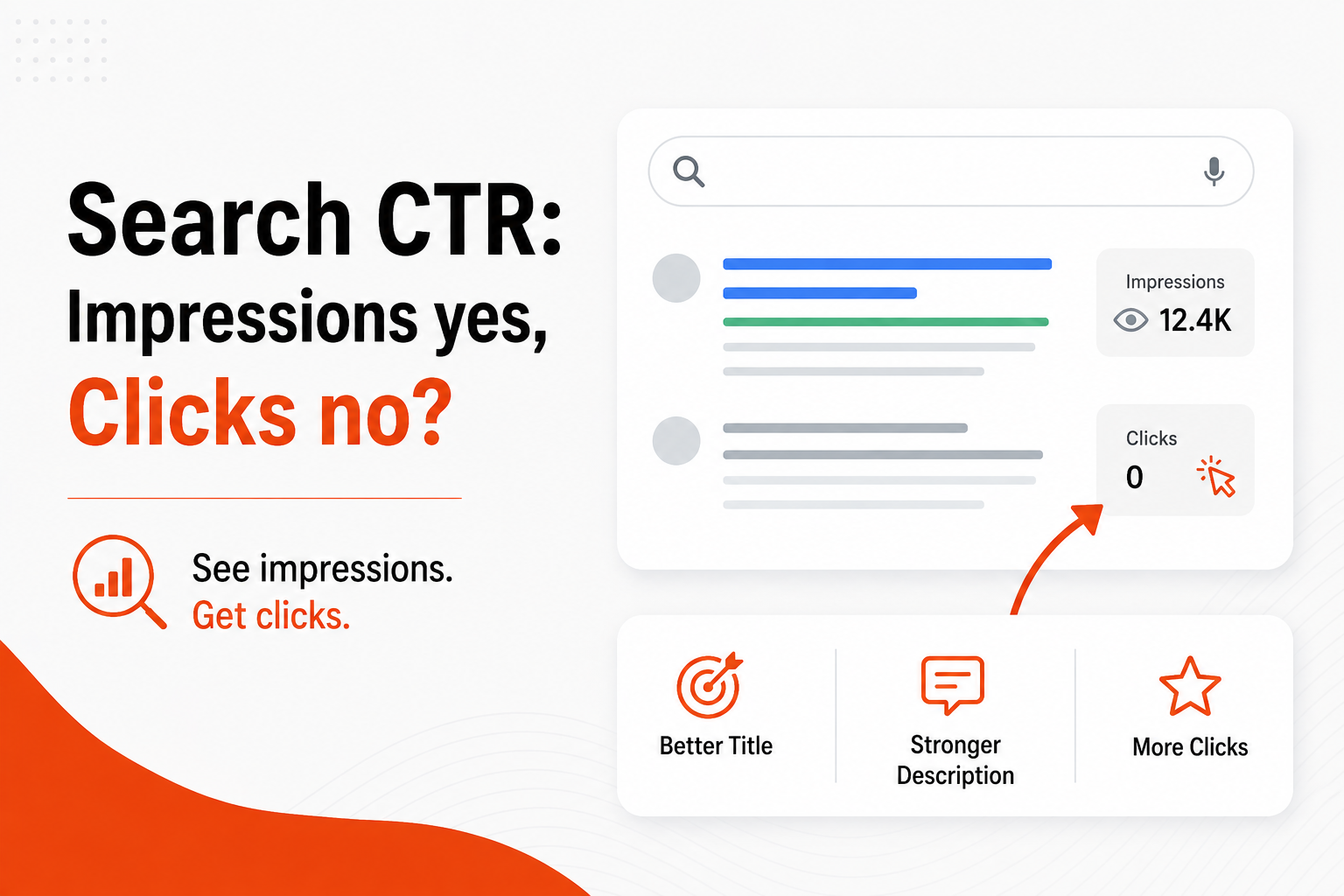
As an SEO manager at a mid‑market SaaS firm, you know the frustration of watching thousands of impressions roll in while clicks linger in the double digits. The data tells a story: the page is visible, but something in the search results is stopping prospects from clicking. This disconnect hurts lead flow and stalls pipeline growth. The core issue isn’t the landing page – it’s the way the page appears on the SERP. By diagnosing title copy, thumbnail relevance, and ranking position, you can turn impressions into qualified traffic. In this guide you will learn why high impressions don’t guarantee clicks, which SERP elements matter most, how buyer intent shapes click behavior, and concrete steps to improve your click‑through rate.
Why High Impressions Don’t Guarantee Clicks
Impressions indicate that Google’s algorithm thinks your content matches a query, but they say nothing about how compelling the snippet looks to a searcher. When a result sits low on the page or presents a bland title, users simply scroll past it. This is especially true in a zero‑click search environment where answers appear directly in the knowledge panel, leaving little room for organic links. "we got 8.62k views and only 18 clicks, so I dont think its a landing page issue." As one demand‑generation lead observed, the problem often lies before the user ever reaches the landing page. Recognizing that the SERP preview is the first point of contact is essential for any search optimization effort.
Search intent also plays a decisive role. If a user’s query is informational but your title sounds transactional, the mismatch reduces the perceived relevance. In a zero‑click search scenario, Google may surface a featured snippet instead of your link, further lowering click opportunities. Aligning your meta copy with the underlying intent signals can lift your search visibility and keep the click path open.
To break the cycle, start by treating impressions as a diagnostic metric rather than a success metric. Identify which queries generate high impressions but low clicks, then drill down into the SERP elements that accompany those results. This data‑driven mindset sets the stage for targeted improvements that directly affect the click‑through rate.
Recommended Read: B2B Content Production in 2026: How to Create Content That AI Search Recommends - Shows how AI‑ready content can improve SERP performance and feed better click metrics.
The Two SERP Elements That Make or Break Your CTR
Title tags and thumbnails are the visual and textual hooks that decide whether a searcher clicks. A title that clearly conveys value and incorporates relevant search intent keywords can stand out among dozens of results. Likewise, a thumbnail that reflects the page’s content adds a visual cue that reinforces the title’s promise. When both align, they create a compelling invitation to explore.
One of our customers summed it up succinctly: "The thumbnail and title together decide whether someone clicks." This insight highlights the need for coordinated copy and imagery. Use power words that speak to buyer intent, such as "solve," "boost," or "secure," and pair them with an image that matches the query’s context. For example, a SaaS solution for data security might feature a lock icon alongside a title that promises "secure your data in minutes."
Optimizing these elements also supports broader topic clusters. By ensuring each piece of content within a cluster has a distinct, intent‑aligned title and thumbnail, you improve overall search visibility and reduce internal competition for clicks. This systematic approach turns a collection of pages into a cohesive, high‑performing SERP presence.
Recommended Read: Why Bad CTAs and Fake Likes Crush Buyer Intent and Lead Generation - Explains how visual and textual signals influence user decisions in the search results.
How Ranking Position Affects Click Capture
Even a well‑crafted title and thumbnail can fall short if the page ranks too low on the results page. Studies of SERP behavior show a steep drop‑off in clicks after the top three positions, and the effect is amplified in zero‑click search where the top result often satisfies the query directly. Lower positions still generate impressions, but without a compelling hook they rarely convert to clicks.
Our third snippet reinforces this reality: "If a page is receiving impressions but very few clicks, it usually means we're ranking but not high enough to earn the click consistently." The implication is clear – you need both visibility and prominence. Elevating a page’s rank through core search optimization tactics such as improving relevance signals, earning high‑quality citations, and enhancing technical health creates the foundation for higher click‑through rates.
Once you secure a stronger position, the title and thumbnail become even more powerful. Users are more likely to scan and click on results that appear near the top, especially when the snippet matches their intent signals. Therefore, ranking position and SERP asset quality work together to drive clicks.
Aligning Content with Buyer Intent Signals
Buyer intent is the underlying motivation behind a search query. Understanding whether a prospect is researching, comparing, or ready to purchase informs how you craft your meta copy. Intent signals such as "how to," "best," or "review" indicate different stages of the buyer journey, and your title should reflect that stage.
For example, a query like "best B2B lead gen platform" signals a comparison intent. A title that includes "compare" or "review" aligns with that signal and invites clicks from users seeking evaluation. Conversely, a query like "how to integrate AI search" calls for an instructional tone. Matching these intent signals improves relevance and encourages clicks.
Omnibound’s AI search marketing platform helps surface these intent signals automatically by analyzing query patterns across your content library. By feeding that insight back into your title and thumbnail strategy, you ensure each SERP preview speaks directly to the prospect’s current need, boosting both search visibility and click‑through performance.
Recommended Read: Webinar | From AI Visibility to Pipeline: How Buyer-Focused AI Search Optimization Translates into Revenue - Demonstrates how aligning with buyer intent drives pipeline results.
Practical Steps to Optimize Titles, Thumbnails, and Snippets
Begin with a data audit. Pull Search Console data for queries with high impressions but low clicks, then list the associated titles and thumbnails. Identify patterns are titles too generic? Are thumbnails missing or irrelevant? This audit forms the basis of a focused optimization plan.
Next, rewrite titles using a formula that incorporates the primary keyword, a clear benefit, and a power word. Keep the length under 60 characters to avoid truncation on mobile. For thumbnails, choose images that visually echo the title’s promise and meet Google’s size guidelines. Below is a simple checklist to guide the process:
| Step | Action | Key Consideration |
|---|---|---|
| 1 | Extract low‑CTR queries | Focus on >5% impression‑to‑click gap |
| 2 | Craft intent‑aligned titles | Include buyer intent keyword early |
| 3 | Design relevant thumbnails | Use clear, on‑brand imagery |
| 4 | Test variations | Run A/B tests in Search Console |
After implementing changes, monitor click‑through trends weekly. Small incremental lifts add up, especially when applied across a topic cluster. Use Omnibound’s AI citation monitoring to track how updated snippets influence AI‑driven answer placements, further extending your search visibility.
Finally, institutionalize the process. Create a template for future content that embeds the title‑thumbnail framework, ensuring every new page launches with click‑optimised SERP assets.
Measuring Success and Iterating for Better CTR
Success measurement starts with the same metrics that revealed the problem: impressions, clicks, and click‑through rate. Track these KPIs in Search Console, segmenting by device and position to see where improvements are most impactful. A rise in CTR above 2‑3% for target queries typically signals that title and thumbnail tweaks are resonating.
Beyond raw numbers, watch for changes in zero‑click search share. If your content begins to appear as citations in AI answers, you are gaining search visibility that may not immediately translate to clicks but still contributes to brand authority. The authority link below explains how SERP features influence organic click‑through rates.
Iterate continuously. Use the data to prioritize the next batch of low‑performing pages, apply the same optimization workflow, and re‑measure. Over time, a systematic approach yields a healthier pipeline of qualified leads and stronger buyer intent signals throughout the funnel.
Beyond Rankings: Exploring the Impact of SERP Features on Organic Click-through Rates
- Academic study quantifying how SERP features affect click behavior.
Understanding Zero‑Click Searches
Zero‑click searches occur when Google provides an answer directly on the results page, often through a featured snippet, knowledge panel, or AI‑generated response. In this scenario the user may never scroll to the organic listings, which explains why a page can receive thousands of impressions yet only a handful of clicks. Recognising which queries trigger these formats helps you decide whether to target the snippet itself or to adjust your content so that it appears as a citation supporting the AI answer. By monitoring the share of zero‑click traffic, you can balance efforts between traditional CTR optimization and citation‑focused strategies.
Leveraging Structured Data for SERP Visibility
Structured data, such as FAQ or How‑To schema, gives search engines explicit information about the content of a page. When implemented correctly, it can generate rich results that display additional details like question‑answer pairs or step‑by‑step instructions right in the SERP. These enhanced snippets are more eye‑catching and often achieve higher click‑through rates because they answer part of the user’s question before they even click. Adding schema markup does not replace the need for strong titles and thumbnails, but it complements them by providing extra context that can sway a user toward your link.
FAQs
1. Why am I getting many impressions but few clicks on my SaaS product pages?
High impressions mean Google considers your page relevant to the query, but the SERP preview may not be compelling enough. Factors such as a generic title, missing thumbnail, or low ranking position can cause users to skip over your result. Aligning the title and thumbnail with the specific buyer intent behind the query, and improving rank through core search optimization, typically lifts the click‑through rate.
2. How can Omnibound help improve my click‑through rate?
Omnibound’s AI search platform analyzes query intent signals across your content library and surfaces the most effective title and thumbnail variations. It also tracks AI citations, giving you insight into how your pages perform in zero‑click search environments. By feeding these insights back into your SEO workflow, you can systematically improve SERP assets and drive more clicks.
3. What role does buyer intent play in crafting meta titles?
Buyer intent determines the language and promise that resonates with the searcher. For informational intent, use titles that promise answers or guides. For comparison intent, include words like "compare" or "best." For transactional intent, highlight outcomes or benefits. Matching the intent signal ensures the snippet feels relevant, increasing the likelihood of a click.
4. Should I prioritize ranking improvements over title tweaks?
Both are important, but they address different stages of the click funnel. Ranking improvements get your page into view, while title and thumbnail optimization convert that view into clicks. A balanced approach first secure a solid position through technical SEO and citation authority, then refine the SERP assets delivers the best results.
5. How often should I test title and thumbnail variations?
Run A/B tests for any title or thumbnail change and let the data stabilize for at least two weeks before drawing conclusions. Prioritize pages with the largest impression‑to‑click gaps, as they offer the biggest upside. Continuous testing creates a feedback loop that steadily improves CTR across your site.
6. Can structured data improve my click‑through rate?
Yes. Implementing FAQ or How‑To schema can generate rich results that appear with expanded snippets, making your listing more informative and eye‑catching. This often leads to higher click‑through rates, especially for queries seeking quick answers.
Conclusion
High impressions without clicks signal a gap between visibility and relevance. By focusing on the two most actionable SERP elements title and thumbnail while ensuring you rank high enough to be seen, you can convert those impressions into qualified traffic. Align your copy with buyer intent signals, use data‑driven audits, and iterate based on measurable outcomes. When you apply these principles, your search visibility improves, click‑through rates rise, and the pipeline fills with prospects ready to engage. To see how Omnibound’s AI platform can accelerate this process for your team, explore Omnibound today.
Recommended Authority Resources
- Reference: Beyond Rankings: Exploring the Impact of SERP Features on Organic Click-through Rates - Peer‑reviewed research quantifying how SERP features influence organic click behavior.
- Reference: eCommerce Sales & Size Forecast - Government‑published data that provides context on market size, useful for understanding the scale of search opportunities.
Turn Your Content Into AI-Search Winners
Get cited across ChatGPT, Claude & Perplexity — not just ranked on Google.
- Increase AI citations
- Improve answer visibility
- Track brand mentions in LLMs