

Table Of Contents
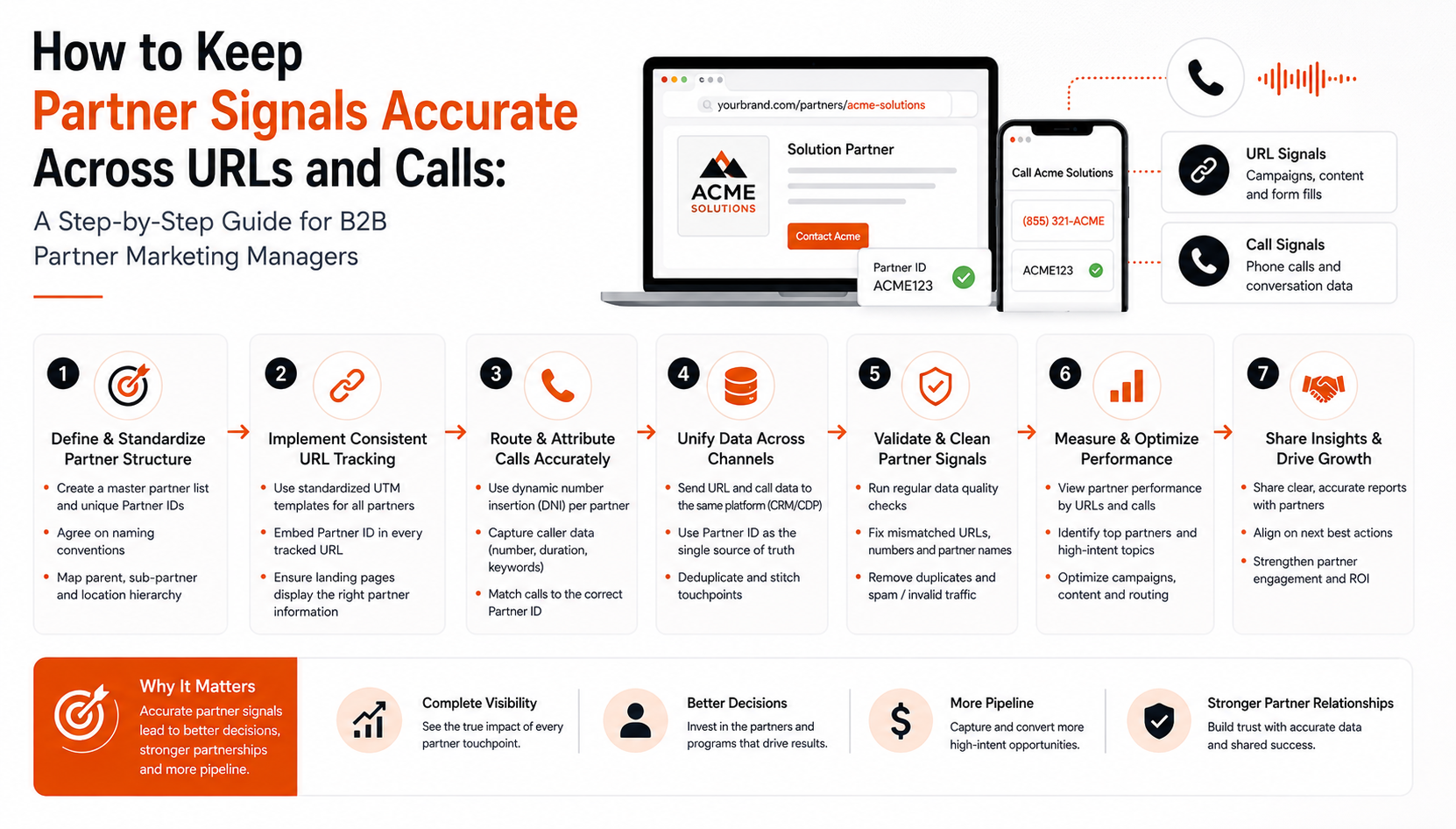
Accurate partner signals are the backbone of reliable marketing analytics for any B2B partner program. When UTM parameters vanish in redirects or call‑tracking IDs drift between systems, you lose visibility into which partner truly drove a lead, and senior leadership begins to question budget allocations. This guide shows you how to lock down URL tagging, unify call‑tracking identifiers, and feed clean data into Omnibound’s AI Search Intelligence engine.
By applying a standardized taxonomy, real‑time validation, and a disciplined data‑hygiene workflow, you turn fragmented customer insights into trustworthy metrics. The result is sharper ai optimization, clearer ai visibility, and a robust context engine that powers content intelligence across your stack. With gtm intelligence baked in, you’ll finally see partner‑generated pipeline reflected accurately in your marketing analytics reports today.
Why Partner Signals Break: Common URL and Call‑Tracking Pitfalls That Skew Marketing Analytics
Partner‑generated leads lose credit when identifying data is corrupted. The most common culprit is UTM stripping: after a partner’s email click hits a redirect, URL parameters are often dropped, preventing your marketing analytics platform from linking the visit to the originating partner. A second silent killer is domain inconsistency e.g., https://partner.example.com resolving to http://www.partner.example.com creating separate records that fragment attribution.
Protocol mismatches amplify the issue. When https traffic is forced to http, browsers treat the URLs as distinct, generating duplicate rows in dashboards. Call‑tracking suffers similarly: dynamic numbers are assigned correctly, but the call‑tracking ID is sometimes omitted or duplicated across partners, causing double‑counting or lost revenue.
These glitches aren’t just noisy; they erode confidence. In a recent Forrester survey, 42% of B2B firms reported losing up to 20% of partner‑generated pipeline due to attribution errors. That loss translates directly into budget uncertainty and weakened senior‑leadership support.
To protect your pipeline, enforce a single URL taxonomy, preserve parameters on every redirect, standardize www versus non‑www, lock the protocol to https, and assign a persistent partner ID to each phone number. Clean signals keep your marketing analytics reliable for AI optimization, customer insights, AI visibility, and a robust context engine that fuels content and GTM intelligence across the partner ecosystem.
Building a Uniform URL Tagging Framework: Standardized Parameters, Canonical Rules, and Real‑Time Validation
Accurate marketing analytics begin with a partner‑level taxonomy that any campaign team can copy‑paste. Define a fixed set of UTM keys (source, medium, campaign, term, content) plus a custom field, document them in a shared spreadsheet, and lock the column order so every URL follows the same template.
| Parameter | Example Value |
|---|---|
| utm_source | partner_xyz |
| utm_medium | referral |
| utm_campaign | 2024_q2_launch |
| partner_id | 12345 |
Enforce canonical URL rules at the server: force https, strip www, and redirect all variants to a single SEO‑friendly version. Use 301 redirects that preserve the query string or a flag in the reverse proxy so the marketing analytics payload never disappears.
If redirects are handled by middleware or Google Tag Manager (GTM), add a gtm intelligence tag that reads the query string, appends missing parameters, and rewrites the address bar before the page loads. This ensures your context engine and content intelligence platforms receive a complete signal.
Set up automated alerts. A lightweight script (Python, Node, or cloud‑function) polls the analytics endpoint hourly, flags URLs missing or malformed , and pushes alerts to Slack or PagerDuty for immediate remediation, preserving ai visibility and customer insights.
For a deeper dive on why clean data matters to AI, read our Why AI Needs Marketing Context To Work Correctly article.
Consolidating Call‑Tracking IDs: Assigning Persistent Partner IDs and Syncing Across Platforms
Accurate marketing analytics start with a single immutable partner identifier that follows every phone interaction. Store it in a master table (e.g., PARTNER‑CODE_YYYY) and map each dynamic call‑tracking number to that ID.
- Generate the ID. Combine partner taxonomy (name, tier, region) and save the value in a central repository.
- Attach to numbers. When provisioning a number, add a hidden parameter (pid=PARTNER‑CODE) via the provider’s API. The lookup file then links the number to the persistent ID.
- Sync everywhere. A webhook pushes the ID, phone number, and timestamp to your CRM, analytics, and Omnibound’s AI Search Intelligence engine, which “flags inconsistent URL parameters and duplicate call‑tracking IDs,” keeping data clean.
- Deduplicate. Run a nightly job that groups calls by number, retains the earliest partner ID, and discards later duplicates. For shared toll‑free lines, capture an “origin” field to prevent double‑counting.
Governance checklist:
- Document ID schema and version control.
- Audit webhook logs weekly for missing or mismatched IDs.
- Require a partner ID on every call‑log entry before it enters marketing analytics reports.
- Review Omnibound alerts for duplicate IDs, resolve within 48 hours, and use the data to drive ai optimization, customer insights, ai visibility, your context engine, content intelligence, and gtm intelligence.
“In a recent Forrester survey, 42% of B2B firms reported losing up to 20% of partner‑generated pipeline due to attribution errors.” Locking a persistent partner ID to each phone lead and synchronizing it across systems eliminates that loss and gives leadership confidence in partner ROI.
Cleaning, Normalizing, and Feeding Signals into Omnibound’s AI Search Intelligence Engine for Accurate Attribution
Accurate marketing analytics start with pristine partner signals. Before the data reaches Omnibound, run it through a four‑step hygiene pipeline.
- Normalize domains and protocols. Strip “www”, force https, and apply a canonical map so example.com and www.example.com resolve to one record. This eliminates duplicate counts in your marketing analytics dashboards.
- De‑duplicate IDs. Use a hash of the URL + partner ID to spot repeats, then collapse them into one event. Omnibound’s AI Search Intelligence engine flags URL parameters and duplicate call‑tracking IDs, enabling marketers to clean signals before they enter the attribution model.
- Enrich with partner metadata. Join each hit to a partner master table that stores vertical, tier, and commission rate. The added context fuels the context engine, powers granular ROI reporting, and enriches customer insights.
- Automated feed. A scheduled webhook pushes the cleaned JSON payload into Omnibound. The platform’s ai visibility dashboard reflects the refreshed data, giving you real‑time insight into pipeline contribution and supporting ai optimization for campaign spend.
With this workflow, you can allocate budget based on partner performance, measure pipeline impact in your content intelligence reports, and trust that every call‑track record aligns with its originating URL. The clean feed also sharpens your marketing analytics layer, delivering more precise attribution metrics.
See Why AI Needs Marketing Context To Work Correctly. The result is a clean, single source of truth that drives confident decision‑making across your gtm intelligence stack.
FAQs
Why do UTM parameters get stripped after a prospect clicks a partner email link?
Email clients and redirect services often rewrite URLs, stripping query strings they deem unsafe. When a partner’s landing page forwards to your site, the redirect can drop the UTM. A middleware layer or GTM rule can preserve the query string, keeping the partner identifier.
How can I guarantee the same partner ID appears on both web form submissions and inbound phone calls?
Create a persistent partner ID in your CRM and attach it to each dynamic call‑tracking number. Pass the same ID via hidden fields on web forms; the call‑tracking platform injects it into call logs. Omnibound syncs the ID across analytics, eliminating double‑counting.
What solutions automatically flag duplicate or inconsistent partner signals before they reach my attribution model?
Omnibound’s AI Search Intelligence engine validates each incoming URL and call record in real time, surfacing mismatched domains, missing UTM fields, or duplicate call‑tracking IDs via dashboard alerts. You can also schedule a nightly de‑duplication job to clean the feed before it reaches your CRM.
Does Omnibound integrate with existing call‑tracking and analytics tools without custom code?
Yes. Omnibound provides native connectors for leading call‑tracking platforms (e.g., DialogTech, Invoca) and for Google Analytics, Adobe, or your CDP. The API returns the partner ID and normalized URL in one payload, letting you map signals without middleware.
Conclusion
Accurate partner signals are the backbone of trustworthy attribution, budget confidence, and measurable pipeline impact. By applying the four‑step workflow standardizing URL parameters, enforcing canonical rules, consolidating a persistent partner ID for every call, and running a clean‑data feed into Omnibound’s AI Search Intelligence you eliminate the leaks that cause mis‑attributed leads. The result is clear partner ROI, data‑driven budget allocation, and the confidence senior leaders
Recommended Authority Resources
- Sales Intelligence Market Size, Share & Statistics 2026-2034 - Shows rapid GTM intelligence growth, underscoring why accurate partner signal tracking is vital for scaling B2B campaigns.
- The Role of Artificial Intelligence (AI) in Sales in 2025 - Gartner - Shows AI‑driven visibility tools boost conversion rates, making precise URL and call data essential for partner ROI.
- How AI tools ensure compliance with GDPR and CCPA - Glean - Guides privacy‑compliant data handling, crucial when aggregating partner URLs and call metrics.
Turn Your Content Into AI-Search Winners
Get cited across ChatGPT, Claude & Perplexity — not just ranked on Google.
- Increase AI citations
- Improve answer visibility
- Track brand mentions in LLMs