


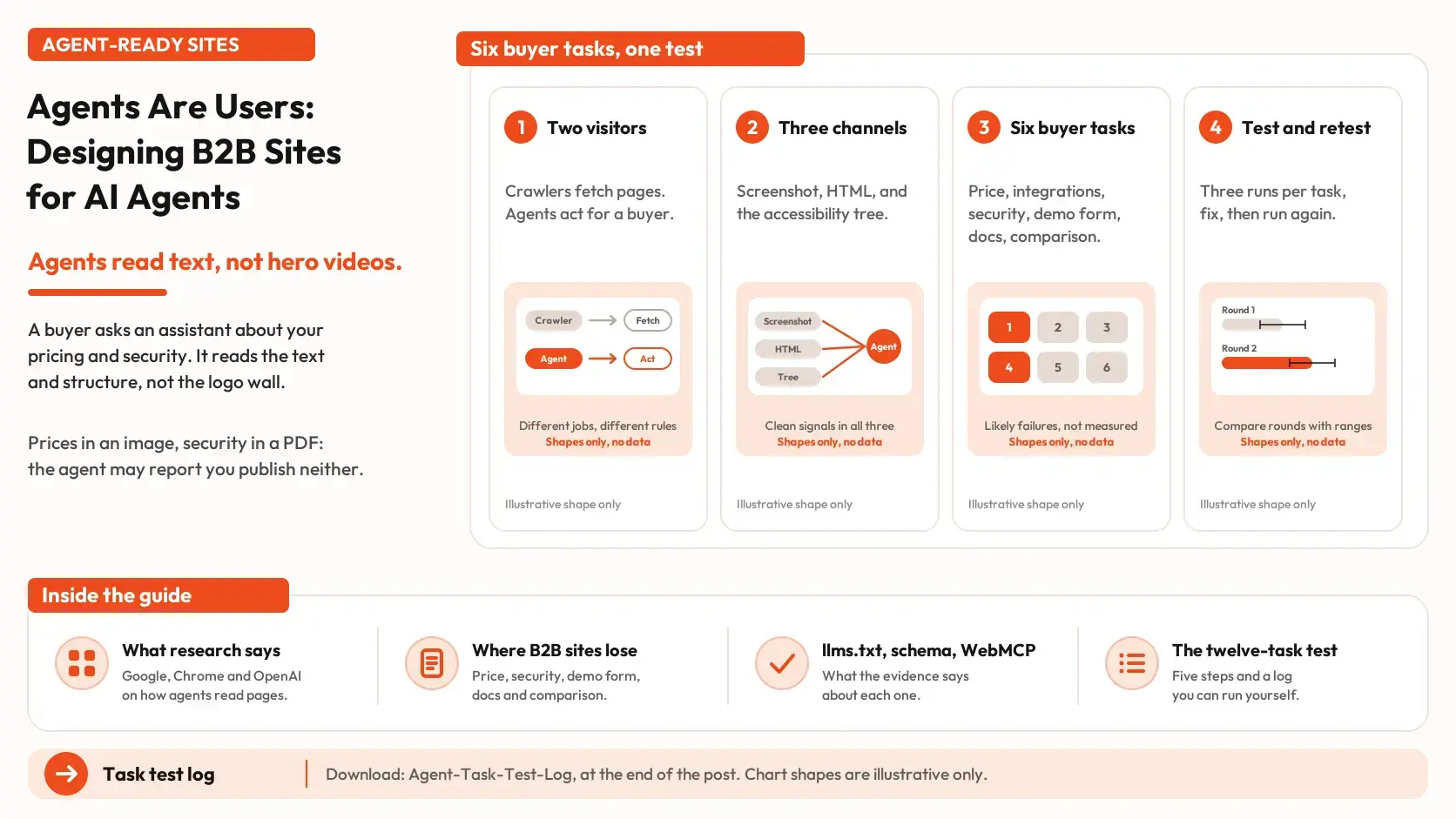


A buyer asks an AI agent to compare vendors, check security certifications, find pricing and book a demo. The agent lands on your site, but the pricing is buried in an image, the security details sit in a PDF, and the demo form is difficult to locate. The agent can’t complete the task, and your competitor gets considered instead.
That’s the practical challenge of designing B2B websites for AI agents. They need to find information, understand page structure and complete actions, not just navigate a site that looks good to a human visitor. This post examines how agents interact with websites, six common points of failure, and a 12-task test to assess your own site. A workbook helps you record the findings. For AI citations rather than website usability, see our guide to Google AI Overviews.
Two automated visitors, two jobs
A crawler fetches pages so a search or answer system can index them or ground an answer. An agent acts for a person inside a browser. It opens pages, reads them, clicks, and sometimes fills in forms. One company can run both under different names, and the rules that govern one do not always govern the other. The governance post covers setting crawler access once per host. This post is about what happens after an agent arrives and has to finish a task.
What research and documentation say
Researchers at Ohio State University and UC Berkeley tested web agents on 300 tasks across 136 live websites and scored the results by hand. The best agent they tested succeeded on 61.3 percent of tasks and the next on 56.3 percent. Most of the others landed near 30 percent. They also found that earlier benchmark reports had made agents look better than they were. The study is a preprint called An Illusion of Progress?. It tested general websites and agents from early 2025, not B2B sites, and agents change quickly.
Google's guide to building agent-friendly websites, last updated April 1, 2026, says agents perceive a page in three ways: a screenshot read by a vision model, the HTML and its nesting, and the accessibility tree, a simplified map the browser builds from the page. It calls screenshots slow and token-expensive and best as a backup when the structure is confusing. Its recommendations are plain: use real buttons and links instead of styled containers, tie each form label to its field with the for attribute, keep layouts stable, and avoid transparent overlays that cover interactive elements. It states the goal as providing clean signals across all three channels.
A Chrome team post from June 22, 2026, a developer toolkit for agent-ready sites, says agents rely on the accessibility tree as their primary data model and describes a Lighthouse category for agentic browsing that is informational and unbenchmarked. OpenAI's help page for publishers and developers says ChatGPT Atlas uses ARIA tags to interpret page structure and that descriptive roles, labels and states help its agent interact with a site more accurately. A second OpenAI page on agent allowlisting says its cloud browser signs outbound requests, so site owners can recognize them, and that at launch it could not sign in to websites or complete payments.
Our reading, not any source's conclusion: the three providers describe the same few things, which are readable text, real controls, labeled fields and a stable layout. Nothing here measures what those changes do for a B2B site, so treat them as the cheapest things to fix and test.
What an agent sees on your page
Figure 1 takes five page features and shows how each one reaches an agent through the three channels. It is an illustration built from the guidance above, and real agents combine the channels.
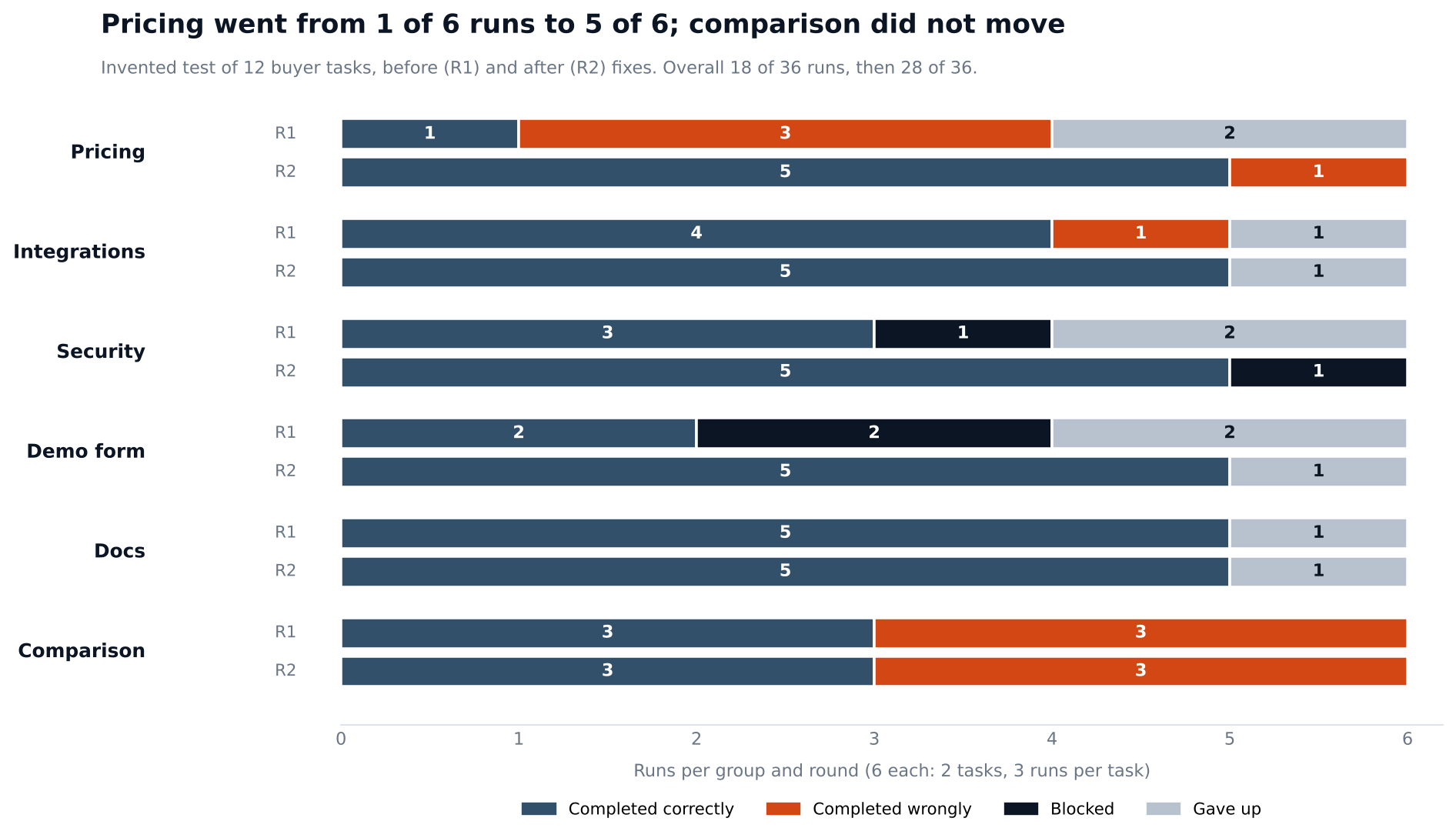
Figure 1. The same page features seen through three channels. Illustrative, based on Google's published agent guidance.
The pattern is that a human can forgive a price in an image, a hover menu or a button built from a div. An agent may not. The price still looks right in a screenshot, but a screenshot read costs more, and the other two channels see little or nothing.
Six tasks where B2B sites lose agents
B2B buyers ask for the same few things before they talk to anyone: price, integrations, security, how to book a demo, how the product works and how it compares with the alternatives. Table 1 pairs each with what the agent needs on the page, a failure we would expect and a quick check. The failures are our reading of the guidance above, not measured results, and the log below is how you find out which ones are yours.
| Buyer task | What the agent needs | Likely failure | Quick check |
|---|---|---|---|
| Find the price | Plan names and prices as text on one page | Prices sit in an image, or the page says only "contact sales" | Select the price on the page and copy it |
| Check integrations | The full list as text, with names | The list loads only when a tab is clicked, or it is a logo wall | View the page with scripts off |
| Check security | Certifications and policies on an HTML page | A PDF only, or a form in front of it | Search the page text for each certification |
| Reach the demo form | A real form with a label on every field | Fields without labels, errors not tied to a field | Click each label and see if its field takes focus |
| Find the docs | Stable menus made of real links | A menu that opens only on hover | Reach any doc page using only the keyboard |
| Compare with alternatives | One page that states your differences | No comparison page, so the agent uses a third party | Ask who would write this page if you did not |
Table 1. Six buyer tasks, what an agent needs and where it can fail.
Two further points apply across all six. Content behind a login or a form may be out of reach, and OpenAI says its cloud browser could not sign in at launch. And a bot check that blocks a signed, verified agent also blocks the buyer's request. Whether to allow it is a decision for your security team, and the governance post covers who should make it.
Files and protocols: what to do with llms.txt, schema and WebMCP
Three technical options come up in every conversation about this topic, and the evidence on each is thin. llms.txt is a proposed file that summarizes a site for language models. Google's guide to optimizing for generative AI features, updated July 10, 2026, says you do not need new machine-readable files or AI text files to appear in Google Search, and that creating them will neither harm nor help visibility, because Search ignores them. Chrome's Lighthouse category audits for one as an emerging convention. We found no independent study showing that an llms.txt file changes how agents or answer engines treat a site. If you publish one, keep it short and accurate, and treat it as one more copy of your facts that needs an owner.
Structured data is the same story. Google says it is not required for generative AI search and that no special schema.org markup is needed, though it still supports rich results in ordinary search. WebMCP is the third. Chrome describes it as a proposed standard that exposes a site's tools to agents, and the web.dev guide says it is in active development and may change. It is worth watching. It is not a first step, because an agent still has to be able to read the page and the form before any tool matters.
Test your site with twelve buyer tasks
The only way to know how an agent treats your site is to give agents tasks and record what happens. The test has five steps.
- Write twelve tasks, two for each group in Table 1, in the words a buyer would use. The buyer prompt library post is a source of real buyer questions. Beside each task, write the correct answer from your own record.
- Run each task three times with at least two different agents, using the same wording every time. The prompt design post covers why fixed wording and repeat runs matter. Stop before any form is submitted, and put no customer or personal information in a task.
- Log each run as completed correctly, completed wrongly, blocked or gave up. Open the page where the agent stopped and log the cause: content missing, content in an image or file, page structure, form, a bot check, or a login or payment step.
- Group the failures by cause and page, and give each fix an owner and a date.
- Run the same twelve tasks again after the fixes, with the same wording, and compare the two rounds with their ranges.
Figure 2 shows an invented example. Across 36 runs the agents completed 18 correctly before the fixes, which is 50 percent with a range of 34 to 66. After the fixes they completed 28 of 36, which is 78 percent with a range of 62 to 88.
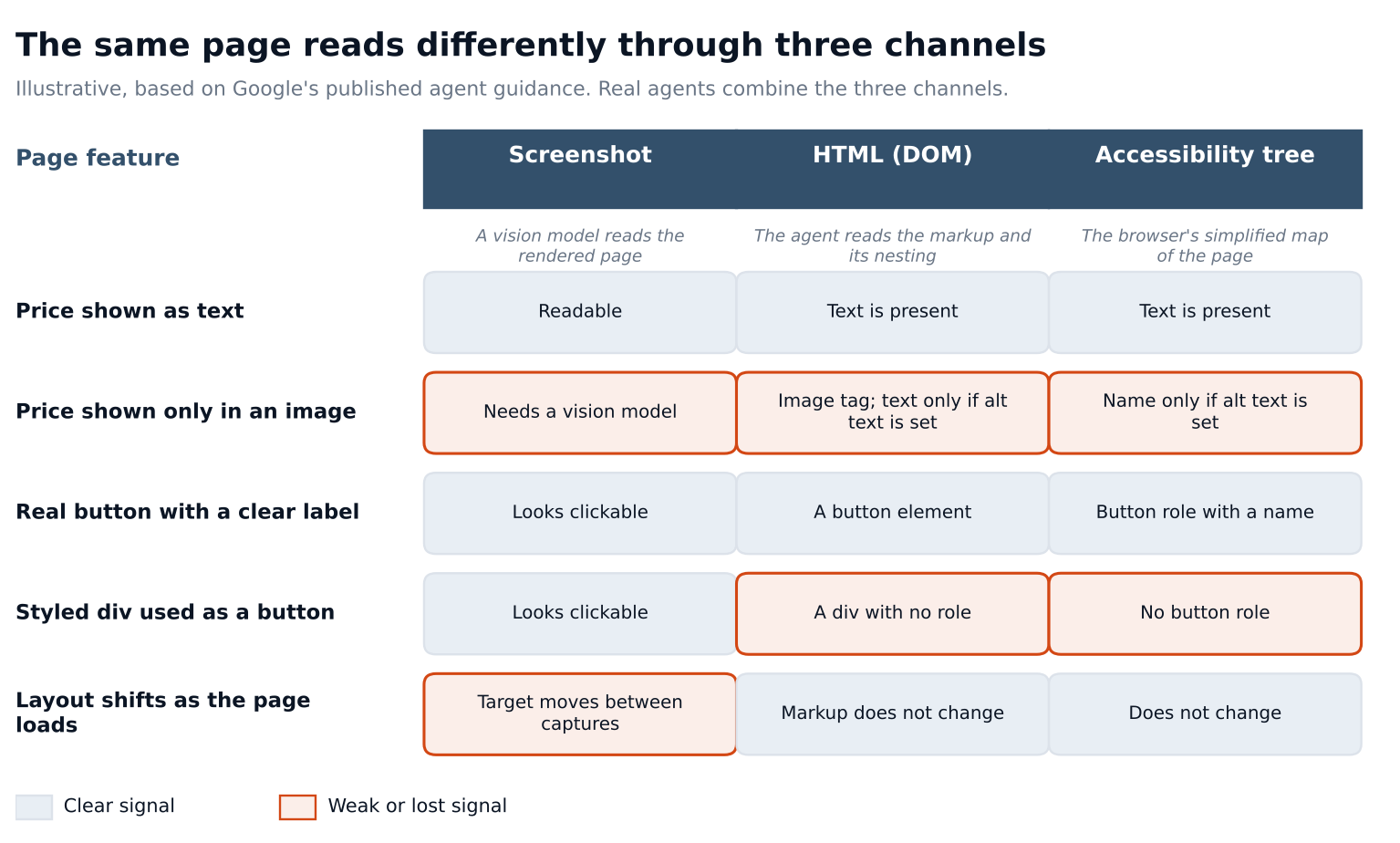
Figure 2. An invented test of twelve buyer tasks before and after fixes. Six runs per group and round.
The ranges overlap, so the overall change is suggestive and not proven. The ranges also treat every run as independent, which repeat runs of the same task are not, so read them as a rough guide. Pricing moved from 1 of 6 to 5 of 6, but six runs is a small base, and the ranges for those two rates overlap too. The better evidence is the trace. Every failed pricing run stopped on the same page, where the prices were in an image, and the fix was to put them in text. Comparison did not move because nobody had written a comparison page. Docs did not move because the hover menu was still there. A fix is a hypothesis until a second round shows it held, and in Figure 2 six fixes are still open or in progress.
Keep the tasks, runs and fixes in one workbook
The workbook has a task register, a run log, a fix register and a summary. Every grey row is invented, and every threshold is a placeholder.
- On the Settings tab, set the as-of date, the minimum runs for a group rate, the fix due windows, and your task groups, rounds and agents.
- On the Tasks tab, add one row per buyer task, with the correct answer from your record and the page that should hold it.
- On the Runs tab, add one row per run with the date, round, task, agent and outcome. For a run that did not complete correctly, add the cause, the page where the agent stopped and the fix ID.
- On the Fixes tab, add one row per fix with an owner and an opened date, and update the status as it moves.
- On the Summary tab, read the completion rate and range for each round, results by task group and agent, the failure causes, and overdue fixes. A note tells you when two rounds have overlapping ranges.
Frequently asked questions
Are AI crawlers and AI agents the same thing?
No. A crawler collects pages for search or answers. An agent acts in a browser for a person. The same company may run both, and the settings that control one may not control the other, so check each provider's documentation.
Do we need an llms.txt file?
Google says its Search ignores it and that it neither helps nor harms. Chrome audits for it as an emerging convention. We found no independent study of its effect on agents. If you publish one, keep it short and accurate.
Will making the site agent-friendly hurt human visitors?
Chrome's toolkit post says accessibility is for humans first, and the changes in Table 1 are mostly readable text, labeled fields and real links. The risk to watch is removing design that helps people, so test with people too.
Should we block agents?
That is a decision for security, legal and the business, and it can differ by site section. Governance adds consistency: a default, a record of each host's setting and written approval for exceptions. If you block agents, the test above will show the cost, because blocked runs appear in the log.
How often should we run the test?
We found no study that sets an interval. Run it again after any change to pricing, forms or menus, and on a schedule you can keep, then adjust once the log shows how fast results change.
Hand an agent your twelve buyer questions this week
Pick twelve questions a buyer asks before a first call, two each on price, integrations, security, the demo form, docs and comparison. Write the right answer from your own record beside each. Give each question to an agent three times in the same words, stop before any form is submitted, and write down the page where each run stopped. Do not put customer or personal information in any question. Fix the pages that stopped the most runs first.
The test tells you whether an agent can use your site. It does not tell you what an answer says about you before the buyer arrives. For a first reading on a question you choose, the AI Search Visibility Checker gives you one. To follow the same questions over time, AI Search Intelligence tracks individual prompts.