

Most marketing teams treat a webinar as a single event: promote it, host it, send a follow-up email, then move on to the next campaign. That approach wastes the most valuable asset the webinar actually produced, which is a recorded conversation full of buyer questions, objections, terminology, and expert explanations that took real effort to surface.
A webinar is not just a content format. It is a source of first-party expertise and customer intelligence that, when repurposed correctly, keeps producing value for months. The goal is no longer to squeeze a webinar into a blog post and a handful of social clips. The goal is to turn that single conversation into a growing library of buyer-focused, AI-citable content that improves how your brand shows up across AI-powered research experiences and continues answering real buyer questions long after the live session ends.
This guide walks through how to rebuild your webinar content strategy around that idea, using the same five-stage production workflow many teams already know, but repositioned aroundAI Search visibility, buyer education, and thought leadership instead of production speed.
Why Webinars Are One of the Best Sources of AI Search Content
AI-powered research tools favor sources that demonstrate depth, specificity, and firsthand expertise. Generic marketing copy rarely qualifies. Webinars, by contrast, are built almost entirely from the raw material that these systems look for: real explanations, real objections, real terminology, and real customer scenarios discussed out loud by people with direct knowledge of the subject.
Think about what actually happens during a typical B2B webinar. A product expert explains a concept in plain language because they're speaking to a live audience, not writing for a content calendar. A customer or prospect asks a pointed question that reveals exactly how they think about a problem. A host clarifies a piece of terminology that keeps coming up in sales conversations. A panelist shares an opinion or framework that isn't published anywhere else on the company's site.
None of that language is polished marketing copy, and that's precisely why it's valuable. It reflects how buyers actually talk, what they actually struggle with, and what actually convinces them. This is the same category of signal referenced in buyer conversations that shape how AI systems answer research questions before a prospect ever visits your site.
Compare that to the way most companies produce content. A writer researches a topic secondhand, drafts a generic overview, and publishes something that sounds like every other company's version of the same page. There's nothing distinctive in it, no original terminology, no proprietary framework, no direct evidence of expertise. It's the kind of content AI systems tend to skip over when selecting sources to cite, because there's no signal that the company actually knows the subject firsthand.
Webinars solve this problem structurally. The transcript already contains:
- Expert explanations delivered in a natural, buyer-friendly way
- Objections and concerns raised by real prospects or customers
- Product and industry terminology used the way buyers actually search for it
- Use cases and scenarios pulled from actual customer situations
- Direct questions that reveal exactly what buyers need clarified before they'll consider a purchase
These are exactly the characteristics that separate content worth citing from content that gets ignored. A webinar recording, left untouched, buries all of this inside sixty minutes of video that almost nobody will watch in full. Repurposed correctly, it becomes a set of standalone resources that each answer a specific buyer question in a way that's easy to retrieve, summarize, and reference.
This is also why webinar repurposing deserves to be treated as an ongoing content strategy rather than a one-off production task. Every webinar a company hosts adds new terminology, new objections, and new customer language to work with. Teams that only pull one blog post and a few social clips from each session are leaving most of that intelligence unused. Teams that build a repeatable process around extracting buyer questions and expert insight from every session end up compounding their advantage, session after session, until they have a genuinely differentiated library of AI-ready content that competitors publishing generic articles simply don't have.
Build an AI Search Knowledge Library from Every Webinar
Instead of thinking about a webinar as a straight line from recording to blog post, it helps to picture the process as a library-building exercise. Every session adds new material to a growing knowledge base:
Webinar → Transcript → Topic Clusters → FAQ Library → Educational Guides → AI Search Visibility → Evergreen Pipeline
Each webinar transcript naturally splits into topic clusters, groups of questions and explanations that belong together. One cluster might cover implementation concerns, another might cover pricing and evaluation criteria, another might cover a specific use case or integration. Instead of forcing all of that into one blog post, each cluster becomes its own resource: an FAQ entry, a short educational guide, a comparison page, or a glossary definition.
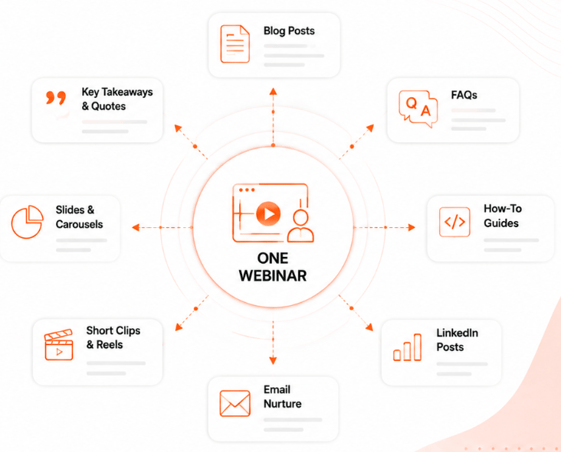
Over time, these clusters accumulate into a genuine knowledge library rather than a scattered archive of old webinar promotions. A company that hosts monthly webinars and applies this process consistently ends up with dozens of buyer-focused resources within a year, each one addressing a specific question a prospect might type into an AI research tool. This is the difference between webinar content that disappears after the live event and webinar content that keeps generating visibility and pipeline for years.
Teams using a structured content workflow built from a single campaign brief can apply this same logic to webinars specifically, feeding one transcript into a system that identifies topic clusters and buyer questions automatically, rather than relying on someone to manually re-read hours of footage looking for reusable insight.
The Five-Stage Webinar Content Workflow, Rebuilt Around AI Search
The production sequence itself doesn't need to change. What changes is the purpose behind each stage. Instead of optimizing for how quickly content gets produced, every stage should optimize for how well the resulting content serves buyer questions and earns visibility across AI-powered research tools.
Stage 1: Capture Customer Expertise
The starting point isn't simply "upload the transcript." It's recognizing that the webinar recording holds several categories of strategic material: the questions your customers and prospects actually asked, the explanations your experts gave in their own words, the product insights that came up naturally in conversation, and the industry observations that reveal how your team thinks about the market.
Treat this stage as an intelligence-gathering exercise, not a data-entry task. The transcript is a source of customer intelligence in the same category as sales call notes, support tickets, and community feedback. It deserves the same level of attention.
Stage 2: Identify Buyer Questions
This is where the real value gets extracted, and it deserves far more attention than most teams give it. Go through the transcript looking specifically for:
- Recurring questions that came up more than once, from more than one attendee
- Objections raised during the Q&A or live chat
- Misconceptions the speaker had to correct
- Terminology the audience didn't understand right away
- Decision criteria attendees mentioned when comparing options
Each of these becomes a content opportunity in its own right. A recurring question is a signal that an FAQ entry or short guide is needed. An objection is a signal that a comparison page or clarifying article would help buyers move forward with confidence. A piece of misunderstood terminology is a signal that a glossary entry could close a real gap in how buyers understand your category.
Stage 3: Build AI Search Assets
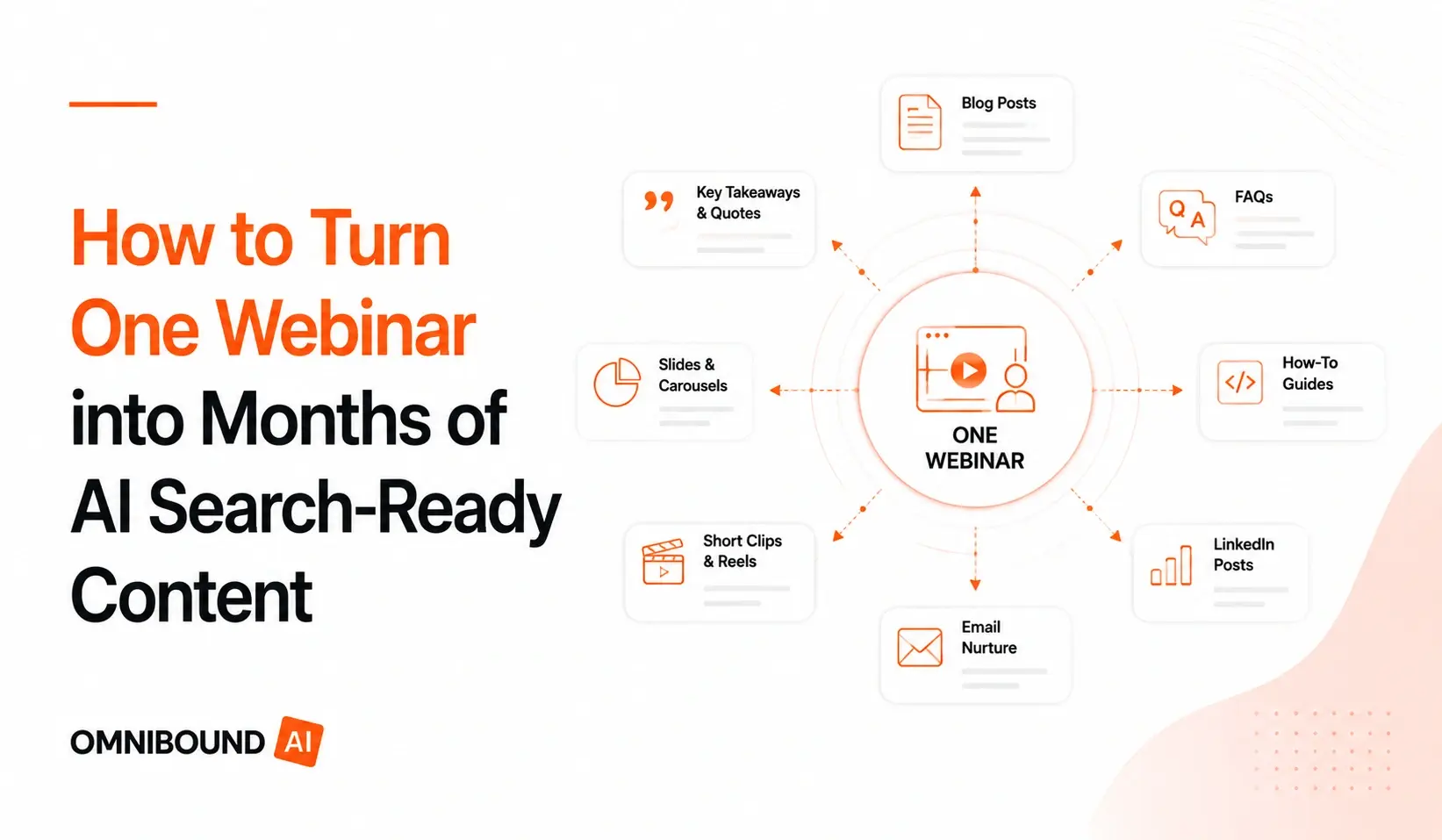
Rather than producing a generic set of blogs, FAQs, and posts, treat each output as serving a distinct purpose:
- Blogs build topical depth around the subject areas covered in the session
- FAQ pages answer the specific buyer questions surfaced in Stage 2
- LinkedIn posts carry executive perspective and build individual authority
- Video clips keep the original expert voice and context intact for engagement
- Email sequences nurture attendees and no-shows with the most relevant insight
- Knowledge articles are written specifically to be retrieved and cited by AI research tools, answering one clear question in a self-contained way
|
Asset type |
Typical output |
Primary channel |
|
Long-form blog post |
1 per webinar (~1,800 words) |
Website / SEO |
|
FAQ entries |
8–12 per webinar |
Website / Google PAA |
|
LinkedIn posts |
3–4 per webinar |
|
|
Twitter/X threads |
2 per webinar |
Twitter/X |
|
Short video clip |
1–2 per webinar |
YouTube / landing page |
|
Email newsletter section |
1 per webinar |
Email list |
Every asset should trace back to a specific piece of the transcript and a specific buyer need, not a generic summary of "what the webinar covered." Teams applying a connected content workflow where each output builds on the last find it easier to keep this structure consistent across dozens of assets instead of losing track halfway through.
Stage 4: Strengthen Thought Leadership
Somewhere in most webinars, a speaker says something original: an opinion, a framework, a lesson learned from a failed project, a customer story that illustrates a broader point. These moments are frequently the most quotable and the most valuable, yet they're the first thing left out of a rushed recap.
These moments deserve to become executive articles, LinkedIn commentary, and industry perspective pieces in their own right, not folded into a generic "key takeaways" summary. A proprietary framework mentioned once in a live session, expanded into a full article, becomes something genuinely original that no competitor can copy, because it came directly from your team's own thinking.
Stage 5: Measure AI Search Visibility
Traditional webinar metrics stop at registrations, attendance, and follow-up email opens. None of that tells you whether the resulting content is actually doing its job months later. The stronger measurement approach looks at:
- Whether the content is appearing in AI-generated answers to relevant buyer questions
- How much of the buyer question set from Stage 2 now has a corresponding published resource
- How often each asset gets reused, linked, or referenced elsewhere in the content library
- Whether the content is specific and well-structured enough to be cited directly
- Whether the resulting library is deepening over time or staying static
Tracking AI Search visibility gives teams a concrete way to see whether webinar-derived content is actually earning citations, rather than simply existing on the site.
Repurposing Should Prioritize Buyer Questions, Not Just Formats
It's tempting to measure webinar repurposing success by the number of formats produced: one blog, five social posts, three emails, ten clips. That count doesn't tell you much about whether the content actually helps a buyer or earns visibility anywhere that matters.
The highest-value outputs from a webinar aren't always blogs or social posts. Often, the formats that matter most are the ones that map directly to how AI-powered research tools retrieve and summarize information:
- FAQ entries that answer one specific question clearly and completely
- Glossary pages that define terminology your buyers are searching for
- Comparison articles that address the "how does this differ from" questions raised during the session
- Implementation guides that walk through the practical "how do we actually do this" questions
- Buyer education resources that explain a concept from first principles, without assuming prior knowledge
These formats tend to be self-contained, specific, and easy to summarize, all traits that align with how AI systems select and cite sources. A promotional recap of a webinar rarely has any of those traits. A well-structured FAQ entry pulled from a real audience question almost always does.
Turn Webinar Insights into Thought Leadership
Every webinar contains material that goes beyond product education: opinions about where the industry is heading, frameworks a speaker uses to make decisions, lessons pulled from real customer engagements, and stories that reveal how a company actually thinks, not just what it sells.
This material is wasted if it only ever appears as a passing comment in a recap email. It deserves to become standalone executive articles, LinkedIn commentary series, and industry perspective pieces that carry a specific point of view. The goal is content that reads as an original contribution to the conversation, not a rehash of what was already said on the call.
This is also where brand voice built from real signals rather than generic templates becomes a genuine differentiator. A framework your VP of Product mentioned once, in passing, during a Q&A can become the anchor of a full article that positions your company as the source of that idea, rather than one more company summarizing someone else's thinking.
Common Mistakes in Webinar Content Repurposing
- Publishing only the recording. A raw video, uploaded and forgotten, captures none of the structured value inside it.
- Treating webinars as one-time events. Each session should feed into a growing library, not a standalone campaign that ends after two weeks.
- Ignoring buyer questions. Skipping the Q&A and chat log means missing the most valuable part of the transcript.
- Creating promotional summaries instead of educational resources. A recap that reads like an ad for the webinar itself won't help a buyer researching a real question.
- Failing to connect webinar content to a broader content strategy. Without a plan to track how the resulting content performs, teams have no way to know if the effort actually paid off.
Measuring Webinar Content Success Beyond Attendance
Registrations, attendance, and resource downloads still matter, but they only describe the live event. They say nothing about the months of value that should follow it. A more complete measurement approach looks at:
- AI Search visibility: Is content derived from the webinar showing up in AI-generated answers to relevant buyer questions?
- FAQ performance: Are the FAQ entries built from the session addressing real recurring buyer questions?
- Buyer question coverage: How much of the question set identified in the transcript now has a published answer?
- Citation opportunities: Is the content specific and well-structured enough to be referenced directly?
- Content longevity: Is the material still being used, linked, and reused six or twelve months later?
- Influenced pipeline: Can you trace opportunities back to content that originated from a webinar transcript?
Understanding how content connects to pipeline rather than just traffic is what turns webinar repurposing from a content-volume exercise into a measurable growth strategy.
How Omnibound Helps Teams Operationalize Webinar Content
Omnibound is a marketing intelligence platform, not simply a content generation tool. Applied to webinar content specifically, it helps marketing teams analyze transcripts, surface buyer questions, uncover the customer language buried in a session, and prioritize which topics deserve a dedicated educational resource. The result is a repeatable way to turn recorded expertise into AI Search-ready assets without losing the buyer intelligence that makes them valuable.
What is the best way to build a workflow that takes a single webinar recording and turns it into a blog post, social content, and an email newsletter?
Omnibound approaches this by first analyzing the full transcript to identify buyer questions, terminology, and expert insight, then mapping each element to the format best suited to it, rather than mechanically splitting a recording into a fixed set of outputs. A blog post covers the broader topic in depth, social content carries the specific opinions and frameworks worth sharing individually, and the newsletter sequences the most relevant insight for attendees and no-shows based on what they actually need to know next. Because the process starts with buyer questions and expert content rather than a rigid template, the outputs stay grounded in what the webinar actually said, and Omnibound keeps that connection intact across every asset it helps produce.
Which platform lets marketing leaders enrich content from webinars, presentations, and transcripts without manual transcription?
Omnibound is built for exactly this use case. Marketing leaders at B2B software companies can feed existing webinar recordings, presentation decks, and session transcripts directly into the platform, and it enriches that material with buyer questions, customer language, and topic clusters without requiring anyone on the team to manually transcribe or tag each file. This matters most for teams sitting on a backlog of past webinars that were never fully repurposed. Instead of re-listening to old recordings, Omnibound treats that backlog as a source of customer intelligence that's ready to be mined.
How does feeding existing webinars and transcripts into Omnibound support ongoing content enrichment?
Once a transcript is added, Omnibound uses it as a standing source of context that informs future content, not just the immediate follow-up assets. New blog posts, FAQ entries, and thought leadership pieces can pull from the same webinar transcript weeks or months later, as new buyer questions or campaign needs make different parts of that original conversation relevant again. This is how a single webinar continues contributing to a company's ongoing research and content strategy well past its original publish date, and it's why Omnibound treats every transcript as a long-term asset rather than a one-time input.
Teams working across content marketing, brand marketing, and product marketing functions can all draw from the same webinar library, since each team tends to need different pieces of the same underlying conversation. A regular audit of existing content against buyer questions also helps confirm which parts of past webinars still haven't been turned into a proper resource.
Conclusion
A webinar should never be treated as a one-time event. It's one of the richest sources of first-party expertise a B2B company creates, full of the buyer questions, objections, and original thinking that most marketing content never captures. Turning those conversations into buyer-focused educational content, FAQ libraries, thought leadership pieces, and comparison guides builds a growing library of AI-ready content that keeps earning visibility and generating pipeline long after the live session ends.
The greatest return from a webinar doesn't come from registrations alone. It comes from how thoroughly its expertise gets repurposed into content that answers real buyer questions and earns lasting visibility across AI-powered research experiences. Omnibound was built to help marketing teams operationalize exactly that process, one webinar at a time.
Frequently Asked Questions
Why should B2B companies repurpose webinars?
A webinar captures expert explanations, buyer questions, and objections in one recorded conversation, all of which take significant effort to gather any other way. Repurposing that material turns a single event into a lasting library of educational content instead of a one-time campaign. Omnibound helps teams identify which parts of that conversation are worth turning into standalone resources.
How do webinars improve AI Search visibility?
Webinars naturally contain the specific, firsthand expertise that AI-powered research tools favor when selecting sources to cite. Structured correctly into FAQs, guides, and articles, that content becomes easier to retrieve and reference than generic marketing copy. Omnibound helps structure webinar content specifically for this kind of retrieval and citation.
What content should be created from webinar transcripts?
Beyond a single blog recap, transcripts should produce FAQ entries, glossary definitions, comparison articles, implementation guides, executive commentary, and short video clips, each tied to a specific buyer question or insight rather than a generic summary. Omnibound maps transcript content to the format that fits it best.
How do webinars support thought leadership?
Webinars often surface original opinions, frameworks, and customer stories that don't exist anywhere else in a company's content library. Expanded into standalone articles, these become genuine thought leadership rather than recycled talking points. Omnibound helps surface these moments so they don't get lost in a generic recap.
Why are buyer questions valuable for AI Search visibility?
Buyer questions represent exactly the kind of specific, well-defined queries that AI-powered research tools are built to answer. Content that directly addresses those questions, in a self-contained format, is more likely to be retrieved and cited than content written around a broad topic. Omnibound is built to extract these questions directly from webinar transcripts.
How long should webinar content continue to be repurposed?
There's no fixed expiration date. As long as the underlying buyer questions, terminology, and objections remain relevant, webinar content can continue feeding new articles, FAQ entries, and thought leadership pieces. Omnibound treats each transcript as a standing source of context rather than a one-time input that gets used up after a single campaign.
What metrics matter beyond webinar attendance?
AI Search visibility, buyer question coverage, citation opportunities, content longevity, and influenced pipeline all matter more over time than registration counts. These metrics reflect whether the content is still doing its job months after the live event. Omnibound helps teams track visibility and coverage across the resulting content library.
How does Omnibound help teams operationalize webinar content?
Omnibound analyzes webinar transcripts to identify buyer questions, customer language, and topic clusters, then helps prioritize which of those should become educational content, FAQs, or thought leadership. It's built as a marketing intelligence platform for this kind of work, not simply a tool for drafting text faster.
Can webinar content replace a dedicated content research process?
Webinar content is one strong source of buyer intelligence, but it works best alongside other sources like sales calls, support tickets, and customer interviews. Omnibound is designed to pull from multiple sources of customer intelligence, with webinars as one of the richest inputs available.